SQL Cheatsheet
Cheatsheet Content
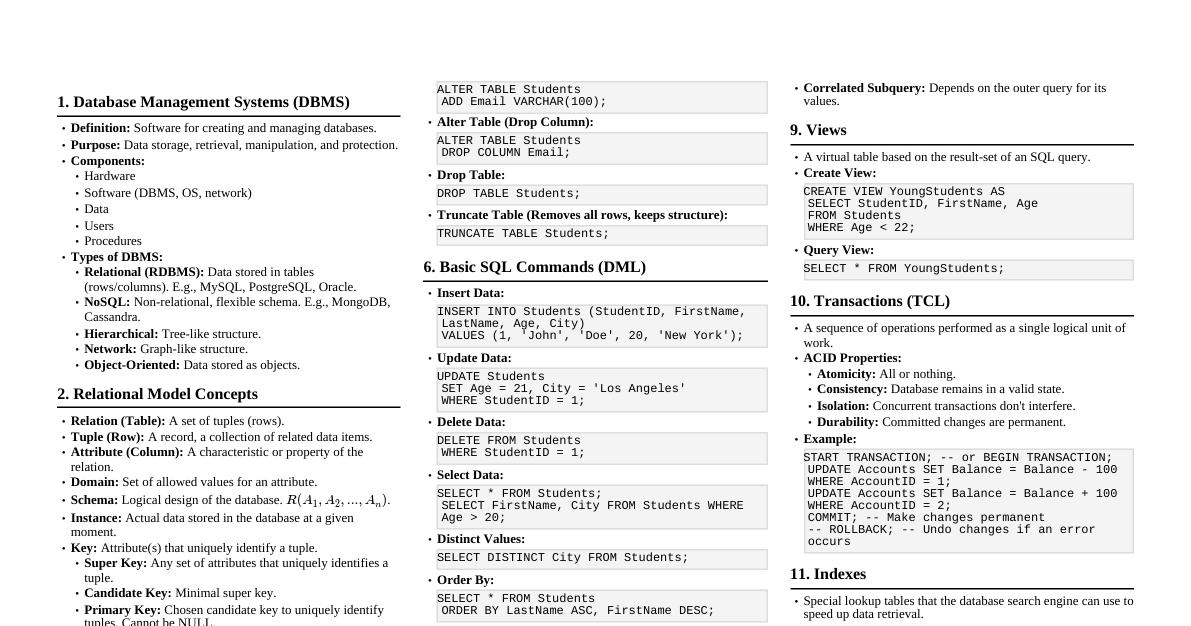
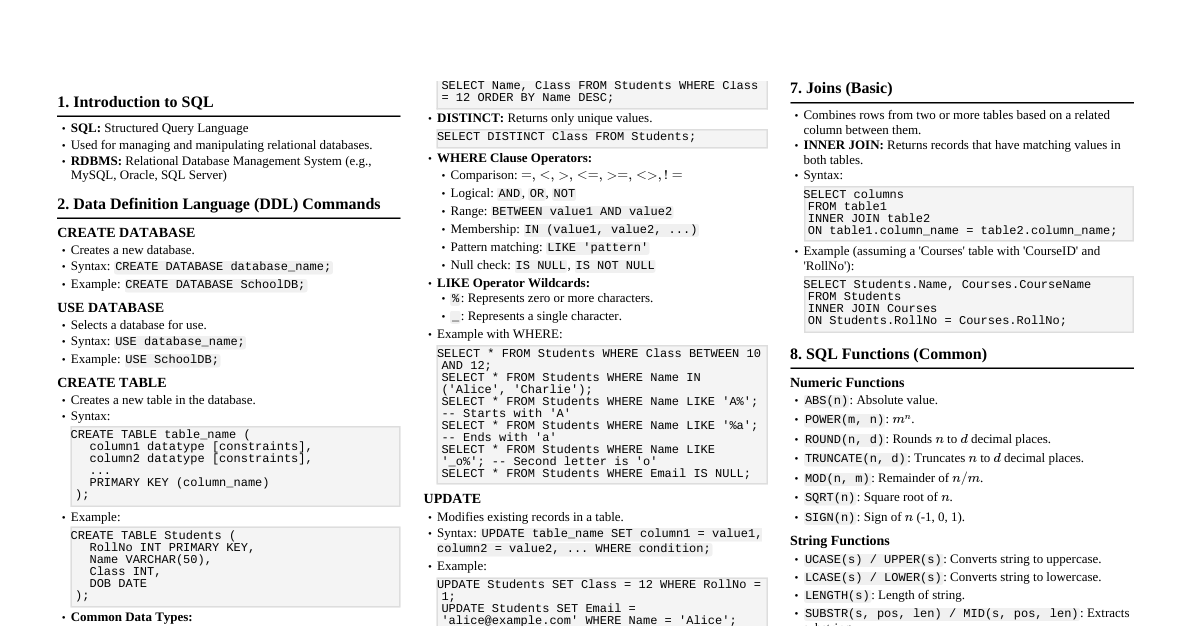
1. Basic SQL Commands SELECT: Retrieve data from a database. SELECT column1, column2 FROM table_name; SELECT * FROM table_name; FROM: Specifies the table(s) to retrieve data from. WHERE: Filters records based on a specified condition. SELECT * FROM Customers WHERE Country = 'Mexico'; AND, OR, NOT: Combine multiple conditions. SELECT * FROM Customers WHERE Country = 'Germany' AND City = 'Berlin'; SELECT * FROM Customers WHERE City = 'Berlin' OR City = 'München'; SELECT * FROM Customers WHERE NOT Country = 'Germany'; ORDER BY: Sorts the result set. SELECT * FROM Customers ORDER BY Country ASC, CustomerName DESC; INSERT INTO: Add new rows to a table. INSERT INTO Customers (CustomerName, ContactName, Country) VALUES ('Cardinal', 'Tom B. Erichsen', 'Norway'); UPDATE: Modify existing records in a table. UPDATE Customers SET ContactName = 'Alfred Schmidt', City = 'Frankfurt' WHERE CustomerID = 1; DELETE: Delete existing records from a table. DELETE FROM Customers WHERE CustomerName = 'Alfreds Futterkiste'; DELETE FROM Customers; -- Deletes all rows! 2. Data Types (Common) INT: Integer numbers (e.g., 1, 100). DECIMAL / NUMERIC: Fixed-point numbers (e.g., 10.50, 3.14). VARCHAR(size): Variable-length string (e.g., 'Hello', max size). CHAR(size): Fixed-length string (e.g., 'A', fixed size). TEXT: Large text strings. DATE: Date (YYYY-MM-DD). TIME: Time (HH:MM:SS). DATETIME / TIMESTAMP: Date and time. BOOLEAN / BOOL: True/False values. 3. Creating & Managing Tables CREATE DATABASE: Create a new database. CREATE DATABASE MyDatabase; DROP DATABASE: Delete an existing database. DROP DATABASE MyDatabase; CREATE TABLE: Create a new table. CREATE TABLE Persons ( PersonID INT PRIMARY KEY, LastName VARCHAR(255) NOT NULL, FirstName VARCHAR(255), Age INT ); DROP TABLE: Delete an existing table. DROP TABLE Persons; ALTER TABLE: Add, delete, or modify columns in a table. ALTER TABLE Persons ADD Email VARCHAR(255); ALTER TABLE Persons DROP COLUMN Age; ALTER TABLE Persons MODIFY COLUMN Email VARCHAR(100); TRUNCATE TABLE: Delete all rows from a table, but keep the table structure. TRUNCATE TABLE Persons; 4. Constraints NOT NULL: Ensures a column cannot have a NULL value. UNIQUE: Ensures all values in a column are different. PRIMARY KEY: A unique identifier for each record (NOT NULL and UNIQUE). FOREIGN KEY: Links two tables together (refers to a PRIMARY KEY in another table). DEFAULT: Sets a default value for a column when no value is specified. CHECK: Ensures all values in a column satisfy a specific condition. 5. Joins Used to combine rows from two or more tables, based on a related column between them. INNER JOIN: Returns records that have matching values in both tables. SELECT Orders.OrderID, Customers.CustomerName FROM Orders INNER JOIN Customers ON Orders.CustomerID = Customers.CustomerID; LEFT JOIN (LEFT OUTER JOIN): Returns all records from the left table, and the matched records from the right table. If no match, NULL from the right side. SELECT Customers.CustomerName, Orders.OrderID FROM Customers LEFT JOIN Orders ON Customers.CustomerID = Orders.CustomerID ORDER BY Customers.CustomerName; RIGHT JOIN (RIGHT OUTER JOIN): Returns all records from the right table, and the matched records from the left table. If no match, NULL from the left side. SELECT Orders.OrderID, Employees.LastName, Employees.FirstName FROM Orders RIGHT JOIN Employees ON Orders.EmployeeID = Employees.EmployeeID ORDER BY Orders.OrderID; FULL JOIN (FULL OUTER JOIN): Returns all records when there is a match in either left or right table. SELECT Customers.CustomerName, Orders.OrderID FROM Customers FULL OUTER JOIN Orders ON Customers.CustomerID = Orders.CustomerID ORDER BY Customers.CustomerName; 6. Aggregate Functions Perform calculations on a set of rows and return a single summary value. COUNT(): Returns the number of rows that matches a specified criterion. SELECT COUNT(CustomerID) FROM Customers; SUM(): Calculates the sum of a set of values. SELECT SUM(Quantity) FROM OrderDetails; AVG(): Calculates the average of a set of values. SELECT AVG(Price) FROM Products; MIN(): Returns the smallest value of the selected column. SELECT MIN(Price) FROM Products; MAX(): Returns the largest value of the selected column. SELECT MAX(Price) FROM Products; 7. Grouping Data GROUP BY: Groups rows that have the same values in specified columns into summary rows. Often used with aggregate functions. SELECT COUNT(CustomerID), Country FROM Customers GROUP BY Country; HAVING: Filters groups based on a specified condition (similar to WHERE, but for groups). SELECT COUNT(CustomerID), Country FROM Customers GROUP BY Country HAVING COUNT(CustomerID) > 5; 8. Subqueries A query nested inside another SQL query. Example: SELECT ProductName FROM Products WHERE Price > (SELECT AVG(Price) FROM Products); 9. Set Operations UNION: Combines the result-set of two or more SELECT statements (removes duplicates). SELECT City FROM Customers UNION SELECT City FROM Suppliers ORDER BY City; UNION ALL: Combines the result-set of two or more SELECT statements (includes duplicates). SELECT City FROM Customers UNION ALL SELECT City FROM Suppliers ORDER BY City; INTERSECT: Returns only the rows that are common to both result sets (supported by some databases like Oracle, MySQL uses JOIN). EXCEPT / MINUS: Returns rows from the first query that are not present in the second query (supported by some databases like Oracle, SQL Server). 10. Wildcard Characters (LIKE Operator) %: Represents zero, one, or multiple characters. SELECT * FROM Customers WHERE CustomerName LIKE 'a%'; -- Starts with 'a' SELECT * FROM Customers WHERE CustomerName LIKE '%a'; -- Ends with 'a' SELECT * FROM Customers WHERE CustomerName LIKE '%or%'; -- Has 'or' in any position _: Represents a single character. SELECT * FROM Customers WHERE CustomerName LIKE '_r%'; -- Second letter is 'r' 11. Aliases Column Alias: Assigns a temporary name to a column. SELECT CustomerName AS Name, ContactName AS "Contact Person" FROM Customers; Table Alias: Assigns a temporary name to a table. SELECT o.OrderID, c.CustomerName FROM Orders AS o, Customers AS c WHERE o.CustomerID = c.CustomerID; 12. Views CREATE VIEW: Creates a virtual table based on the result-set of a SQL statement. CREATE VIEW [Germany Customers] AS SELECT CustomerName, ContactName FROM Customers WHERE Country = 'Germany'; SELECT from View: SELECT * FROM [Germany Customers]; DROP VIEW: Deletes a view. DROP VIEW [Germany Customers]; 13. Indexes CREATE INDEX: Creates indexes on tables to retrieve data faster. CREATE INDEX idx_lastname ON Persons (LastName); DROP INDEX: Deletes an index. DROP INDEX idx_lastname ON Persons; -- MySQL DROP INDEX Persons.idx_lastname; -- SQL Server