DBMS & SQL Cheatsheet
Cheatsheet Content
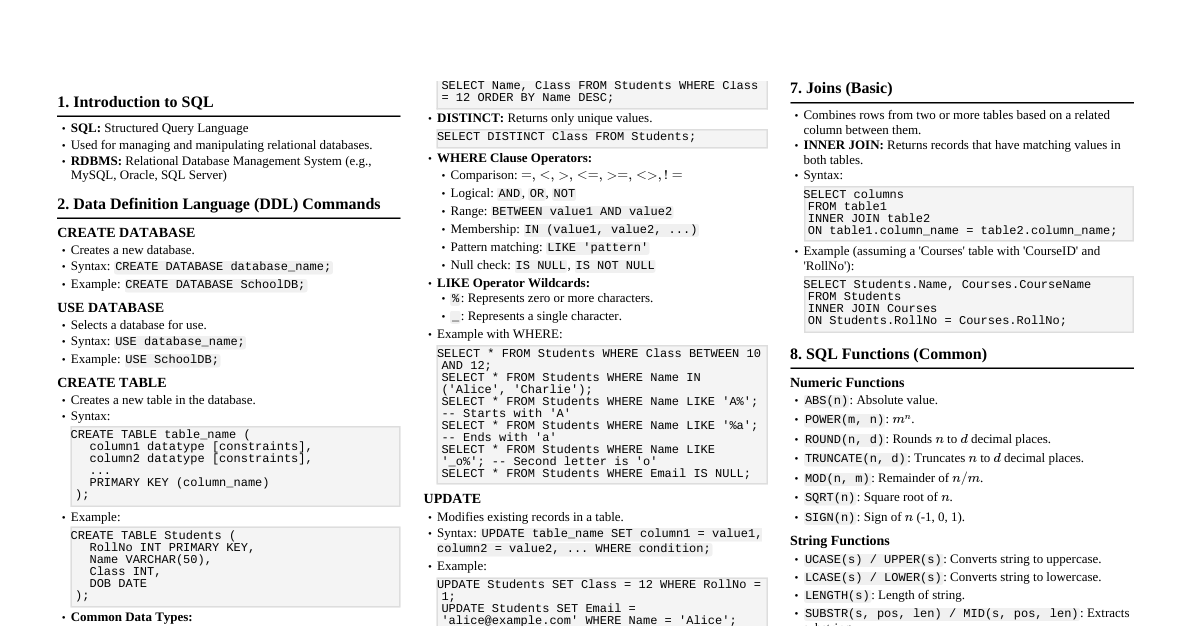
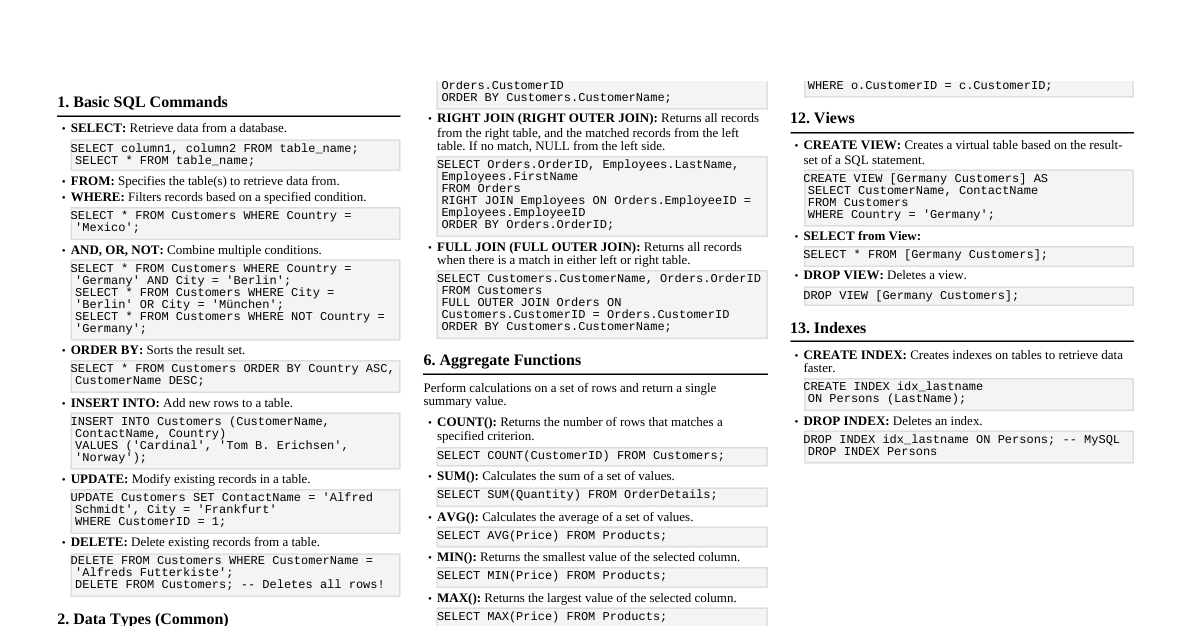
1. Database Management Systems (DBMS) Definition: Software for creating and managing databases. Purpose: Data storage, retrieval, manipulation, and protection. Components: Hardware Software (DBMS, OS, network) Data Users Procedures Types of DBMS: Relational (RDBMS): Data stored in tables (rows/columns). E.g., MySQL, PostgreSQL, Oracle. NoSQL: Non-relational, flexible schema. E.g., MongoDB, Cassandra. Hierarchical: Tree-like structure. Network: Graph-like structure. Object-Oriented: Data stored as objects. 2. Relational Model Concepts Relation (Table): A set of tuples (rows). Tuple (Row): A record, a collection of related data items. Attribute (Column): A characteristic or property of the relation. Domain: Set of allowed values for an attribute. Schema: Logical design of the database. $R(A_1, A_2, ..., A_n)$. Instance: Actual data stored in the database at a given moment. Key: Attribute(s) that uniquely identify a tuple. Super Key: Any set of attributes that uniquely identifies a tuple. Candidate Key: Minimal super key. Primary Key: Chosen candidate key to uniquely identify tuples. Cannot be NULL. Foreign Key: Attribute(s) in one table that refer to the primary key of another table, establishing a link. Alternate Key: Candidate keys not chosen as the primary key. 3. Normalization Purpose: Reduce data redundancy and improve data integrity. Normal Forms: 1NF (First Normal Form): Atomic values (no multi-valued attributes). No repeating groups. 2NF (Second Normal Form): Is in 1NF. No partial dependencies (non-key attributes must depend on the entire primary key). 3NF (Third Normal Form): Is in 2NF. No transitive dependencies (non-key attributes must not depend on other non-key attributes). BCNF (Boyce-Codd Normal Form): Every determinant is a candidate key. (Stronger than 3NF). 4NF (Fourth Normal Form): Is in BCNF. No multi-valued dependencies. 4. SQL - Structured Query Language Definition: Standard language for managing and manipulating relational databases. Sub-languages: DDL (Data Definition Language): Define database structure. CREATE ALTER DROP TRUNCATE RENAME DML (Data Manipulation Language): Manage data within schema objects. SELECT INSERT UPDATE DELETE DCL (Data Control Language): Control access to data. GRANT REVOKE TCL (Transaction Control Language): Manage transactions. COMMIT ROLLBACK SAVEPOINT 5. Basic SQL Commands (DDL) Create Table: CREATE TABLE Students ( StudentID INT PRIMARY KEY, FirstName VARCHAR(50), LastName VARCHAR(50), Age INT, City VARCHAR(50) ); Alter Table (Add Column): ALTER TABLE Students ADD Email VARCHAR(100); Alter Table (Drop Column): ALTER TABLE Students DROP COLUMN Email; Drop Table: DROP TABLE Students; Truncate Table (Removes all rows, keeps structure): TRUNCATE TABLE Students; 6. Basic SQL Commands (DML) Insert Data: INSERT INTO Students (StudentID, FirstName, LastName, Age, City) VALUES (1, 'John', 'Doe', 20, 'New York'); Update Data: UPDATE Students SET Age = 21, City = 'Los Angeles' WHERE StudentID = 1; Delete Data: DELETE FROM Students WHERE StudentID = 1; Select Data: SELECT * FROM Students; SELECT FirstName, City FROM Students WHERE Age > 20; Distinct Values: SELECT DISTINCT City FROM Students; Order By: SELECT * FROM Students ORDER BY LastName ASC, FirstName DESC; Limit/Top: SELECT * FROM Students LIMIT 10; -- MySQL/PostgreSQL SELECT TOP 10 * FROM Students; -- SQL Server Aggregate Functions: COUNT() : Number of rows. SUM() : Sum of values. AVG() : Average value. MIN() : Minimum value. MAX() : Maximum value. SELECT COUNT(StudentID), AVG(Age) FROM Students; Group By & Having: SELECT City, COUNT(StudentID) AS TotalStudents FROM Students GROUP BY City HAVING COUNT(StudentID) > 1; 7. SQL Joins Purpose: Combine rows from two or more tables based on a related column. Types: INNER JOIN: Returns rows when there is a match in both tables. SELECT S.FirstName, C.CourseName FROM Students S INNER JOIN Enrollments E ON S.StudentID = E.StudentID INNER JOIN Courses C ON E.CourseID = C.CourseID; LEFT JOIN (LEFT OUTER JOIN): Returns all rows from the left table, and the matched rows from the right table. NULL for no match. SELECT S.FirstName, E.EnrollmentDate FROM Students S LEFT JOIN Enrollments E ON S.StudentID = E.StudentID; RIGHT JOIN (RIGHT OUTER JOIN): Returns all rows from the right table, and the matched rows from the left table. NULL for no match. SELECT S.FirstName, E.EnrollmentDate FROM Enrollments E RIGHT JOIN Students S ON E.StudentID = S.StudentID; FULL JOIN (FULL OUTER JOIN): Returns all rows when there is a match in one of the tables. NULL for no match. SELECT S.FirstName, C.CourseName FROM Students S FULL OUTER JOIN Enrollments E ON S.StudentID = E.StudentID FULL OUTER JOIN Courses C ON E.CourseID = C.CourseID; CROSS JOIN: Returns the Cartesian product of the tables. SELECT S.FirstName, C.CourseName FROM Students S CROSS JOIN Courses C; 8. Subqueries A query nested inside another query. Can be used in SELECT , FROM , WHERE clauses. Example: SELECT FirstName, Age FROM Students WHERE Age > (SELECT AVG(Age) FROM Students); Correlated Subquery: Depends on the outer query for its values. 9. Views A virtual table based on the result-set of an SQL query. Create View: CREATE VIEW YoungStudents AS SELECT StudentID, FirstName, Age FROM Students WHERE Age Query View: SELECT * FROM YoungStudents; 10. Transactions (TCL) A sequence of operations performed as a single logical unit of work. ACID Properties: Atomicity: All or nothing. Consistency: Database remains in a valid state. Isolation: Concurrent transactions don't interfere. Durability: Committed changes are permanent. Example: START TRANSACTION; -- or BEGIN TRANSACTION; UPDATE Accounts SET Balance = Balance - 100 WHERE AccountID = 1; UPDATE Accounts SET Balance = Balance + 100 WHERE AccountID = 2; COMMIT; -- Make changes permanent -- ROLLBACK; -- Undo changes if an error occurs 11. Indexes Special lookup tables that the database search engine can use to speed up data retrieval. Create Index: CREATE INDEX idx_lastname ON Students (LastName); Unique Index: Enforces uniqueness on the indexed column(s). CREATE UNIQUE INDEX idx_email ON Students (Email);