GPAI's Parallel Problem Generator: AI That Rewrites the Problem and Redraws the Figure
Jul 9, 2026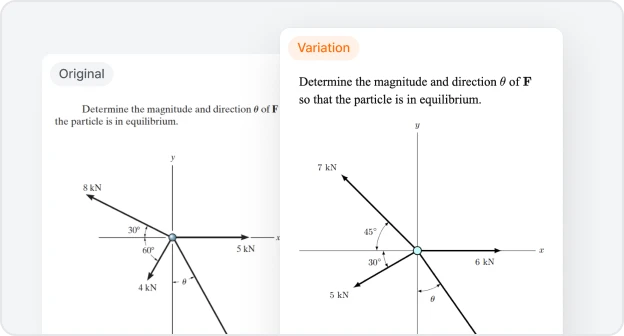
Key Points
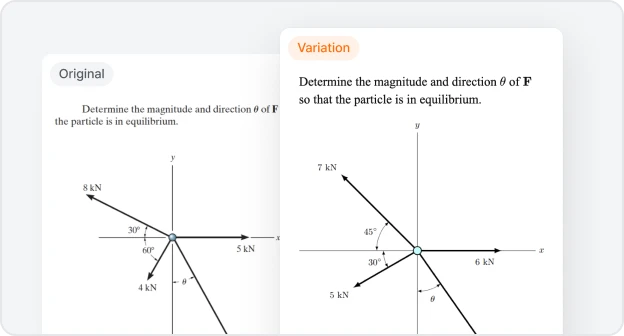
GPAI's Parallel Problem Generator (released July 8, 2026) creates parallel problems — new variations with the same structure, different values, and redrawn figures — automatically.
"Parallel" means structurally identical: the same concept, the same solution strategy, the same difficulty level. Not just different numbers — a different problem that requires the same reasoning to solve.
Every twin problem ships with a verified step-by-step solution. The answer actually works. The figure matches.
The Part That Kills Your Weekend
Writing a new exam problem from scratch is hard. You need values that make physical or mathematical sense — numbers chosen so the solution comes out clean, the intermediate steps are instructive, and the answer isn't trivially obvious or computationally ugly. That alone takes time.
Then there is the figure.
In any STEM problem that includes a circuit diagram, a free body diagram, a velocity-time graph, a phase portrait, or a reaction mechanism, the figure is not decorative. It is the problem. Change the values, and the diagram has to change with them. Redrawing it correctly — every version, for every student — is what STEM educators actually lose their weekends to.
Both of these tasks, together, have always required a human expert sitting down and doing the work. Until now.
Why Automating This Has Been Hard
The barrier to AI-generated STEM problems is not intelligence. It is correctness — on two fronts at once.
The numbers have to actually work. Randomly swapping values in a physics or chemistry problem often breaks it: the answer becomes unsolvable, or the setup becomes physically impossible. A valid parallel problem requires values chosen so the solution is clean and meaningful — which means understanding the mathematical structure of the problem, not just substituting surface numbers.
The figure has to match the new values. In a typical AI workflow, figures are static images — rasterized PNGs or embedded graphics that can't be touched programmatically. Change the problem text, and the diagram still shows the old scenario. Someone still has to redraw it by hand.
This is why generating complete exam variations has remained manual work. Until now.
Meet the Parallel Problem Generator
GPAI's Parallel Problem Generator was released on July 8, 2026. The name captures the core idea: original and variation are Parallels — different on the surface, identical in structure. They require the same concept, the same solution strategy, and the same level of reasoning to solve. Only the specific values and figures differ.
"Automatically turn any problem into a similar one. Practice is infinite."
Upload a photo of any STEM problem, choose how you want it varied, and GPAI writes a fresh problem with the same structure — including redrawn figures, a correct answer, and a step-by-step solution.
The Mathematical Principle: Equivalent-Structure Preservation
What separates the Parallel Problem Generator from value-substitution tools is that variations preserve the solution path, not just the surface form.
Formally, if the original problem is P₀ = (S₀, C₀, R₀) — where S₀ is the symbolic structure, C₀ is the constraint set, and R₀ is the solution recipe — then the parallel P₁ = (S₁, C₁, R₁) must satisfy R₁ ≅ R₀: the solution paths are isomorphic. The generator redesigns S₁ and C₁ to satisfy this condition, not just to look similar.
In practice, this means a parallel problem requires the same method to solve, but produces a different answer. Consider an integration problem:
Original: ∫₀¹ x eˣ dx
Parallel: ∫₀² (x − 1) e²ˣ dx
Both require integration by parts — ∫u dv = uv − ∫v du — the same solution strategy applied the same way. But the bounds, the integrand, and the numerical answer are all different. A student who copied the answer to the original would have no advantage on the parallel.
This is what "equivalent structure" means. The concept is preserved. The answer is not.
How It Works
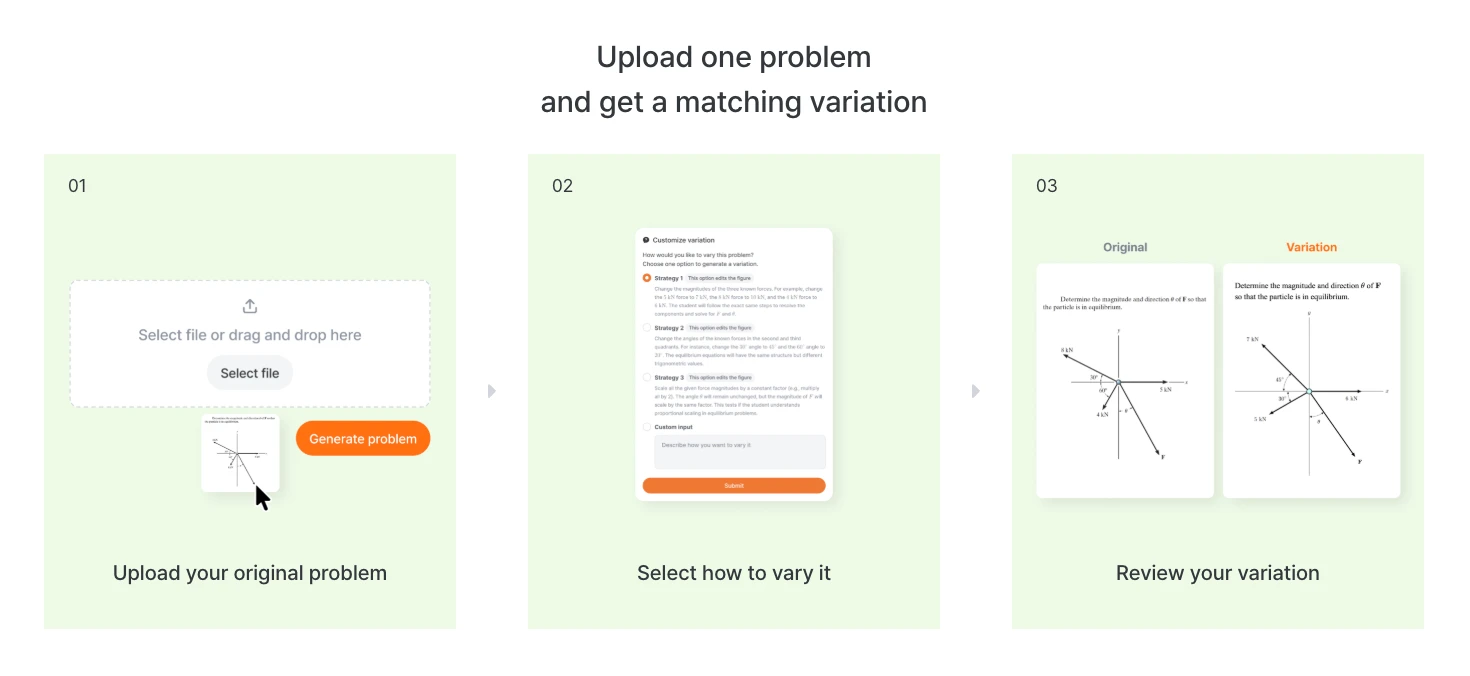
Three steps for the user:
1. Upload the problem. Drop in a photo of any STEM problem — from a textbook, a handwritten worksheet, or a previous exam. GPAI reads the problem text and any figures it contains.
2. Choose a variation strategy. The generator offers different ways to vary the problem — different parameter ranges, restructured scenarios, adjusted difficulty. You pick the direction.
3. Receive a complete parallel problem. GPAI returns:
A new problem with the same structure and working numbers
Redrawn figures calibrated to the new values (circuit diagrams, graphs, free body diagrams, reaction mechanisms — all regenerated from scratch)
A step-by-step solution with the correct answer
A side-by-side comparison showing what changed between the original and the parallel
Text and partial export so you can copy exactly what you need
Why the Figure Actually Moves
The figure regeneration is what makes this possible at all.
When you ask a general AI to help vary a problem, it operates on text. It can substitute values, rephrase sentences, or recombine elements. What it cannot do is touch the figure, because the figure is an image — a static artifact with no computable structure.
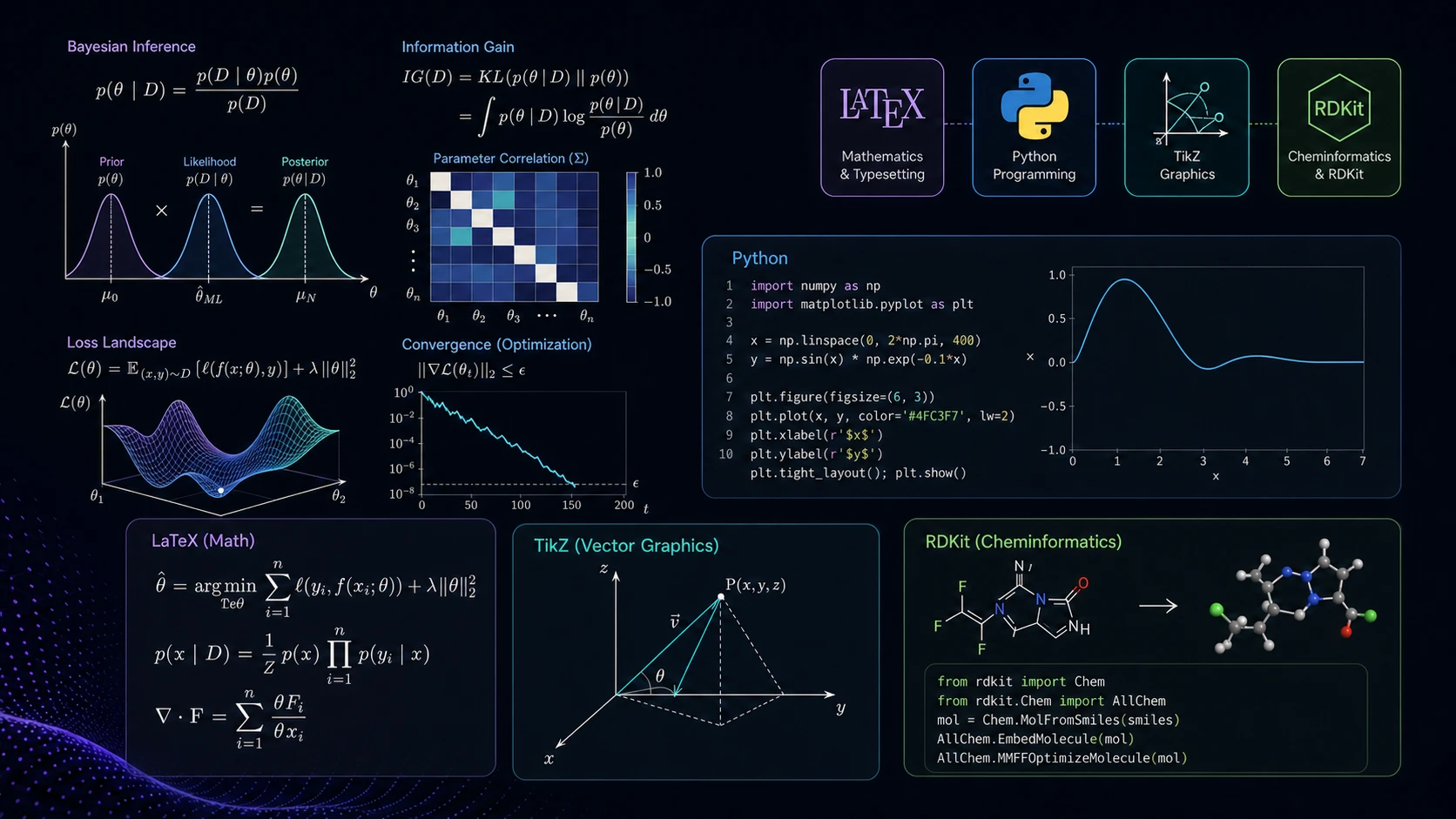
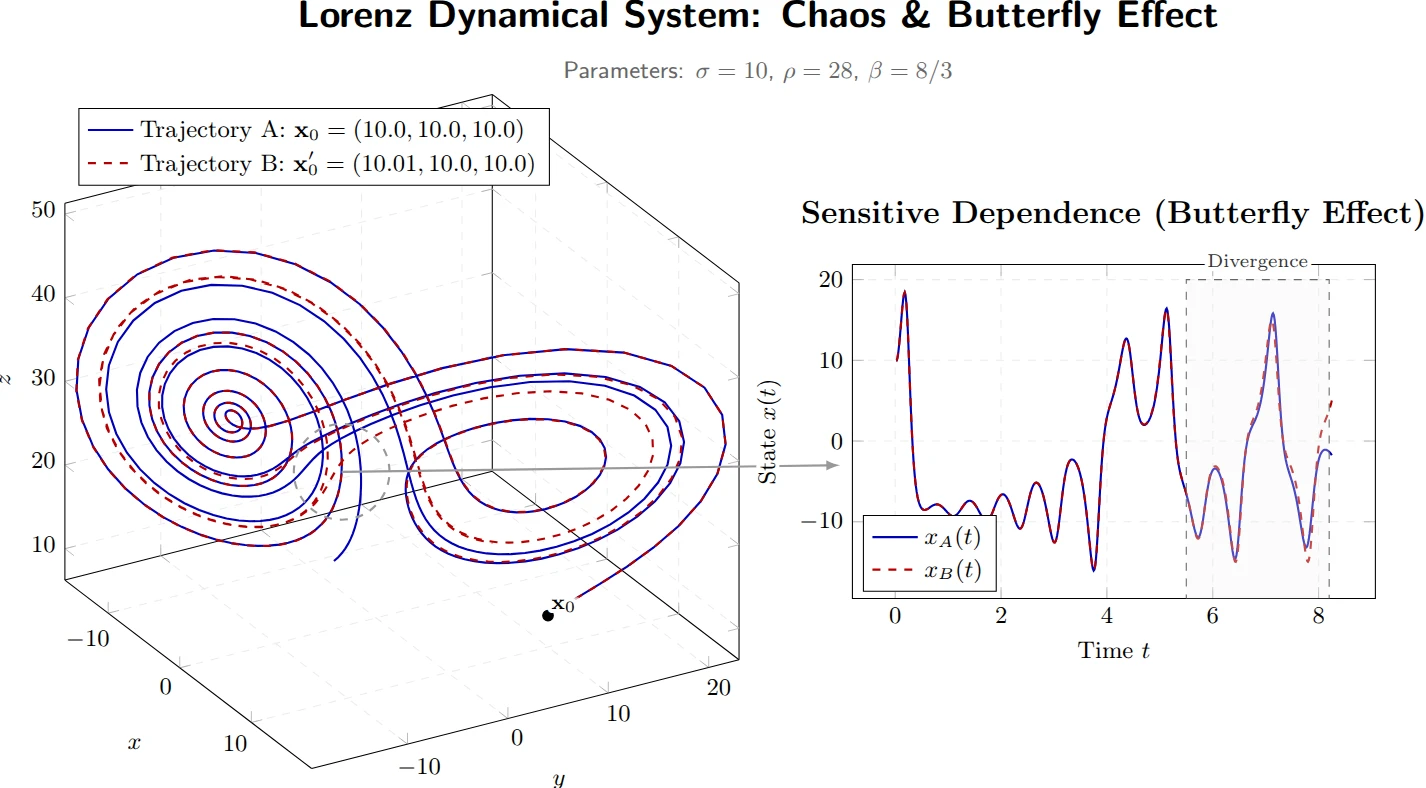
GPAI's figures are not images in this sense. TikZ diagrams are defined by coordinate calculations: every point, arrow, and curve is specified mathematically. RDKit structures are computed from molecular graph theory: bond lengths, valency, and stereochemistry derived from first principles. When the problem changes, the inputs to those computations change, and the figure is regenerated accordingly.
A circuit with different resistances gets a new circuit diagram. A dynamics problem with a different angle gets a new free body diagram. A reaction with a different intermediate gets a new mechanism, with electron-pushing arrows redrawn to reflect the actual electronic structure of the new intermediate.
We didn't just change the numbers. The answer resolves. The figure matches.
Figure Types GPAI Redraws
Problem Type | Figure Regenerated |
|---|---|
Circuit analysis | Circuit diagram with updated component values and topology |
Classical mechanics | Free body diagram with corrected geometry and force vectors |
Dynamics / kinematics | Velocity-time and position-time graphs, recomputed |
Electromagnetism | Vector field diagrams, field line patterns |
Organic chemistry | Reaction mechanism with electron-pushing arrows |
Organometallic chemistry | Catalytic cycle with oxidation states tracked through every step |
Mathematical analysis | Phase portraits, bifurcation diagrams, stability diagrams |
Control systems | Block diagrams, signal flow graphs |
What Educators Can Do With This
Cheat-proof exam versions. Generate a different parallel for each student in the class. Because the answer to the original is not the answer to the parallel, answer sharing provides no advantage. Multiple structurally identical but numerically distinct versions, all with correct answers and redrawn figures, in seconds.
Makeup and retake problems. When a student needs a second attempt at an assessment, generate a parallel of the original problem. Same concept and difficulty — different enough that having seen the original gives no advantage.
Transfer learning through repetition. Assign parallels of problems students have already solved. Repeated practice on the same concept with different values helps students distinguish the method from the specific numbers, building the transfer of understanding that exams test.
Error diagnosis. When a student gets a problem wrong, assign a parallel of that exact problem. If they get the parallel wrong the same way, the error is conceptual. If they get it right, the error was likely arithmetic. The parallel isolates what went wrong without requiring a new problem from scratch.
Manual Variation vs. GPAI Parallel Problem Generator
Capability | Manual / General AI | GPAI Parallel Problem Generator |
|---|---|---|
Generate new problem values | ✓ (manual) | ✓ Automated |
Values preserve solution structure (equivalent-structure) | — | ✓ |
Redraw figures for the variation | — (manual, hours) | ✓ Automated |
Generate step-by-step solution | — (manual) | ✓ Verified |
Original and parallel side by side | — | ✓ |
Export variation as text / selectable parts | — | ✓ |
Chemistry reaction mechanism regeneration | — | ✓ RDKit-based |
Get Started
The Parallel Problem Generator is available now at GPAI Problems. Upload any STEM problem, pick your variation type, and receive a complete parallel — redrawn figure, verified solution, and side-by-side comparison included.
Try GPAI's Parallel Problem Generator →
Frequently Asked Questions
What is a parallel problem?
A parallel problem is a new version of an existing problem that preserves the solution structure of the original — same concept, same solution strategy, same difficulty level — while using different values and a redrawn figure. It exercises the same reasoning as the original without being a copy. Two students who each solve their own parallel version are solving equivalent problems, but neither answer helps with the other.
What does "equivalent-structure preservation" mean?
It means the solution path of the parallel is isomorphic to the original — the same mathematical or scientific method is required, applied the same way. What differs is the specific values, the figure, and the numerical answer. This is what makes parallel problems useful for assessment: they test the same skill while being genuinely distinct problems.
Can GPAI generate parallel problems from a photo?
Yes. Upload a photo of any STEM problem — from a textbook, a handwritten worksheet, or a previous exam. GPAI reads the problem text and any figures it contains, then generates a complete parallel with redrawn figures and a verified solution.
Does GPAI redraw chemistry figures for parallel problems?
Yes. GPAI's Chemistry engine uses RDKit to compute molecular structures and reaction mechanisms from first principles. When conditions change in a chemistry problem, the mechanism, structure, or reaction diagram is redrawn from scratch — including electron-pushing arrows, wedge/dash stereochemistry, and oxidation state tracking through catalytic cycles.
Can parallel problems be used for anti-cheating exam versions?
Yes — this is one of the primary educator use cases. Because each parallel has different values and a redrawn figure, answer sharing provides no advantage. Structurally identical but numerically and visually distinct exam versions can be generated for every student in the class.
How does GPAI verify that parallel problem solutions are correct?
GPAI generates a step-by-step solution for each parallel problem and checks it for internal consistency. For chemistry problems, RDKit's valency verification catches incorrect intermediates and corrects them automatically. For STEM calculations, the solution is verified across all steps so propagated errors are caught before they reach you.
What types of STEM problems does the Parallel Problem Generator support?
The generator works across physics, mathematics, chemistry, and engineering. It supports any problem type whose figures are handled by the TikZ engine (circuit diagrams, free body diagrams, graphs, vector fields, phase portraits, control system block diagrams) or the Chemistry engine (molecular structures, reaction mechanisms, catalytic cycles).
Is the Parallel Problem Generator free?
GPAI offers a free tier with access to core features. Full access to the Parallel Problem Generator — including figure regeneration and verified solutions — is available on paid plans. See pricing at gpai.app.
GPAI is an AI STEM workspace — Visuals, Problems, and Chat in one subscription. The Parallel Problem Generator is part of GPAI Problems: built for educators who need complete, cheat-proof exam variations, and for students who need one more problem just like the last one.