Mobile Computing - Unit 1
Shared 5/21/2026•2 views
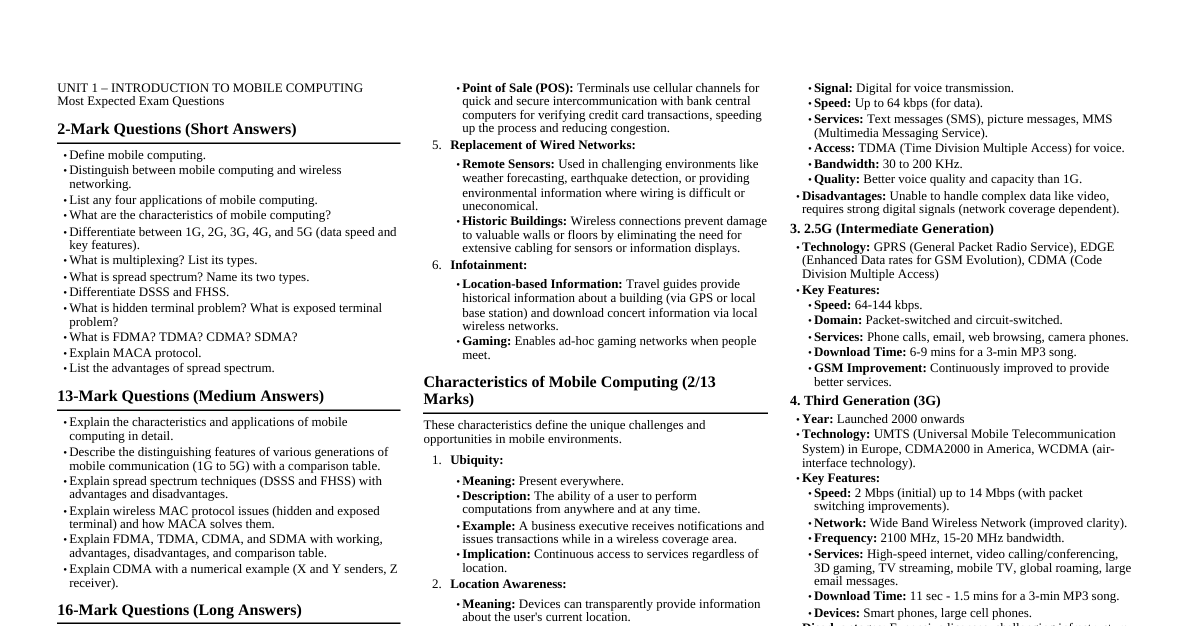
### UNIT 1 – INTRODUCTION TO MOBILE COMPUTING ### Mobile Computing: Definition Mobile Computing is a technology that allows transmission of data, voice, and video via a computer or any other wireless-enabled device without having to be connected to a fixed physical link. It enables users to perform computing tasks and access information while on the move, maintaining network connectivity. ### Mobile Computing vs. Wireless Networking | Feature | Mobile Computing | Wireless Networking | | :--------------- | :------------------------------------------------------------------------------------------------------------------------------------------------------------------------------------------------------------------------------------------------------------------------------------------------------------------------------------------------------------------------ | :-------------------------------------------------------------------------------------------------------------------------------------------------------------------------------------------------------------------------------------------------------------------------------------------------------------------------------------------------------------------- | | **Definition** | Refers to computing devices that are not restricted to a desktop. A mobile device (PDA, smartphone, laptop) allows users to complete tasks without being tethered or connected to a network, accessing information and remote computational service while on the move. | Refers to the method of transferring information without physical cables, using a data source (e.g., agency database server) without a physical connection. It's the underlying communication infrastructure. | | **Focus** | Portability, ubiquitous access to computing resources, and dynamic interaction with changing environments. | Connectivity and data transmission using wireless technologies (Wi-Fi, cellular, Bluetooth). | | **Key Aspects** | Mobility of the device AND the user, context awareness, adaptation to changing network conditions, and interaction with physical environment. | Data transfer mechanisms, protocols for wireless communication, signal propagation, network architecture (e.g., WLAN, cellular networks). | | **Relationship** | Mobile computing *utilizes* wireless networking for connectivity. Wireless networking is a component or enabler for mobile computing. | Wireless networking can exist independently (e.g., a fixed wireless link between two buildings) without necessarily involving mobile computing devices or mobile users. | | **Example** | A salesperson using a laptop to update customer records from a client's office via Wi-Fi, or a user accessing email on a smartphone while commuting. | A Wi-Fi network in an office building that provides internet access to both stationary desktop computers and mobile devices, or a cellular network providing data service to phones. | ### Applications of Mobile Computing Mobile computing offers a wide range of applications across various domains: #### 1. Vehicles - **Digital Audio Broadcasting (DAB):** Provides music, news, road conditions, and weather reports with high data rates (e.g., 1.5 Mbit/s). - **Universal Mobile Telecommunications System (UMTS):** Offers voice and data connectivity (e.g., 384 kbits/s) for personal communication. - **Global Positioning System (GPS):** Determines the current position of the car. - **Ad-hoc Networks:** Cars in the same area can form local ad-hoc networks for fast information exchange in emergencies or to maintain safe distances. - **Emergency Calls:** In case of an accident, the system can automatically trigger airbags and inform police/ambulance services. #### 2. Emergencies - **Ambulance Connectivity:** High-quality wireless connection allows ambulances to send vital patient information to hospitals from accident scenes, enabling early diagnosis and specialist consultation. - **Disaster Relief:** Wireless networks are often the only means of communication during natural disasters (e.g., hurricanes, earthquakes), especially decentralized ad-hoc networks. #### 3. Business - **Mobile Presentations:** Managers can use mobile computers for critical presentations to customers, accessing the latest market share information, and revising presentations on the go. - **Sales Force Automation:** Travelling salespeople can access the company's database instantly, ensuring their laptops reflect current data, tracking their activities, and maintaining database consistency. #### 4. Credit Card Verification - **Point of Sale (POS) Terminals:** In shops and supermarkets, mobile computing facilitates quick and secure intercommunication between POS terminals and bank central computers via cellular channels for credit card transaction verification, speeding up the process and reducing congestion. #### 5. Replacement of Wired Networks - **Remote Sensors:** Wireless networks replace wired connections for remote sensors (e.g., weather forecasts, earthquake detection, environmental information) where wiring is impractical or costly. - **Historic Buildings:** Used in historical buildings to avoid damaging valuable walls or floors with excessive cabling, providing connectivity for computers, sensors, or displays. #### 6. Infotainment - **Location-Based Information:** Wireless networks provide up-to-date information based on location. A travel guide, for example, can provide historical facts about a building (using GPS/triangulation) or download concert information via a local wireless network. - **Ad-hoc Gaming:** A growing field where ad-hoc networks enable users to play games together when they meet. ### Characteristics of Mobile Computing A computing environment is considered "mobile" when either the sender or receiver of information can move while transmitting or receiving. Key characteristics include: #### 1. Ubiquity - **Definition:** Ubiquity means "present everywhere." In mobile computing, it refers to a user's ability to perform computations from anywhere and at any time. - **Example:** A business executive can receive business notifications and issue transactions as long as they are within a wireless coverage area, enabling continuous productivity. #### 2. Location Awareness - **Definition:** The ability of a mobile system to determine its current physical location and provide this information to applications. - **Example:** A handheld device with GPS can transparently provide location info to a tracking station. Applications range from strategic services (e.g., fleet management, traffic control) to personalized services (e.g., finding a nearby car maintenance shop for a driver). This makes emergency services more effective by directing them to the call site. #### 3. Adaptation - **Definition:** The ability of a system to adjust to fluctuating bandwidth without inconveniencing the user. - **Importance:** Crucial in mobile environments due to intermittent disconnections, handoffs, obstacles, and environmental noise, which cause bandwidth variations. The system adapts to maintain service quality. #### 4. Broadcast - **Definition:** Due to the broadcast nature of the underlying communication network, data can be efficiently delivered simultaneously to hundreds of mobile users. - **Example:** All users near a railway station could receive advertising information from a taxi service operator at the same time. #### 5. Personalization - **Definition:** Services in a mobile environment can be easily customized according to a user's profile. - **Example:** A mobile user might only need specific information from certain sources on their handheld device; personalization ensures they receive only relevant data, enhancing user experience. ### Generations of Mobile Communication Technologies Mobile communication technologies have evolved through several generations, each bringing significant improvements in speed, capacity, and services. #### 1. First Generation (1G) - **Introduction:** Early 1980s (1982), completed in early 1990s. - **Technology:** Advanced Mobile Phone System (AMPS). - **Modulation:** Frequency Modulated. - **Access Method:** Frequency Division Multiple Access (FDMA). - **Channel Capacity:** 30 KHz. - **Frequency Band:** 824-894 MHz. - **Key Features:** - **Speed:** 2.4 kbps. - **Service:** Voice calls only, within one country. - **Signal Type:** Analog signal. - **Voice Quality:** Poor. - **Battery Life:** Poor. - **Phone Size:** Large. - **Capacity:** Limited. - **Handoff Reliability:** Poor. - **Security:** Poor (voice calls easily eavesdropped). - **Spectrum Efficiency:** Very low. - **Technologies Included:** Mobile Telephone System (MTS), Advanced Mobile Telephone System (AMTS), Improved Mobile Telephone Service (IMTS), Push to Talk (PTT). - **Architecture:** BS (Base Station) -> MSC (Mobile Switching Center) -> PSTN (Public Switched Telephone Network) / Internet. #### 2. Second Generation (2G) - **Emergence:** Late 1980s. - **Signal Type:** Digital signals for voice transmission. - **Focus:** Digital voice and low-speed data services. - **Bandwidth:** 30 to 200 KHz. - **Key Features:** - **Data Speed:** Up to 64 kbps. - **Services:** Text messages (SMS), picture messages, Multimedia Messaging Service (MMS). - **Voice Quality & Capacity:** Improved. - **Limitations:** Unable to handle complex data like videos, requires strong digital signals (weak in no network coverage areas). #### 2.5 Generation (2.5G) - **Enhancement:** Builds upon 2G, integrating packet-switched and circuit-switched domains. - **Data Rate:** Up to 144 kbps. - **Technologies:** GPRS (General Packet Radio Service), CDMA (Code Division Multiple Access), EDGE (Enhanced Data rates for GSM Evolution). - **Services:** Enhanced data services beyond basic SMS/MMS. #### 3. Third Generation (3G) - **Launch:** 2000. - **Aim:** High-speed data. - **Data Speed:** Up to 2 Mbps (initially) to 14 Mbps (improved). - **Access Method:** Wide Band Wireless Network. - **Frequency Band:** 2100 MHz. - **Bandwidth:** 15-20 MHz. - **Key Features:** - **Devices:** Typically called smartphones. - **Bandwidth & Data Transfer Rates:** Increased to accommodate web-based applications, audio, and video files. - **Communication:** Faster, large email messages. - **Security:** High speed web, more security, video conferencing, 3D gaming. - **Capacity:** Large capacities and broadband capabilities. - **Services:** TV streaming, mobile TV, phone calls. - **Download Speed:** 3-minute MP3 download in 11 seconds to 1.5 minutes. - **Challenges:** Expensive licenses, high infrastructure cost, high bandwidth requirement, expensive phones. - **Technologies:** UMTS (Universal Mobile Telecommunication System) in Europe, CDMA2000 in America, TD-SCDMA in China, WCDMA (air-interface for UMTS). #### 4. Fourth Generation (4G) - **Data Speed:** 100 Mbps (downloading). - **Services:** Similar to 3G, plus Multi-Media Newspapers, higher clarity TV programs, faster data transmission. - **Technology:** LTE (Long Term Evolution). - **Focus:** Accommodating QoS and rate requirements for applications like wireless broadband access, MMS, video chat, mobile TV, HDTV, Digital Video Broadcasting (DVB), and minimal voice and data services. - **Key Features:** - **Speed:** 10 Mbps – 1 Gbps. - **Video:** High quality streaming video. - **Connectivity:** Combination of Wi-Fi and Wi-Max. - **Security:** High. - **Service Availability:** Any kind of service, any time, anywhere as per user requirements. - **Services:** Expanded multimedia services. #### 5. Fifth Generation (5G) - **Start:** Late 2010s. - **Focus:** World Wide Wireless Web (WWWW), complete wireless communication with no limitations. - **Key Features:** - **Connectivity & Coverage:** Far better levels. - **Support:** Highly supportable to WWWW. - **Speed & Capacity:** High speed, high capacity, large broadcasting of data in Gbps. - **Multimedia:** Multi-media newspapers, HD clarity TV programs. - **Data Transmission:** Faster than previous generations. - **Device Features:** Large phone memory, improved dialing speed, clarity in audio/video. - **Services:** Supports interactive multimedia, voice, streaming video, internet, and other services. - **Overall:** More effective and attractive. #### Comparison Table of Mobile Communication Generations | Generation | Start | Data Bandwidth | Technology | Switching | Core Network | Handoff | | :--------- | :----------- | :------------- | :---------------------------------------- | :------------------- | :----------- | :------------------- | | **1G** | 1970-1980 | 2 Kbps | Analog Cellular | Circuit | PSTN | Horizontal | | **2G** | 1990-2000 | 64 Kbps | Digital Cellular | Circuit | PSTN | Horizontal | | **2.5G** | 2001-2004 | 144 Kbps | GPRS, EDGE, CDMA | Packet | PSTN | Horizontal | | **3G** | 2004-2005 | 2 Mbps | CDMA 2000 (1xRT, EVDO), UMTS, EDGE | Packet | Internet | Horizontal | | **3.5G** | 2006-2010 | > 2 Mbps | WiMax, LTE, Wi-Fi | Packet | Internet | Horizontal & Vertical | | **4G** | 2011-Now | 1 Gbps | WiMax, LTE, Wi-Fi | All Packet | Internet | Horizontal & Vertical | | **5G** | Soon (2020+) | > 1 Gbps | Dynamic Information access, AI Capabilities | All Packet | Internet | Horizontal & Vertical | ### Multiplexing #### Definition and Need - **Definition:** Multiplexing is a fundamental mechanism in communication systems that allows several users to share a single medium (e.g., a communication channel) with minimum or no interference. - **Need:** To efficiently utilize limited communication resources (bandwidth, time) by allowing multiple signals to be transmitted simultaneously over a shared path. #### 1. Frequency Division Multiplexing (FDM) - **Idea:** Separates the whole spectrum into smaller, non-overlapping frequency bands. Each channel gets a certain band of the spectrum for the entire duration of the communication. - **Working:** The total available bandwidth is divided into a number of narrower frequency bands or channels. Each user is assigned a unique frequency band for their transmission. - **Advantages:** - No dynamic coordination necessary between users. - Works well for analog signals. - **Disadvantages:** - **Waste of Bandwidth:** If traffic is unevenly distributed among channels, some bands might be idle while others are congested. - **Inflexible:** Difficult to dynamically reallocate bandwidth to users with higher demand. - **Guard Spaces:** Requires guard bands (unused frequency ranges) between channels to prevent interference, further reducing efficiency. #### 2. Time Division Multiplexing (TDM) - **Idea:** Divides the communication time into fixed-sized slots. Each channel gets the whole spectrum (full bandwidth) for a certain amount of time in a repeating cycle. - **Working:** Each user is assigned a specific time slot during which they can transmit their data using the entire available frequency band. Users take turns transmitting. - **Advantages:** - Only one carrier is present in the medium at any given time, reducing inter-channel interference. - High throughput, even for many users, if properly synchronized. - **Disadvantages:** - **Precise Synchronization:** Requires very accurate timing synchronization between sender and receiver to ensure correct slot allocation. - **Waste of Time:** If a user has no data to send during their assigned time slot, that slot remains idle and is wasted. #### 3. Time and Frequency Multiplexing (Combination) - **Idea:** Combines both FDM and TDM. A channel gets a certain frequency band for a certain amount of time. - **Example:** GSM (Global System for Mobile Communications) uses a combination of TDMA and FDMA. - **Working:** The total frequency spectrum is divided into frequency bands (FDMA), and each frequency band is further divided into time slots (TDMA). Users are assigned both a specific frequency band and a specific time slot. - **Advantages:** - Better protection against tapping (eavesdropping) due to more complex access. - Protection against frequency-selective interference (fading). - Higher data rates compared to pure Code Multiplexing. - **Disadvantages:** - Requires precise coordination of both frequency and time. #### 4. Code Division Multiplexing (CDM) / Code Division Multiple Access (CDMA) - **Idea:** Each channel has a unique spreading code. All channels use the same spectrum at the same time. - **Working:** Each user's data is multiplied by a unique pseudo-random spreading code. These spread-spectrum signals are then transmitted over the entire available bandwidth simultaneously. At the receiver, the same unique code is used to "despread" and recover the original signal. - **Advantages:** - **Bandwidth Efficient:** Allows multiple users to share the same frequency band simultaneously. - **No Coordination/Synchronization:** Does not require precise frequency allocation or time slot synchronization between users. - **Good Protection:** Offers inherent protection against interference and tapping due to the spreading codes. - **Disadvantages:** - **Lower User Data Rates:** Can have lower individual user data rates compared to other methods if not implemented efficiently. - **Complex Signal Regeneration:** Requires more complex signal processing at the receiver for regeneration. - **Requires Power Control:** Needs precise power control to prevent "near-far" problem where strong signals drown out weaker ones. ### Spread Spectrum #### Definition and Purpose - **Definition:** A class of signaling techniques where the transmitted signal is spread over a much wider frequency band than the minimum bandwidth required to transmit the information. - **Purpose:** - **Secure Communication:** Makes it difficult for unauthorized parties to detect or intercept the signal (Low Probability of Intercept - LPI). - **Anti-Interference/Anti-Jamming:** Makes the signal highly resistant to intentional jamming or unintentional interference (Anti-Jamming - AJ). - **Multiple Access:** Allows multiple users to share the same frequency band simultaneously without significant interference. #### Pseudo-Noise Sequence (PN Sequence) - **Definition:** A coded sequence of 1s and 0s with specific auto-correlation properties, used in spread spectrum techniques. It is typically a maximum-length sequence, which is a type of cyclic code. - **Features:** - **Band Occupancy:** The band of signals occupies a narrow range of frequencies after spreading. - **Power Density:** High. - **Energy Spread:** Low and concentrated. - **Benefit:** Enables spread spectrum signals to be highly resistant to interference or jamming. #### Types of Spread Spectrum ##### 1. Direct Sequence Spread Spectrum (DSSS) - **Working:** - Each bit of user data is multiplied (XORed) by a much faster pseudo-random binary sequence called a **chipping code** (or spreading code). - This process spreads the original narrow-band data signal over a much wider bandwidth. - The spread signal is then modulated and transmitted. - At the receiver, the same chipping code is used to "despread" the signal, recovering the original data. Other signals (noise, interference, or signals from other users with different codes) will remain spread and appear as low-level noise. - **Key Concept:** The chipping code must be much faster than the data rate (many chips per bit) to achieve significant spreading. - **Advantages:** - **Reduces Frequency Selective Fading:** Spreading the signal over a wide band makes it less susceptible to frequency-selective fading. - **Cellular Networks:** Base stations can use the same frequency range, simplifying frequency planning. - **Soft Handoff:** Multiple base stations can detect and recover the signal, facilitating smoother handoffs. - **Good Protection:** Inherently secure against eavesdropping and interference. - **Disadvantages:** - **Precise Power Control Necessary:** To avoid the "near-far" problem where a strong signal from a nearby transmitter can drown out a weaker signal from a distant one. - **Lower User Data Rates:** Can lead to lower aggregate data rates per user compared to other techniques if not carefully designed. - **More Complex Signal Regeneration:** Requires more complex hardware for correlation. ##### 2. Frequency Hopped Spread Spectrum (FHSS) - **Working:** - The carrier frequency of the signal is rapidly changed (hopped) over a wide band of frequencies according to a pseudo-random sequence. - The transmitter and receiver must be synchronized to hop to the same frequency at the same time. - **Frequency Hopping:** Users are made to change frequencies of usage from one to another in a specified time interval. For example, sender 1 uses frequency F1 for a period, then hops to F2. During this time, sender 2 might use F1. This is called **frequency reuse**. - **Dwell Time:** The amount of time spent on each frequency hop. - **Types:** - **Fast Hopping:** Several frequency changes per user bit. - **Slow Hopping:** Several user bits per frequency. - **Advantages:** - **Interference Resistance:** Resistant to narrow-band interference and jamming because the signal hops away from interfered frequencies. - **Simple Implementation:** Can be simpler to implement than DSSS in some aspects. - **Less Robust to Fading:** Frequency selective fading and interference are limited to short periods. - **Disadvantages:** - **Not as Robust as DSSS:** In some scenarios, DSSS offers better performance. - **Simpler to Detect:** Compared to DSSS, it might be easier to detect the hopping sequence. #### Comparison Table: FHSS vs. DSSS | Feature | FHSS | DSSS / CDMA | | :----------------------- | :------------------------------------------------------------ | :------------------------------------------------------------ | | **Frequencies Used** | Multiple frequencies are used (hopped). | Single frequency is used (spread over wide band). | | **User Frequency Tracking** | Hard to find the user's frequency at any instant. | User frequency, once allotted, is always the same. | | **Frequency Reuse** | Frequency reuse is allowed. | Frequency reuse is not allowed. | | **Sender Wait** | Sender need not wait (hops to a new frequency if current is busy). | Sender has to wait if the spectrum is busy (or use power control). | | **Signal Power Strength** | Power strength of the signal is high (during each hop). | Power strength of the signal is low (spread power over wide band). | | **Obstacle Penetration** | Stronger and penetrates through obstacles. | Weaker compared to FHSS. | | **Interference Impact** | Never affected by interference (hops away). | Can be affected by interference (if not properly despread). | | **Cost** | Cheaper. | Expensive. | | **Usage** | Commonly used technique. | Not as frequently used (due to complexity/cost). | #### Advantages of Spread Spectrum (General) - **Cross-talk Elimination:** Reduces interference between different users. - **Better Output with Data Integrity:** Improved signal quality and reliability. - **Reduced Effect of Multipath Fading:** Spreading signal over wide bandwidth mitigates multi-path effects. - **Better Security:** Inherent resistance to eavesdropping and jamming (LPI/AJ properties). - **Reduction in Noise:** Spreading makes the signal less susceptible to narrow-band noise. - **Co-existence with Other Systems:** Allows spread spectrum and narrow-band systems to operate in the same frequency band. - **Longer Operative Distances:** Can achieve longer communication ranges. - **Hard to Detect:** Low probability of intercept. - **Not Easy to Demodulate/Decode:** Difficult for unauthorized receivers to reconstruct the original signal. - **Difficult to Jam the Signals:** High resistance to jamming. ### MAC Protocols – Introduction #### Objectives of a MAC Protocol - **Discipline Enforcement:** To enforce discipline in the access of a shared channel when multiple nodes contend to access it. - **Channel Utilization Maximization:** To maximize the utilization of the channel bandwidth. - **Latency Minimization:** To minimize the average latency of transmission. - **Fairness:** The MAC protocol must be fair and ensure that no node has to wait an unduly long time before being allowed to transmit. #### Properties Required for MAC Protocols - **Rules for Contention:** Should implement rules to enforce discipline when multiple nodes contend for a shared channel. - **Channel Utilization:** Should help maximize the utilization of the channel. - **Fair Channel Allocation:** Channel allocation needs to be fair, ensuring no node is discriminated against or forced to wait excessively. - **Traffic Support:** Should be capable of supporting various types of traffic with different maximum and average bit rates. - **Robustness:** Should be robust in the face of equipment failures and changing network connections. #### Issues in Wireless MAC ##### 1. Collision Detection Difficulty - **Problem:** In wireless environments, it's difficult to implement a collision detection scheme. A transmitting node's own signal is much stronger than any received signal, making it hard to detect collisions while transmitting. - **Consequence:** A transmitting node might continue to transmit an entire frame even if a collision occurs, leading to wasted channel capacity. The destination node would only detect the corrupted frame after reception. ##### 2. Hidden Terminal Problem - **Scenario:** Two mobile stations (A and C) are out of range of each other but both are within range of a third station (B). - A transmits to B. C cannot hear A's transmission. - C also transmits to B. A cannot hear C's transmission. - Both A and C transmit simultaneously, causing a collision at B. - **Problem:** A and C are "hidden" from each other, leading to collisions at B even though their individual channels appear clear. This significantly reduces throughput. ##### 3. Exposed Terminal Problem - **Scenario:** Two mobile stations (B and D) are within range of a third station (C). B is transmitting to A (which is out of range of C). C wants to transmit to D. - C hears B's transmission to A. - C incorrectly assumes the channel is busy and defers its transmission to D. - However, C's transmission to D would not interfere with B's transmission to A (as D is not in range of A, and A is not in range of C). - **Problem:** C is "exposed" to B's transmission and wrongly concludes that it cannot transmit, leading to underutilization of the channel. ### Taxonomy of MAC Protocols MAC protocols can be broadly categorized into Fixed Assignment, Random Assignment, and Reservation-based schemes. #### I. Fixed Assignment Schemes - **Concept:** Resources (bandwidth, time slots, codes) are pre-assigned and dedicated to users for the entire duration of a call or connection. - **Nature:** Circuit-switched schemes. - **Examples:** FDMA, TDMA, CDMA (when used in a fixed assignment manner). ##### 1. Frequency Division Multiple Access (FDMA) - **Definition:** The available bandwidth (frequency range) is divided into many narrower, non-overlapping frequency bands or channels. - **Working:** - Each user (or mobile handset) is allocated a unique frequency band for communication with the base station (BS). - For full-duplex communication, two frequency bands are allocated: one for transmitting (uplink) and one for receiving (downlink). - During a call, no other user can use the allocated frequency band. - **Advantages:** Simple, well-established. - **Disadvantages:** - **Wasteful:** Unused transmission time (e.g., when a user pauses) in a frequency band goes idle, leading to low channel utilization. - **Inflexible:** Difficult to adapt to varying traffic demands. - **Scarce Resource:** Frequency is a limited resource. ##### 2. Time Division Multiple Access (TDMA) - **Definition:** Access methods where nodes are allotted different time slots to access the same physical channel. - **Working:** - The timeline is divided into fixed-sized time slots, which are then distributed among multiple nodes in a round-robin manner. - Each user owns the channel for exclusive use during their assigned time slot. - All users share the same frequency channel but take turns transmitting. - **Example:** TDD/TDMA (Time Division Duplex/Time Division Multiple Access) is a general scheme, used in systems like DECT (Digital Enhanced Cordless Telecommunications). - **Advantages:** Efficient for bursty traffic, allows multiple users to share a single frequency. - **Disadvantages:** - **Low Channel Utilization:** Unused time slots (when a user has no data) go idle. - **Synchronization:** Requires precise synchronization between users. ##### 3. Code Division Multiple Access (CDMA) - **Definition:** Multiple users are allotted unique codes (sequences of 0s and 1s) to access the same channel simultaneously, using spread spectrum techniques. - **Working (Detailed):** 1. **Orthogonal Codes:** Codes for different users must be orthogonal (non-interfering). Two vectors $\vec{p}$ and $\vec{q}$ are orthogonal if their inner product is zero ($\vec{p} \cdot \vec{q} = 0$). - Example: $\vec{p} = (2, 5, 0)$ and $\vec{q} = (0, 0, 17)$. Their inner product is $(2 \times 0) + (5 \times 0) + (0 \times 17) = 0$. 2. **Bipolar Notation:** For good autocorrelation properties, binary 0 is represented as -1 and binary 1 as +1. - Example: Binary sequence `1001` becomes `+1 -1 -1 +1` in bipolar notation. 3. **Pseudo-Random Sequence Generator (PRSG):** - Generates a series of pseudo-random numbers (chipping codes) at a much higher frequency than the user data rate. - A unique starting point (seed) is required for each user's PRSG. 4. **Spreading:** Each user's data bit is XORed (multiplied in bipolar form) with their unique PRSG output (chipping code). This spreads the signal over a wide bandwidth. 5. **Simultaneous Transmission:** All users transmit their spread signals on the same frequency at the same time. 6. **Despreading at Receiver:** The receiver uses the *same* PRSG seed/code as the intended sender to despread the received signal. Only the signal multiplied by that specific code will be despread back to its original data; other signals remain spread and appear as noise. - **Numerical Example (from PDF):** - **Senders:** X and Y. **Receiver:** Z. - **Codes:** X_key = `010011`, Y_key = `110101`. - **Data:** X_data = `1`, Y_data = `0`. - **Bipolar Conversion Rule:** `0` -> `-1`, `1` -> `+1`. 1. **Convert Keys to Bipolar:** - X_key (bipolar): `(0,1,0,0,1,1)` -> `(-1, +1, -1, -1, +1, +1)` - Y_key (bipolar): `(1,1,0,1,0,1)` -> `(+1, +1, -1, +1, -1, +1)` 2. **Calculate Spread Signals (Xs, Ys):** Multiply data (bipolar) by key (bipolar). - X_data = `1` -> `+1` (bipolar) - `Xs = X_data * X_key = (+1) * (-1, +1, -1, -1, +1, +1)` - `Xs = (-1, +1, -1, -1, +1, +1)` - Y_data = `0` -> `-1` (bipolar) - `Ys = Y_data * Y_key = (-1) * (+1, +1, -1, +1, -1, +1)` - `Ys = (-1, -1, +1, -1, +1, -1)` 3. **Calculate Total Signal Received at Z:** Sum of all spread signals. - `Z_received = Xs + Ys` - `Z_received = (-1 + -1, +1 + -1, -1 + +1, -1 + -1, +1 + +1, +1 + -1)` - `Z_received = (-2, 0, 0, -2, +2, 0)` 4. **Dispreading at Z to get X's data:** Multiply Z_received by X_key and sum the results. - `Z_received * X_key = (-2*-1) + (0*+1) + (0*-1) + (-2*-1) + (+2*+1) + (0*+1)` - `= (2) + (0) + (0) + (2) + (2) + (0) = 6` - **Result:** `6`. Since `6 > 0` (positive), the original bit from X was `1`. (Matches X_data = 1). 5. **Dispreading at Z to get Y's data:** Multiply Z_received by Y_key and sum the results. - `Z_received * Y_key = (-2*+1) + (0*+1) + (0*-1) + (-2*+1) + (+2*-1) + (0*+1)` - `= (-2) + (0) + (0) + (-2) + (-2) + (0) = -6` - **Result:** `-6`. Since `-6 sends RTS. 2. Receiver gets RTS -> responds with CTS. 3. Sender gets CTS -> transmits data. 4. If packet is lost -> uses binary exponential back-off (BEB) algorithm. ##### 3. MACAW (MACA for Wireless) - **Concept:** A revision of MACA, addressing some of its limitations, particularly concerning back-off algorithms and fairness. - **Revisions/Improvements over MACA:** - **Sender Senses Carrier:** Before sending RTS, the sender senses the carrier. - **ACK (Acknowledgement):** The receiver sends an ACK after successfully receiving a data frame. This is crucial for reliability. - **Neighbors' Behavior:** - Nodes hearing CTS keep quiet. - Nodes hearing RTS but not CTS (exposed terminals) keep quiet until the CTS is sent (then they might transmit if their destination is not affected). - Neighbors keep silent until ACK is seen. - **Collision Handling:** - No collision detection during transmission. - Senders detect collisions when they don't receive CTS. - They then wait for an exponential back-off time, similar to Ethernet, but with improvements to prevent starvation. ### SDMA (Spatial Division Multiple Access) - **Definition:** A channel access method used in mobile communication systems that reuses the same set of cell phone frequencies in different spatial locations (cells/sectors) by using directional antennas. - **Idea:** Segments space into cells/sectors. - **Working:** - Instead of using omnidirectional antennas, base stations use directional antennas to create sectors within a cell. - Each sector can reuse the same frequencies as other non-adjacent sectors. - This allows multiple users in different spatial locations to use the same frequencies simultaneously without interfering with each other. - **Terminals:** Only one terminal can be active in one cell/one sector at a time for a given frequency. - **Signal Preparation:** Cell structure with directed antennas. - **Advantages:** - Very simple to implement. - Significantly increases system capacity per square kilometer by reusing frequencies. - **Disadvantages:** - Inflexible: Antenna patterns are typically fixed. - **Comment:** Most useful when combined with TDMA, FDMA, or CDMA. Standard in fixed networks. ### Comparison Table: SDMA, FDMA, TDMA, CDMA | Approach | SDMA | FDMA | TDMA | CDMA | | :---------------- | :---------------------------------------------------------------- | :---------------------------------------------------------------- | :---------------------------------------------------------------- | :---------------------------------------------------------------- | | **Idea** | Segment space into cells/sectors. | Segment the frequency band into disjoint sub-bands. | Segment sending time into disjoint time-slots (demand-driven or fixed patterns). | Spread the spectrum using orthogonal codes. | | **Terminals** | Only one terminal can be active in one cell/one sector. | Every terminal has its own frequency, uninterrupted. | All terminals are active for short periods of time on the same frequency. | All terminals can be active at the same place at the same moment, uninterrupted. | | **Signal Prep.** | Cell structure, directed antennas. | Filtering in the frequency domain. | Synchronization in the time domain. | Code plus special receivers. | | **Advantages** | Very simple, increases capacity per km². | Simple, established, very flexible. | Established, fully digital, very flexible. | Flexible, less planning needed, soft handover. | | **Disadvantages** | Inflexible, antenna typically fixed. | Inflexible, frequencies are a scarce resource. | Guard space needed, synchronization difficult. | Complex receivers, needs more complicated power control for senders. | | **Comment** | Only in combination with TDMA, FDMA, or CDMA useful. | Typically combined with TDMA. | Standard in fixed networks, together with FDMA/SDMA used in many mobile networks. | Used in many 3G systems, higher complexity, lowered expectations, integrated with TDMA/FDMA. | ### Important Two-Mark Questions and Answers (from PDF pages 23-26) 1. **What is mobile computing?** Mobile Computing is a technology that allows transmission of data, voice, and video via a computer or any other wireless-enabled device without having to be connected to a fixed physical link. 2. **Distinguish between mobile computing and wireless networking. (May 17)** - **Mobile computing:** Refers to computing devices that are not restricted to a desktop. A mobile device allows users to complete tasks and access information while on the move, without being tethered to a network. - **Wireless networking:** Refers to the method of transferring information without a physical connection, using a data source like a database server. 3. **List the advantages of mobile computing. (May 16)** - Location flexibility and saves time. - Enhanced productivity. - Ease of research. - Entertainment. 4. **What are the limitations of Mobile Computing?** - Insufficient bandwidth. - Security standards. - Power Consumption. - Transmission Interferences. - Potential health hazards. - Human interface with device. 5. **List out the important applications of Mobile computing.** - Vehicles - Emergencies - Business - Replacement of wired networks - Infotainment - Location-dependent services - Mobile and wireless devices 6. **What is meant by SDMA?** Spatial Division Multiple Access (SDMA) is a channel access method used in mobile communication systems which reuses the same set of cell phone frequencies in a given service area by using directional antennas. 7. **List out the characteristics of Mobile communications.** - Fixed and wired - Mobile and wired - Fixed and wireless - Mobile and wireless 8. **What are the different categories of mobile and wireless devices?** - Sensor, Pager, Mobile phones - Embedded controllers, Pocket computer - Personal digital assistant - Notebook/laptop 9. **What is meant by MAC Protocols?** Medium Access Control (MAC) protocol is the first protocol layer above the Physical Layer in Adhoc networks. It resolves the destination IP address (layer 3) to a MAC address (layer 2) for the destination host. 10. **What is meant by multiplexing?** Multiplexing is not only a fundamental mechanism in communication systems but also in everyday life. It describes how several users can share a medium with minimum or no interference. 11. **Write the three types of MAC protocol?** - **Fixed assignment scheme:** Resource required for a call is assigned for its entire duration. - **Random assignment scheme:** Reservation schemes are called packet switched schemes; no resource reservations are made (e.g., ALOHA, Slotted ALOHA, CSMA, CSMA/CD, CSMA/CA). - **Reservation based scheme:** A node makes explicit reservation of the channel for an entire call before transmitting. 12. **What are the categories of Fixed assignment MAC protocols? (Nov 13)** - Frequency Division Multiple Access (FDMA) - Time Division Multiple Access (TDMA) - Code Division Multiple Access (CDMA) 13. **What is meant by FDMA?** Frequency Division Multiple Access (FDMA) is a channel access method used in multiple-access protocols as a channelization protocol. FDMA gives users an individual allocation of one or several frequency bands, or channels. It is particularly commonplace in satellite communication. 14. **What are the different features of MAC Protocols?** - It should implement rules to enforce discipline when multiple nodes contend for a shared channel. - It should help maximize the utilization of the channel. - Channel allocation needs to be fair. - It should be capable of supporting several types of traffic with different maximum and average bit rates. 15. **What are the different Random assignment schemes in MAC? (May 17, Nov 16)** - ALOHA (Advocates of Linux Open-source Hawaii Association) Scheme - Carrier Sense Multiple Access (CSMA) Scheme. 16. **What is ALOHA?** ALOHA refers to a simple communications scheme in which each source (transmitter) in a network sends data whenever it has a frame to send. If the frame successfully reaches the destination, the next frame is sent. If it fails, it is sent again. 17. **Define TDMA.** Time Division Multiple Access (TDMA) is a channel access method for shared medium networks. It allows several users to share the same frequency channel by dividing the signal into different time slots. Users transmit in rapid succession, one after the other, each using its own time slot. 18. **What is CDMA? (Nov 13)** Code Division Multiple Access (CDMA) is a channel access method used by various radio communication technologies. CDMA is an example of multiple access, where several transmitters can send information simultaneously over a single communication channel. 19. **What is the difference between Infrastructure and Ad-hoc Modes?** - **Infrastructure mode:** Devices communicate through a single access point (e.g., a wireless router). - **Ad-hoc mode:** Also known as "peer-to-peer" mode. Devices connect directly to each other without a centralized access point. 20. **What is reservation based scheme?** It is by the RTS/CTS scheme. A sender transmits a Request To Send (RTS) packet to the receiver before actual data transmission. On receiving this, the receiver sends a Clear To Send (CTS) packet, and the actual data transfer commences only after that. 21. **Spread spectrum is inherently secured than simple shift keying techniques. Justify this statement. (May 21)** Firstly, the transmitted signal should be difficult to detect by an adversary/jammer (Low Probability of Intercept - LPI). Secondly, the transmitted signal should be difficult to disturb with a jamming signal (Anti-Jamming - AJ property). Spread spectrum achieves both by spreading the signal power over a wide bandwidth. 22. **Analyze the following scenarios in which mobile communication is involved and mobile communication is not involved.** i) A person from a cell phone accesses a stationary server in his office that is in a wired network. → **Possible** (Mobile communication involved) ii) A person from one PC transfers a file to another person who is also working in a PC using wired connection. → **Not needed** (Mobile communication not involved) iii) A call is made from a land line phone to a mobile phone. → **Possible** (Mobile communication involved) iv) Communication takes place between a pocket PC and a PDA. → **Possible** (Mobile communication involved) ### Part-B / Long Answer Questions (from PDF page 26) 1. What is mobile computing? Mention the characteristics and applications of mobile computing. (May 17) 2. Explain the distinguishing features of various generations of Mobile Communication. 3. Describe in detail about Spread spectrum. 4. Explain in detail about Wireless MAC Issues. 5. What is FDMA? Briefly explain its working and its important applications. (May 17) 6. What is TDMA? Briefly explain its working and its important applications. 7. Define SDMA. Briefly explain its working and its important applications. 8. Explain the Mobile computing application. 9. Differentiate between FDMA, TDMA and CDMA. 10. What is MACA protocol? In which environment is it suitable? Briefly explain. 11. Apply mobile computing to design Taxi dispatcher and monitoring service. Explain the components in detail. (May 18) 12. i) Explain the various components of an FHSS based communication system. (May 21) ii) Assume that two senders A and B want to send the data. CDMA assigns 010011 as the key to A and 110101 as the key to B. A wants to send 1 and B wants to send 0. CDMA codes 0 as -1 and 1 as +1. Explain the steps involved in the process of sending and receiving. (May 21) 13. i) Explain how the slots are reserved by the base station based on the demand received from the mobile nodes using PRMA. (May 21) ii) Assume that three stations A, B and C are deployed as follows. B is within the transmission range of A and C and A and C are not within the transmission range. Explain how collisions are avoided using MACA protocol. (May 21) ### Most Expected Exam Questions #### 2-Mark Questions 1. Define Mobile Computing. 2. What is the main difference between 1G and 2G mobile communication? 3. List two applications of mobile computing in emergencies. 4. What is Ubiquity in mobile computing? 5. What is the purpose of guard spaces in FDM? 6. How does DSSS achieve interference resistance? 7. What is a chipping code in DSSS? 8. Define Dwell time in FHSS. 9. State the primary objective of a MAC protocol. 10. What is the Hidden Terminal Problem? 11. What is the Exposed Terminal Problem? 12. Why is CSMA/CD not suitable for wireless networks? 13. What is the role of RTS/CTS in MAC protocols? 14. How does MACA address the Hidden Terminal Problem? 15. What is the key advantage of CDMA over FDMA/TDMA? #### 13-Mark / 16-Mark Questions 1. Explain Mobile Computing, its characteristics, and various applications in detail with examples. 2. Discuss the evolution of mobile communication technologies from 1G to 5G, highlighting their key features, advantages, and limitations. Include a comparison table. 3. Describe the concept of Spread Spectrum. Explain DSSS and FHSS in detail, including their working principles, advantages, and disadvantages. Provide a comparison table. 4. What are MAC protocols? Explain the objectives and properties of MAC protocols. Discuss the challenges in wireless MAC, specifically the Hidden and Exposed Terminal Problems, with suitable diagrams/scenarios. 5. Explain the working principles of FDMA, TDMA, and CDMA in detail. Differentiate between them using a comprehensive comparison table. 6. Describe the various random assignment MAC protocols, including ALOHA, Slotted ALOHA, CSMA (persistent, non-persistent, p-persistent), CSMA/CD, and CSMA/CA. 7. Explain the MACA protocol in detail. How does it address the Hidden Terminal and Exposed Terminal Problems using the RTS/CTS mechanism? 8. Given a CDMA scenario with sender data and codes, demonstrate the process of spreading and despreading signals at the receiver to retrieve the original data. (Refer to the numerical example provided in the cheatsheet.) ### Final Rapid Revision Section - **Mobile Computing:** Ubiquitous access, portability. - **Characteristics:** Ubiquity, Location Awareness, Adaptation, Broadcast, Personalization. - **Applications:** Vehicles, Emergencies, Business, Credit Cards, Wired Replacement, Infotainment. - **Generations:** 1G (Analog, Voice), 2G (Digital, SMS), 2.5G (GPRS/EDGE), 3G (High-speed Data, Smartphones), 4G (IP-based, Multimedia), 5G (WWWW, AI, Gbps). - **Multiplexing:** FDM (Freq bands), TDM (Time slots), CDM (Codes), TFM (Freq+Time). - **Spread Spectrum:** DSSS (Chipping code), FHSS (Freq hopping). Both provide LPI/AJ. - **MAC Objectives:** Discipline, Max Utilization, Min Latency, Fairness. - **Wireless MAC Issues:** Collision Detection Difficulty, Hidden Terminal, Exposed Terminal. - **MAC Types:** - **Fixed:** FDMA, TDMA, CDMA (pre-assigned). - **Random:** ALOHA, Slotted ALOHA, CSMA, CSMA/CA (contention-based). - **Reservation:** RTS/CTS, MACA, MACAW (explicit reservation). - **CSMA/CD:** Not for wireless due to half-duplex and strong self-signal. - **CSMA/CA:** Collision avoidance through RTS/CTS, random back-off. - **MACA/MACAW:** Uses RTS/CTS to solve Hidden/Exposed terminal problems. MACAW adds ACK and improved back-off. ### Important Definitions to Memorize - **Mobile Computing:** Performing computing tasks while moving. - **Ubiquity:** Being present everywhere; access anywhere, anytime. - **Location Awareness:** System knowing its physical location. - **Adaptation:** System adjusting to changing network conditions. - **Multiplexing:** Sharing a medium among multiple users. - **Spread Spectrum:** Spreading a signal over a wide bandwidth for security/interference resistance. - **Chipping Code:** Pseudo-random sequence used in DSSS. - **Dwell Time:** Time spent on one frequency in FHSS. - **MAC Protocol:** Governs access to shared communication medium. - **Hidden Terminal Problem:** Two stations hidden from each other, but both visible to a third, causing collisions. - **Exposed Terminal Problem:** A station unnecessarily defers transmission because it hears another transmission that would not interfere with its own. - **RTS/CTS:** Request To Send/Clear To Send, a handshake mechanism for channel reservation. - **Orthogonal Codes:** Codes whose inner product is zero, used in CDMA to distinguish users. ### Frequently Confused Concepts - **DSSS vs. FHSS:** DSSS spreads signal over continuous wide band; FHSS hops carrier frequency. Both are spread spectrum techniques. - **CDMA vs. FDMA:** CDMA uses codes for multiple access on the same frequency; FDMA divides frequency into separate bands. - **Hidden vs. Exposed Terminal:** Hidden Terminal leads to *collisions* at the receiver. Exposed Terminal leads to *unnecessary deferral* by the sender. - **2G vs. 3G vs. 4G:** 2G (digital voice, SMS), 3G (mobile broadband, smartphones), 4G (all-IP, high-speed multimedia). Each generation builds on the previous with significant speed and service enhancements. - **Circuit-switched vs. Packet-switched:** Circuit-switched (fixed assignment, dedicated path); Packet-switched (random assignment, data broken into packets).