Operating Systems Cheatsheet
Cheatsheet Content
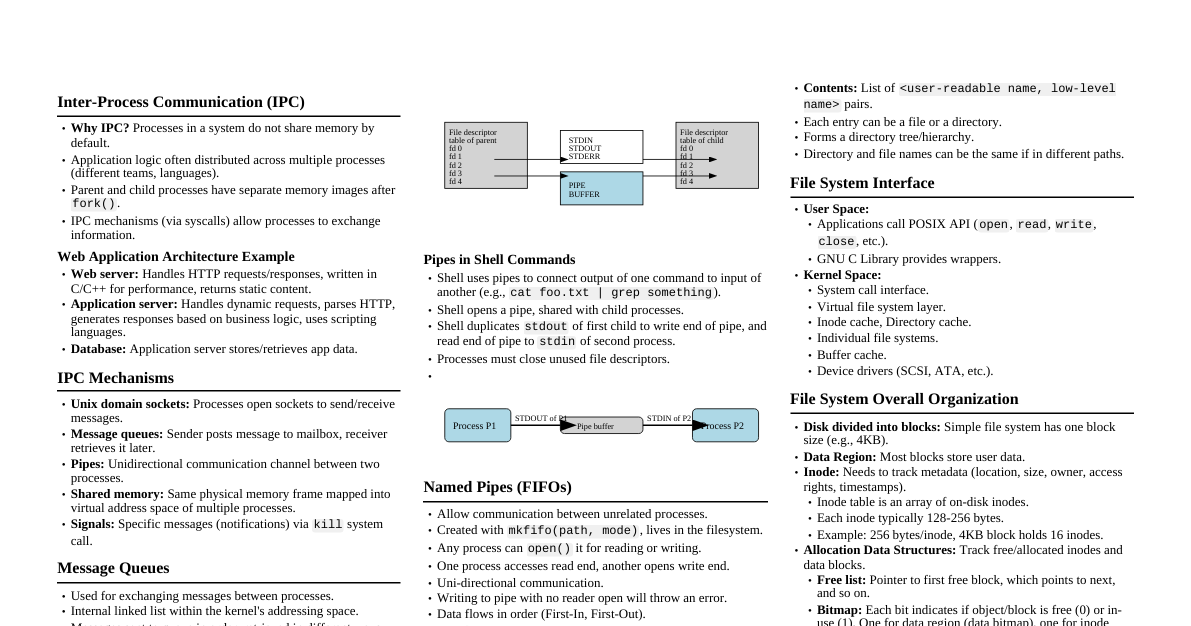
Memory Management System Calls Memory Allocation from User PoV: Focuses on how user programs manage memory, system calls available, and requesting more memory from the OS. Memory Allocation System Calls: Address space created during fork() , changed during exec() . Only allocates sufficient memory determined by the executable (e.g., No system calls needed for memory already part of address space but unallocated (not mapped to physical memory). Valid page not present in RAM: automatically allocated by OS during page fault handling. brk() and sbrk() Change the location of the program break, which defines the end of the process's data segment. Program break is the first location after the end of the uninitialized data segment. Increasing the program break allocates memory; decreasing it deallocates memory. brk(addr) : Sets the end of the data segment to addr . sbrk(increment) : Increments the program's data space by increment bytes. Calling sbrk(0) returns the current program break. mmap() and munmap() mmap() system call used for mapping new memory into a process's virtual address space. OS allocates new valid pages, preferably at requested starting virtual addresses. Physical memory is allocated on demand. Returns the starting virtual address of the allocated chunk. Memory is contiguous in virtual address space, not necessarily physical address space. munmap() : Unmaps memory previously mapped by mmap() . Function Signature: void *mmap(void *addr, size_t length, int prot, int flags, int fd, off_t offset); Parameters: addr : Starting virtual address (preference). length : Length of memory mapped chunk. prot : Permission bits (read, write, execute). flags : Whether private or shared (shared implies changes by one process are visible to others). fd , offset : File descriptor and offset if memory mapping a file. Memory Mapping Types: Anonymous page: Initialized to zero (e.g., heap page). File-backed page: Initialized with file contents (e.g., code page). Physical memory for both types is allocated on demand (page fault triggers OS allocation). Usage: Anonymous pages can be split by heap manager or store user data; file-backed pages read/write files. malloc() / calloc() / realloc() User programs typically use C library functions ( malloc , calloc , realloc ) for dynamic memory allocation. These functions use brk / sbrk / mmap to obtain memory pages from the OS when the heap runs out of space. User programs can also directly allocate page-sized memory using mmap . Common Errors: Not allocating enough memory: e.g., strcpy(dst, src) where dst is not allocated or too small. Use malloc(strlen(src) + 1) . Memory leaks: Allocated memory must be explicitly freed by the user (e.g., with free() ). Types of Memory Allocators General-purpose heap allocators: Support variable-sized memory allocation (like malloc ). Use complex data structures to track free chunks. Frequent calls can slow down programs. Fixed-size allocators: Optimize for fixed-size memory requests. Heap memory divided into fixed-size chunks. More efficient for specific applications. Choice of allocator managed by language libraries, but configurable. Variable Sized Memory Allocator Challenge: Tracking allocated/free variable-sized chunks. External fragmentation: Gaps of different sizes appear in the heap after allocations and deallocations. Free List Data structure (e.g., linked list) to track free chunks in the heap. Initialized with the entire heap. malloc searches the free list for a suitable chunk. Freed chunks are added back to the free list. Splitting and Coalescing Splitting: If an exact-size free chunk is unavailable, a larger chunk may be split (e.g., 10 bytes into 1 and 9 bytes). Coalescing: Adjacent free chunks can be merged into a larger chunk to satisfy larger requests and reduce fragmentation. Headers (Metadata for Allocated Chunks) Allocated chunks store metadata (header) not used by the user. Header typically stores: size : Size of the allocation (needed for free() ). magic number: A random number to detect overflow from previous chunks. Embedded Free List Free list information (e.g., pointer to next free chunk) can be embedded within the free chunk itself. Only the head of the list needs to be remembered by the allocator. Issue: External fragmentation can still lead to situations where enough total free memory exists, but no single contiguous block is large enough for a request. Splitting and coalescing are necessary to manage this. Merging adjacent free chunks (coalescing) is crucial but can be complex if not all adjacent chunks are merged. Which Free Chunk to Choose? First Fit: Allocates the first free chunk that fits. Best Fit: Allocates the free chunk that is closest in size to the request. Worst Fit: Allocates the free chunk that is farthest in size from the request (leaves a larger remaining chunk). Segregated Free Lists Maintain separate free lists for chunks of different sizes for efficiency. Useful for applications with popular chunk sizes. Requests not satisfied by segregated lists are handled by a variable-sized allocator. Reduces external fragmentation and the need for splitting/coalescing. Slab allocator: Preallocates slabs of memory with fixed-size chunks, avoiding alloc/free overheads. Buddy Allocation Allocates memory in sizes that are powers of 2 (e.g., 8KB for a 7000-byte request). Adjacent power-of-2 chunks can be merged (e.g., two 8KB blocks form a 16KB block). Inter-Process Communication (IPC) Why IPC? Application logic distributed across multiple processes. Processes do not share memory by default. Parent/child processes have identical but separate memory images after fork() . IPC mechanisms (via OS syscalls) allow processes to exchange information. IPC Mechanisms Unix domain sockets: Processes open sockets to send/receive messages. Message queues: Sender posts to a mailbox, receiver retrieves later. Pipes: Unidirectional communication channel between two processes. Shared memory: Same physical memory frame mapped into virtual address space of multiple processes. Signals: Specific messages via kill system call. Message Queues Used for exchanging messages between processes. Internal linked list within kernel's addressing space. Messages sent in order, retrieved in various ways. Each queue uniquely identified by an IPC identifier. Processes open a connection using a "key" to get a handle. Messages are buffered in the queue until retrieved. Example: Web server posts HTTP requests to queue, app server retrieves and processes, posts responses back. Shared Memory Fastest form of IPC because it avoids data copying between user and kernel address spaces. Same memory appears in the memory image of multiple processes. Shared memory segment identified by a unique key. Processes request to map/attach a specific shared memory segment into their address space. Data written by one process is immediately available to others. Requires extra mechanisms for coordination (e.g., semaphores for reader-writer synchronization). Pipes Unidirectional FIFO (First-In, First-Out) channel. pipe() system call creates a channel, returning two file descriptors (one for writing, one for reading). Data written into the pipe is buffered until read. Bi-directional communication requires two pipes. Anonymous Pipes Only available for related processes (e.g., parent and its children). Pipe opened before fork() so file descriptors are shared. Typically, one end (parent or child) closes the read end, the other closes the write end. Pipes in Shell Commands: Shell opens a pipe, duplicates stdout of first command to write end, and stdin of second command to read end. Processes must close unused file descriptors. Named Pipes (FIFOs) A FIFO special file that lives in the filesystem. Created with mkfifo(pathname, mode) . Any process can open it for reading or writing, even if unrelated. Data flows in order: first byte written is first byte read. Writing to a pipe with no reader open will throw an error. Deleting the original file creates a dangling reference. Storage Devices Hard Disk Drive (HDD) Anatomy Platters: Rigid circular disks where data is stored, stacked on a spindle. Both surfaces store data. All platters rotate in sync. Read/Write Heads: Fly above platter surfaces to read/write data. Attached to an actuator assembly. Flying Height: Incredibly minute distance (~nanometers) between heads and platters. Precise positioning is critical. Tracks: Concentric rings on a platter. Each track is divided into sectors. Sectors: Smallest addressable unit (typically 512 or 520 bytes). Even small data requires a full sector. Zoned Data Recording (ZDR) Physical size of sectors gets smaller towards the platter's center. ZDR squeezes more sectors onto outer tracks, allowing more data storage. Platters divided into zones; tracks in the same zone have the same number of sectors. Performance Points Outer tracks have more sectors, allowing faster data transfer. Most drives write to outer tracks first. Sequential reads/writes are faster than random reads/writes because less head movement is needed. Varying Sector Sizes Modern drives use larger logical sector sizes (e.g., 4KB) for better error correction (ECC) and efficiency. Cylinders A cylinder is a set of tracks that are all equidistant from the spindle, across all platters. Cylinder-Head-Sector (CHS) Addressing Cylinder number: Gives the track. Head number: Specifies the recording surface (platter side) for the track. Sector number: Indicates the sector on the track. Logical Block Addressing (LBA) A simpler addressing scheme than CHS, implemented in the drive controller. Abstracts away complexities of CHS (sector size, number of platters, heads, zones). Maps logical block addresses to physical CHS locations. Spindle Spindle motor spins the platters at a constant speed (RPM). All platters start and stop spinning together. Controller Has a processor and memory, runs firmware. Masks physical complexities of the disk, presents LBA form to BIOS/OS. Monitors drive health, maintains a "bad block map" (hidden sectors used to remap bad sectors). Drive Fragmentation Older drives encounter bad blocks, which are remapped to reserved areas by the controller. Remapping causes additional latency (drive fragmentation) for sequential reads. Queueing Allows the drive to reorder I/O operations for optimal performance (e.g., minimizing head movement and rotational latency). How SSDs Work (Solid State Drives) No Moving Parts: Unlike HDDs, SSDs use NAND flash memory to store data, meaning no platters, read/write heads, or spindles. This makes them much faster and more durable. NAND Flash Memory: Data is stored in cells that hold electrical charges, representing bits (0s and 1s). SLC (Single-Level Cell): Stores 1 bit per cell. Fastest, most durable, most expensive. MLC (Multi-Level Cell): Stores 2 bits per cell. Good balance of speed, durability, and cost. TLC (Triple-Level Cell): Stores 3 bits per cell. Higher capacity, lower cost, less durable than MLC/SLC. QLC (Quad-Level Cell): Stores 4 bits per cell. Highest capacity, lowest cost, least durable. Pages and Blocks: Data is read and written in "pages" (e.g., 4KB, 8KB, 16KB). Pages are grouped into larger "blocks" (e.g., 256KB, 512KB, 1MB). You can read or write data at the page level. You can only erase data at the block level. This is a key difference from HDDs. Wear Leveling: Flash memory cells have a limited number of erase cycles. An SSD controller uses wear leveling algorithms to distribute writes evenly across all cells to extend the drive's lifespan. Garbage Collection: When data changes, the old data isn't immediately erased. Instead, the SSD marks the old pages as invalid. Periodically, the controller performs garbage collection: it identifies blocks with many invalid pages, moves valid data from those blocks to new blocks, and then erases the entire old block. This process is essential for maintaining performance and free space. TRIM Command: The operating system sends TRIM commands to the SSD when files are deleted. This tells the SSD which data blocks are no longer in use, allowing the controller to perform garbage collection more efficiently and proactively, improving performance and lifespan. Controller: The SSD has a powerful controller chip that manages all operations, including wear leveling, garbage collection, error correction (ECC), data mapping, and communication with the host system. Files, Directories and Interface What is a File? Linear array of bytes. Each file has a low-level name (inode number). File system doesn't interpret contents (C file, text, image, etc.). Store data and retrieve when asked. What is a Directory? Each directory has a low-level name (inode number). Contents: list of <user-readable name, low-level name> pairs. Each entry can be a file or a directory. Forms a directory tree/hierarchy. File System Interface User applications interact with the file system via GNU C Library functions, which use system calls. Kernel space components include: Inode cache, Virtual file system, Directory cache, Individual file systems, Buffer cache, Device drivers. The file system stack handles requests from user space, translating them into operations on physical storage devices. Creating a File open() : #include <fcntl.h> int open(const char *pathname, int flags, mode_t mode); Returns a file descriptor (integer). Private per process. Used to read or write to the file. O_CREAT | O_WRONLY | O_TRUNC : Create, write-only, truncate if exists. S_IRUSR | S_IWUSR : User read/write permissions. creat() : Older way to create files. File Descriptors Managed by the operating system on a per-process basis. In xv6 OS, it's an array of pointers to struct file . Each struct file contains metadata: type (FD_NONE, FD_PIPE, FD_INODE), ref (reference count), readable , writable , pipe , inode , off (file offset). Reading a File read() : #include <unistd.h> ssize_t read(int fd, void *buf, size_t count); Reads up to count bytes from fd into buf . Returns number of bytes read (0 for end of file), advances file position. Returns -1 on error. Writing to a File write() : #include <unistd.h> ssize_t write(int fd, const void *buf, size_t count); Writes up to count bytes from buf to fd . Returns number of bytes written, -1 on error. A successful write() may transfer fewer than count bytes due to insufficient space or signal interruption. Reading and Writing Not Sequentially ( lseek() ) lseek() : Repositions the file offset of an open file description. #include <unistd.h> off_t lseek(int fd, off_t offset, int whence); SEEK_SET : Offset set to offset bytes. SEEK_CUR : Offset set to current location + offset . SEEK_END : Offset set to file size + offset . Open File Table Keeps track of all currently opened files in the system. One lock per entry. Mapping of file descriptor to an entry in the open file table is generally one-to-one. Each logical read/write on a file has its own current offset. Shared File Entries in Open File Table ( fork() ) When a process fork() s, the child process inherits a copy of the parent's file descriptors, which point to the same file entries in the open file table. Changes to the file offset by one process are visible to the other. dup() and dup2() dup(oldfd) : Allocates a new file descriptor that refers to the same open file description as oldfd . dup2(oldfd, newfd) : Copies oldfd to newfd (if newfd is open, it's first closed). Writing Immediately to Disk ( fsync() ) fsync(fd) : Transfers (flushes) all modified data of the file referred to by fd to the disk device. Blocks until the device reports completion. Returns 0 on success, -1 on error. Renaming Files ( rename() ) rename(oldpath, newpath) : Renames a file or directory. Atomic operation: either the old file or new file exists, nothing in between. Helpful for editing files by creating a temporary file and then renaming it. Getting File Information ( stat() ) stat(path, buf) : Fills a struct stat with file information. st_dev : ID of device. st_ino : Inode number. st_mode : Protection (permissions). st_nlink : Number of hard links. st_uid : User ID of owner. st_gid : Group ID of owner. st_size : Total size in bytes. st_blksize : Block size for filesystem I/O. st_blocks : Number of blocks allocated. st_atime : Time of last access. st_mtime : Time of last modification. st_ctime : Time of last status change. Creating Directories ( mkdir() ) mkdir(pathname, mode) : Creates a new directory. Permissions ( mode ) like 777 (read/write/execute for user, group, other). Creates two default entries: . (current directory) and .. (parent directory). Reading Directories ( opendir() , readdir() , closedir() ) opendir(name) : Opens a directory stream, returns a pointer to DIR structure. readdir(dirp) : Returns a pointer to a dirent structure representing the next directory entry. Returns NULL at end or on error. d_name : Filename. d_ino : Inode number. d_off : Offset to next dirent. d_reclen : Length of this record. d_type : Type of file. closedir(dirp) : Closes the directory stream. Deleting Directories ( rmdir() ) rmdir(pathname) : Deletes a directory. Directory must be empty (except for . and .. ). Returns 0 on success, -1 on error. Hard Link ( link() ) link(oldpath, newpath) : Creates a new link (hard link) to an existing file. Refers to the same inode number as the original file. File data is not copied; there are now two human-readable names for the same file. If newpath exists, it will NOT be overwritten. Cannot span filesystems or be applied to directories. Symbolic Link (Soft Link) ( symlink() ) symlink(target, linkpath) : Creates a symbolic link (soft link). A symbolic link is a file itself, containing the path to the target file. Deleting the original file creates a dangling reference (the symlink points to a non-existent file). Removing Files ( unlink() ) unlink(pathname) : Deletes a name from the filesystem. Works differently for hard links and soft links: For hard links, it decreases the link count of the inode. The file data is only deleted when the link count reaches zero and no process has the file open. For symbolic links, it deletes the symbolic link file itself, not the target file. Memory Mapping ( mmap() for Files) mmap(addr, length, prot, flags, fd, offset) : Maps a file into a process's memory. User process can ask the OS to map a file into its memory (address space). Demand Paging: Mapped pages are not brought into physical memory until referenced. mmap() lazily loads pages. Designing a Simple File System Key Considerations On-disk structures: How data and metadata are organized (data structures). Access methods: How file system calls ( open() , read() , write() ) map to these structures. Efficiency of operations. Overall Organization Blocks: Disk divided into fixed-size blocks (e.g., 4KB). Data Region: Most blocks store user data. Inode Table: Array of on-disk inodes, storing file metadata. Inodes are typically small (128-256 bytes). Number of inodes determines max number of files. Allocation Data Structures Free List: Linked list of free blocks. Bitmap: Each bit indicates if a block/inode is free (0) or in-use (1). Separate bitmaps for data blocks and inodes. Superblock First block of the file system, contains critical information: Number of inodes and data blocks. Location of inode table. Magic number (file system type). Making a File System ( mkfs ) Command to build a file system on a device (e.g., hard disk partition). Writes an empty file system with a root directory. Mounting a File System ( mount ) Makes a file system accessible within the uniform file-system tree. Takes an existing directory as a target mount point and "pastes" the new file system onto it. Inode - Index Node Each inode is referred to by an i-number. Inode contains metadata and pointers to data blocks. For a 256-byte inode and 12KB inodeStartAddr , inode number 32 would be at inodeStartAddr + (32 * sizeof(inode)) . Inode Contents mode : Read/write/execute permissions. uid : Owner user ID. size : File size in bytes. atime : Last access time. ctime : Creation time. mtime : Last modification time. dtime : Deletion time. gid : Group ID. links_count : Number of hard links. blocks : Pointers to data blocks (set of 15 total). flags , osd1 : OS-dependent fields. block : A set of disk pointers (15 total). generation : File version (used by NFS). file_acl , dir_acl : Access control lists. Inode Pointing to Data Blocks Direct Pointers: Each pointer refers to one disk block. Limited to small files. Multi-level Indexing: Single Indirect Pointer: Points to a block that contains pointers to user data blocks. Double/Triple Indirect Pointers: Point to blocks containing pointers to other indirect blocks, allowing very large files. Extent-based approaches: (e.g., SGI XFS, Linux ext4) Store a pointer and a length (in blocks) for contiguous regions, more efficient for contiguous files and less metadata overhead. Linked-Based Approach (e.g., FAT file systems) Inode contains a pointer to the first block. An in-memory file allocation table tracks the next block for each data block. Difficult to create hard links. Directory Organization A directory is also a file; its data blocks contain <filename, inode_number> pairs. Can be a simple linear list, or more complex structures like B-trees (XFS) for faster lookups. Deleting a file in a linear list might involve marking the entry as zero. Free Space Management Bitmaps: Store one bit per block to indicate free/in-use. Efficient for finding contiguous free blocks. Free Lists: Superblock points to the first free block, which points to the next, etc. Complex Data Structures: XFS uses B-trees for free blocks. Reading a File (Process) open("/path/to/file") : Traverse the pathname to find the desired inode (reading root inode, then directory data blocks, then sub-directory inodes, etc.). Perform final permissions check. Allocate a file descriptor in the process's open-file table. read(fd, buf, count) : First read (at offset 0) reads the first data block. The data block is found via the inode. Updates inode's last access time. Updates file offset in the open-file table. Continues until all blocks are read. close(fd) : Deallocates the file descriptor. Writing to a File (Process) open() : Same as reading. write() : May allocate a new block if the existing data block is overwritten. Each write to a new block generates 5 I/Os: read data bitmap, write data bitmap, read inode, write inode, write actual block. Creating a File ( open(O_CREAT) ) Read inode bitmap to find a free inode. Write to inode bitmap (mark as allocated). Write to new inode (initialize it). Read directory inode. Write to directory data (link high-level name to inode number). Write to directory inode (update metadata). Additional I/Os if directory needs to grow. How to Reduce File System I/O Costs? (Caching) Caching of writes: Synchronous/write-through cache: Writes to disk immediately. Asynchronous/write-back cache: Stores dirty blocks in memory, writes back after a delay (write buffering). Avoids I/Os if a file is created and deleted quickly. File system can schedule I/Os efficiently. Caching of reads: Static Partitioning: Fixed size (e.g., 10% memory) for popular blocks. Uses LRU for eviction. Predictable performance but potentially wasteful. Dynamic Partitioning: Virtual memory and file system pages use a unified page cache. Harder to implement, better resource utilization. First open() often generates significant I/O; subsequent calls can hit the cache.