Computer Science Book Compilation
Cheatsheet Content
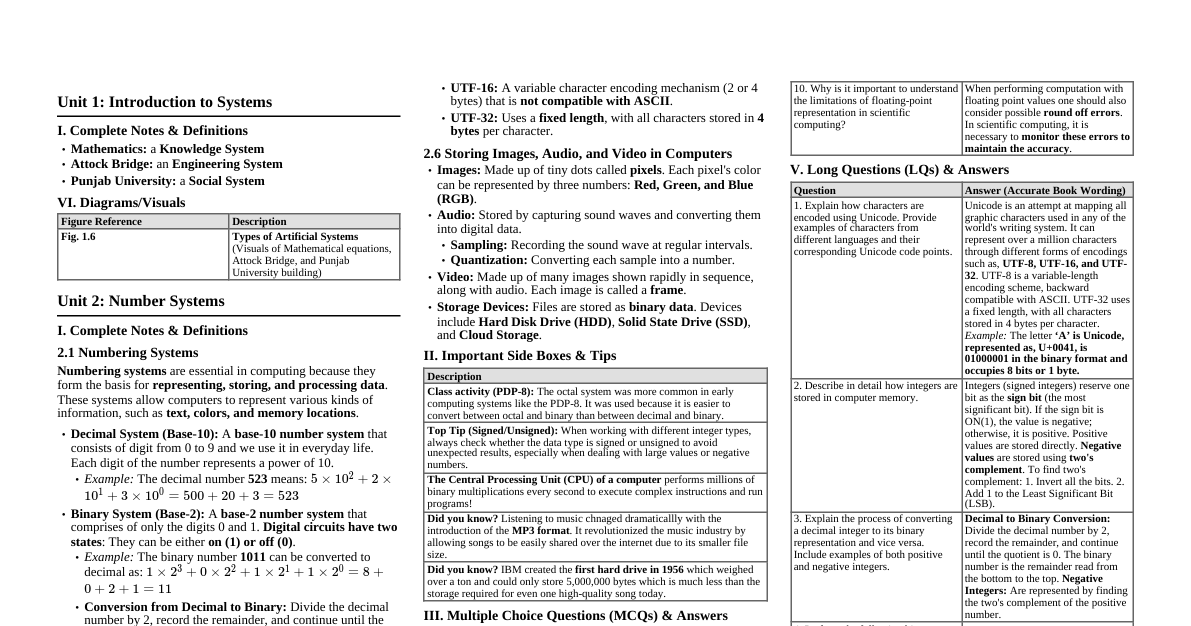
Unit 1: Introduction to Systems I. Complete Notes & Definitions Mathematics: a Knowledge System Attock Bridge: an Engineering System Punjab University: a Social System VI. Diagrams/Visuals Figure Reference Description Fig. 1.6 Types of Artificial Systems (Visuals of Mathematical equations, Attock Bridge, and Punjab University building) Unit 2: Number Systems I. Complete Notes & Definitions 2.1 Numbering Systems Numbering systems are essential in computing because they form the basis for representing, storing, and processing data . These systems allow computers to represent various kinds of information, such as text, colors, and memory locations . Decimal System (Base-10): A base-10 number system that consists of digit from 0 to 9. Each digit represents a power of 10. Example: The decimal number 523 means: $5 \times 10^2 + 2 \times 10^1 + 3 \times 10^0 = 500 + 20 + 3 = 523$ Binary System (Base-2): A base-2 number system that comprises of only the digits 0 and 1. Digital circuits have two states : They can be either on (1) or off (0) . Example: The binary number 1011 can be converted to decimal as: $1 \times 2^3 + 0 \times 2^2 + 1 \times 2^1 + 1 \times 2^0 = 8 + 0 + 2 + 1 = 11$ Conversion from Decimal to Binary: Divide the decimal number by 2, record the remainder, and continue until the quotient is 0. Octal System (Base-8): A positional numeral system with base eight , implying digits range from 0 to 7. Each octal digit represents three binary digits (bits) . Example: The octal number 157 means, $1 \times 8^2 + 5 \times 8^1 + 7 \times 8^0 = 64 + 40 + 7 = 111$ Hexadecimal System (Base-16): A base 16 number system with digit number from 0 to 9 and alphabets from A to F . Every single hexadecimal digit equals four binary bits . Example: The hexadecimal number 1A3 can be represented in decimal as: $1 \times 16^2 + 10 \times 16^1 + 3 \times 16^0 = 419$ 2.2 Data Representation in Computing Systems Whole Numbers (W): A set of non-negative integers . They include zero and all the positive integers. Example: The number of students in a school , a person's age in years, and grades. Maximum value: If $n$ is the number of bits, the maximum value that can be represented is $2^n - 1$. Integers (Z): Extend the concept of whole numbers to include negative numbers. In computer programming, called signed integers . The set is $Z = \{..., -3, -2, -1, 0, 1, 2, 3, ...\}$. Negative Values and Two's Complement: To store negative values, computers use a method called two's complement . Invert all the bits. Add 1 to the Least Significant Bit (LSB). Example: -5 in 8-bit two's complement is 11111011 . 2.3 Storing Real Values in Computer Memory Real Values (Floating-Point Numbers): Used to represent number with fractions and/or decimals . Represented similarly to scientific notation: $\text{A floating-point number} = \text{sign} \times \text{mantissa} \times 2^{\text{exponent}}$. Example: 5.75 is represented as $1.4375 \times 2^2$. Single Precision (32-bit): 1st bit is the sign bit , the next 8 bits are for the exponent , and the remaining 23 bits are for the mantissa . The approximate range is from $1.4 \times 10^{-45}$ to $3.4 \times 10^{38}$. Double Precision (64-bit): The exponent is represented using 11 bits . 2.4 Binary Arithmetic Operations Arithmetic operations include addition, subtraction, multiplication and division. Addition Rules: $1 + 1 = 0$ (with a carry of 1 to the next higher bit) . Example: 1101 + 1011 = 11000 . Subtraction: Carried out by adding the two's complement of the subtrahend to the minuend. Multiplication: Follows similar principles to long multiplication in decimal. Division: Follows steps like comparing, subtracting, and shifting, akin to long division. 2.5 Common Text Encoding Schemes ASCII: American Standard Code for Information Interchange . Each character is given a code number between 0 and 127 . Example: The ASCII code for an upper case letter “P” is 80 . Extended ASCII: Uses 8 bits and includes 256 characters . Unicode: An attempt at mapping all graphic characters used in any of the world's writing system . Can represent over a million characters . UTF stands for Unicode Transformation Format . UTF-8: A variable-length encoding scheme (1 to 4 bytes) that is backward compatible with ASCII . UTF-16: A variable character encoding mechanism (2 or 4 bytes) that is not compatible with ASCII . UTF-32: Uses a fixed length , with all characters stored in 4 bytes per character. 2.6 Storing Images, Audio, and Video in Computers Images: Made up of tiny dots called pixels . Each pixel's color can be represented by three numbers: Red, Green, and Blue (RGB) . Audio: Stored by capturing sound waves and converting them into digital data. Sampling: Recording the sound wave at regular intervals. Quantization: Converting each sample into a number. Video: Made up of many images shown rapidly in sequence, along with audio. Each image is called a frame . Storage Devices: Files are stored as binary data . Devices include Hard Disk Drive (HDD) , Solid State Drive (SSD) , and Cloud Storage . II. Important Side Boxes & Tips Class activity (PDP-8): The octal system was more common in early computing systems like the PDP-8. It was used because it is easier to convert between octal and binary than between decimal and binary. Top Tip (Signed/Unsigned): When working with different integer types, always check whether the data type is signed or unsigned to avoid unexpected results, especially when dealing with large values or negative numbers. The Central Processing Unit (CPU) of a computer performs millions of binary multiplications every second to execute complex instructions and run programs! Did you know? Listening to music changed dramatically with the introduction of the MP3 format . It revolutionized the music industry by allowing songs to be easily shared over the internet due to its smaller file size. Did you know? IBM created the first hard drive in 1956 which weighed over a ton and could only store 5,000,000 bytes which is much less than the storage required for even one high-quality song today. III. Multiple Choice Questions (MCQs) & Answers Question Correct Answer (Accurate Book Wording) 1. What does ASCII stand for? (a) American Standard Code for Information Interchange 2. Which of the following numbers is a valid binary number? (a) 110110₂ 3. How many bits are used in the standard ASCII encoding? (a) 7 bits 4. Which of the following is a key advantage of Unicode over ASCII? (b) It can represent characters from many different languages 5. How many bytes are used to store a typical integer? (c) 4 bytes 6. What is the primary difference between signed and unsigned integers? (a) Unsigned integers cannot be negative 7. In the single precision, how many bits are used for the exponent? (b) 8 bits 8. What is the approximate range of values for single-precision floating-point numbers? (a) $1.4 \times 10^{-45}$ to $3.4 \times 10^{38}$ 9. What are the tiny dots that make up an image called? (a) Pixels 10. In an RGB color model, what does RGB stand for? (a) Red, Green, Blue IV. Short Questions (SQs) & Answers Question Answer (Accurate Book Wording) 1. What is the primary purpose of the ASCII encoding scheme? It is a character encoding standard adopted for representing in devices such as computers and similar systems that use text. 2. Explain the difference between ASCII and Unicode. ASCII is limited to 7bits and can represent only 128 characters, whereas Unicode can represent over a million characters through different forms of encodings such as, UTF-8, UTF-16, and UTF-32. 3. How does Unicode handle characters from different languages? Unicode is an attempt at mapping all graphic characters used in any of the world's writing system. It uses various encodings (UTF-8, UTF-16, UTF-32) to map all graphic characters. 4. What is the range of values for an unsigned 2-byte integer? The range is from 0 up to the maximum value of $2^{16} - 1 = 65,535 $. 5. Explain how a negative integer is represented in binary. Negative values are stored using two's complement . To find the two's complement, you Invert all the bits (change 0s to 1s and 1s to 0s) and then Add 1 to the Least Significant Bit (LSB). 6. What is the benefit of using unsigned integers? Unsigned integers are often used to represent quantities that can't be negative . They allow us to store bigger values because no bit is reserved as the sign bit. 7. How does the number of bits affect the range of integer values? If $n$ is the number of bits, the maximum value that can be represented is $2^n - 1$. A larger number of bits allows for storing bigger values. 8. Why are whole numbers commonly used in computing for quantities that cannot be negative? In computing, whole numbers are often used to represent quantities that can't be negative . Examples include the number of students in a school, a person's age in years, and grades. 9. How is the range of floating-point numbers calculated for single precision? In Single Precision (32-bit), the exponent can be ranged between $-126$ and $+127$. The approximate range of values is from $1.4 \times 10^{-45}$ to $3.4 \times 10^{38}$. 10. Why is it important to understand the limitations of floating-point representation in scientific computing? When performing computation with floating point values one should also consider possible round off errors . In scientific computing, it is necessary to monitor these errors to maintain the accuracy . V. Long Questions (LQs) & Answers Question Answer (Accurate Book Wording) 1. Explain how characters are encoded using Unicode. Provide examples of characters from different languages and their corresponding Unicode code points. Unicode is an attempt at mapping all graphic characters used in any of the world's writing system. It can represent over a million characters through different forms of encodings such as, UTF-8, UTF-16, and UTF-32 . UTF-8 is a variable-length encoding scheme, backward compatible with ASCII. UTF-32 uses a fixed length, with all characters stored in 4 bytes per character. Example: The letter ‘A’ is Unicode, represented as, U+0041, is 01000001 in the binary format and occupies 8 bits or 1 byte . 2. Describe in detail how integers are stored in computer memory. Integers (signed integers) reserve one bit as the sign bit (the most significant bit). If the sign bit is ON(1), the value is negative; otherwise, it is positive. Positive values are stored directly. Negative values are stored using two's complement . To find two's complement: 1. Invert all the bits. 2. Add 1 to the Least Significant Bit (LSB). 3. Explain the process of converting a decimal integer to its binary representation and vice versa. Include examples of both positive and negative integers. Decimal to Binary Conversion: Divide the decimal number by 2, record the remainder, and continue until the quotient is 0. The binary number is the remainder read from the bottom to the top. Negative Integers: Are represented by finding the two's complement of the positive number. 4. Perform the following binary arithmetic operations: a. Multiplication of $101_2$ by $11_2$. b. Division of $1100_2$ by $10_2$. a. Multiplication of $101_2$ and $11_2$ results in $1111_2$ . b. Division of $1100_2$ by $10_2$ results in $110_2$ . 6. Add the following binary numbers: a) $101 + 110$; b) $1100 + 1011$ a) $101_2 + 110_2 = 1011_2$ . b) $1100_2 + 1011_2 = 10111_2$ . 7. Convert the following numbers to 4-bit binary and add them: (a) $7 + (-4)$ (b) $-5 + 3$ (a) $7 (0111) + (-4) (1100) = 0011_2$ (3). (b) $(-5) (1011) + 3 (0011) = 1110_2$ (-2). 8. Solve the following (a) $1101_2 - 0100_2$; (b) $1010_2 - 0011_2$; (c) $1000_2 - 0110_2$; (d) $1110_2 - 100_2$. Binary subtraction is carried out by adding the two's complement of the subtrahend to the minuend. Unit 3: Digital Systems and Logic Design I. Complete Notes & Definitions 3.1 Basics of Digital Systems Digital systems manipulate digital information in the form of binary digits, which are either 0 or 1 . Analog Signals: Signals that changes with time smoothly and continuously over time. Example: Voice signal (speaking) and body's temperature. Analog to Digital Conversion (ADC): Conversion of analog signals into digital signals, which are discrete . Digital to Analog Conversion (DAC): Conversion whereby analog signals are converted to digital signals, making it possible for human to perceive the information, for instance through speakers . Digital Logic: The basis of digital systems. Involves the use of binary numbers (0 and 1) to represent and manipulate information. 5 volts refer to a binary ‘1’ , while 0 volts refer to a binary ‘0’ . 3.2 Boolean Algebra and Logic Gates Boolean algebra is a branch of mathematics relate to logic and symbolic computation, using two values namely True and False . Boolean Functions: Algebraic statements that describe the relationship between binary variables and logical operations. A function has one or more binary inputs and produces a single binary output . Logic Operations (AND, OR, NOT): AND: Output is “1” only when both inputs are “1” . OR: Output is true ( 1 ) when at least of ‘1’ of the inputs is true (1) . NOT: Takes a single binary variable and simply negates its value . Logic Gates: Physical devices in electronic circuits that perform Boolean operations . NAND Gate: An AND gate combined with a NOT gate . It generates true when at least one of the inputs is false. XOR Gate: Outputs true only when exactly one of the inputs is true . Logic Diagrams: Depict the working of a digital circuit through symbols that represent to its individual logic gates . 3.5 Application of Digital Logic Half-adder: A basic circuitry unit that performs addition of two single-bit binary digits . Boolean Expressions: $S = A \oplus B$ and $C = A \cdot B$. Full-adder: A more complex circuit that adds three single-bit binary numbers : two bits that belong to the sum and a carry bit from a previous addition. Boolean Expressions: $Sum = A \oplus B \oplus C_{in}$ and $Carry= (A \cdot B) + (C_{in} \cdot (A \oplus B))$. Karnaugh Map (K-map): A graphical representation which can be used to solve Boolean algebra expressions and minimize a logic function where algebraic computations are not employed. Minterm: A specific product (AND) form of a Boolean expression that includes all of the function's variables, either in their normal or complemented form. II. Important Side Boxes & Tips ADC and DAC Conversion: Why is it needed? Digital to analog conversion, and vice versa, is critical since it enables data processing, storage, and transmission. Digital signals are much less affected by noise and signal degradation and are therefore better suited for transmitting and storing information over long distances. George Boole , a mathematician who invented Boolean algebra was born in Lincoln, England in the year 1815. His work laid the debate and the basis for future digital revolution and computer science as well as subsequent technologies of the future. Did you know? In binary logic, $1 + 1$ does not equal $2$ but equals $1$ in logical operation . This is because the OR operation returns a value of 1 if any or both of the inputs to this operator are 1. Class activity (Logic Gates): Imagine a safety system where an alarm should go on if either one of two sensors detects an issue. Sensor 1: No issue (False); Sensor 2: Issue detected (True); Alarm: ON (True) because one sensor detects an issue (NAND Gate example). III. Multiple Choice Questions (MCQs) & Answers Question Correct Answer (Accurate Book Wording) 1. Which of the following Boolean expressions represents the OR operation? (b) $A + B$ 2. What is the dual of the Boolean expression $A \cdot 0 = 0$? (a) $A + 1 = 1$ 3. Which logic gate outputs true only if both inputs are true? (b) AND gate 4. In a half-adder circuit, the carry is generated by which operation? (b) AND operation 5. What is the decimal equivalent of the binary number 1101? (c) 13 IV. Short Questions (SQs) & Answers Question Answer (Accurate Book Wording) 1. Define a Boolean function and give an example. A Boolean function is a function which has a one or more binary inputs and produces a single binary output . Example: A simple Boolean function representing the AND operation: $\mathbf{F(A, B) = A \cdot B}$ . 2. What is the significance of the truth table in digital logic? A truth table is useful in demonstrating the functionality of the AND operation with all possibilities of the input variables . 3. Explain the difference between analog and digital signals. Analog signals change with time smoothly and continuously over time. Digital signals are the signals which have only two values that are in the form of '0' and '1' . 4. Describe the function of a NOT gate with its truth table. The NOT operation takes a single binary variable and simply negates its value . If the input is one, the output is zero and if the input is zero, the output is one. 5. What is the purpose of a Karnaugh map in simplifying Boolean expressions? A Karnaugh map (K-map) is a graphical representation which can be used to solve Boolean algebra expressions and minimize a logic function where algebraic computations are not employed. V. Long Questions (LQs) & Answers Question Answer (Accurate Book Wording) 1. Explain the usage of Boolean functions in computers. Boolean functions are used in Arithmetic Operations (in ALUs of CPUs to perform addition, subtraction, etc.); Data Processing (to process binary data in memory and storage devices); and Control Logic (to control various parts of the system's operation to function in co-ordinated manner). 4. Compare and contrast half-adders and full-adders, including their truth tables, Boolean expressions, and circuit diagrams. A half adder performs addition of two single-bit binary digits . It has $S = A \oplus B$ and $C = A \cdot B$. A full-adder is a more complex circuit that adds three single-bit binary numbers . It has $Sum = A \oplus B \oplus C_{in}$ and $Carry= (A \cdot B) + (C_{in} \cdot (A \oplus B))$. 5. How do Karnaugh maps simplify Boolean expressions? Provide a detailed example with steps. K-maps simplify expressions by plotting the truth values of a Boolean function to enable the identification of patterns and to perform term combining for minimization . Steps: 1. Create a grid based on variables. 2. Complete the grid using output values. 3. Arrange the 1s in the largest possible groups of size 1, 2, 4, 8, etc. Example: Simplifying $A \cdot \overline{B} + \overline{A} \cdot B + A \cdot B$ results in $F (A, B) = B + A$ . Unit 4: System Troubleshooting I. Complete Notes & Definitions 4.1 System Troubleshooting Troubleshooting is essential for maintaining the smooth operation of systems . It helps identify the problem and find a solution quickly . 4.1.1 Systematic Process of Troubleshooting Identify Problem: Recognize that something is not working as it should. Establish a Theory of Probable Cause: Come up with a theory about what might be causing it (e.g., dead battery, faulty power cord). Test the Theory to Determine the Cause: Check if the suspected cause is actually the reason for the problem. Establish a Plan of Action to Resolve the Problem: Decide what steps you need to take to resolve the issue (e.g., replace the battery). Implement the Solution: Do whatever is necessary to fix the problem. Verify Full System Functionality: Check to make sure that the problem is fully resolved and the system is working properly again. Document Findings, Actions, and Outcomes: Record everything done during the process for future reference. 4.1.2 Importance of Troubleshooting in Computing Systems Preventing Downtime: Troubleshooting helps identify and resolve the system problems in very short time. Downtime occurs when a computer system is not operational . Ensuring Data Integrity: Data integrity means ensuring that data is accurate and reliable . Troubleshooting helps identify the source of data corruption and prevent it from happening again. Improving Security: Troubleshooting can help identify vulnerabilities and security breaches . 4.2 Troubleshooting Strategies Application Freezing: When a program stops responding . Solution: Use Ctrl + Alt + Delete to open the Task Manager and click "End Task" . Restarting: Restarting a computer can fix up to 50% of all software issues . It clears the memory, stops background processes, and gives the system a fresh start. RAM Failures: Symptoms include frequent system crashes , Blue Screens Of Death (BSOD) , and poor performance. Hard Drive Failures: Symptoms include strange noises (like clicking) , slow performance, frequent crashes, and corrupted files. Data Backups: Copies of important data or files stored separately from the original to protect against data loss . Methods: Using External Storage Devices or utilizing Cloud Solutions . II. Important Side Boxes & Tips Tech Detective Work: Troubleshooting is like being a detective for technology. Just like a detective solves mysteries, you solve tech problems by following clues and gathering evidence! Instant Fix: Sometimes, the quickest fix for a computer problem is to restart it. This is like giving the computer a nap—sometimes it just needs a short break to work properly again. Restarting the Computer: Restarting a computer can fix up to 50% of all software issues . This is because a reboot clears the system's memory and stops processes that might be causing conflicts. Memory Failures: Faulty RAM can cause system crashes and data corruption. RAM errors can account for up to 10% of all computer crashes and Blue Screens Of Death (BSOD) . The Power of Updates: Some updates, like those for operating systems or antivirus software, can be essential for security. For instance, the WannaCry ransomware attack in 2017 exploited a vulnerability in older Windows systems, which had been patched in a security update. III. Multiple Choice Questions (MCQs) & Answers Question Correct Answer (Accurate Book Wording) 1. What is the first step in the systematic process of troubleshooting? (C) Identify Problem 2. Why is effective troubleshooting important for maintaining systems? (C) It ensures systems operate smoothly and efficiently 3. Which step involves coming up with a theory about what might be causing a problem? (B) Establish a Theory of Probable Cause 4. After implementing a solution, what is the next step in the troubleshooting process? (C) Verify Full System Functionality 5. Which of the following is an example of identifying a problem in troubleshooting? (C) Noticing that a laptop does not turn on when the power button is pressed 6. Why is documenting findings, actions, and outcomes important in troubleshooting? (B) It provides a record for future reference 7. What is the purpose of establishing a plan of action in troubleshooting? (D) To decide on the steps needed to resolve the issue 8. Why is troubleshooting important in computing systems? (C) It helps keep systems running smoothly and securely 9. What does troubleshooting help prevent by quickly identifying and resolving issues? (C) Downtime and lost productivity 10. Which of the following is an example of ensuring data integrity through troubleshooting? (A) Identifying a software bug that causes incorrect database results IV. Short Questions (SQs) & Answers Question Answer (Accurate Book Wording) 1. What is the first step in the systematic process of troubleshooting, and why is it important? The first step is to Identify Problem . It is important because this means recognizing that something is not working as it should . 2. After identifying a problem, what is the next step in troubleshooting, and how does it help in resolving the issue? The next step is to Establish a Theory of Probable Cause . This helps in resolving the issue by thinking about what could have gone wrong . 3. Describe the importance of testing a theory during the troubleshooting process. Provide an example. Testing the theory is important to check if the suspected cause is actually the reason for the problem . Example: If you think the laptop's battery is dead, you can test this theory by plugging in the power cord and seeing if the computer turns on . 4. Explain what the "Implement the Solution" step entails in a troubleshooting. This means doing whatever is necessary to fix the problem . 5. Why is it necessary to verify full system functionality after implementing a solution? You need to check to make sure that the problem is fully resolved and the system is working properly again. V. Long Questions (LQs) & Answers Question Answer (Accurate Book Wording) 1. Discuss the importance of troubleshooting in maintaining the smooth operation of systems, especially computing systems. Troubleshooting is essential for maintaining the smooth operation of systems. It helps keep our computers, software, and networks running smoothly, preventing issues like downtime, data loss, or security issues . 2. Explain the systematic process of troubleshooting. Describe each step in detail. The process involves seven steps: 1. Identify Problem . 2. Establish a Theory of Probable Cause . 3. Test the Theory to Determine the Cause . 4. Establish a Plan of Action to Resolve the Problem . 5. Implement the Solution . 6. Verify Full System Functionality . 7. Document Findings, Actions, and Outcomes . 5. Analyze the various ways troubleshooting is vital in computing systems, particularly in preventing downtime, ensuring data integrity, and improving security. Provide specific examples and scenarios to support your analysis. Preventing Downtime: Troubleshooting helps identify and resolve system problems in very short time. Ensuring Data Integrity: Troubleshooting prevents data corruption by identifying and fixing the source. Improving Security: Troubleshooting identifies vulnerabilities and security breaches quickly, allowing for action to protect the system. 10. Describe the different data backup methods, including using external storage devices and cloud solutions. Using External Storage Devices: Use external hard drives or USB flash drives to back up important files. This provides a physical copy of your data. Utilizing Cloud Solutions: Use cloud storage services like Google Drive, Dropbox, or OneDrive to back up your data online. This allows you to access your files from anywhere. Unit 5: Software System I. Complete Notes & Definitions 5.1 Software Software is a collection of programs and instructions that tell a computer what to do and how to do . Without software, computers would be useless machines. 5.1.2 Types of Software System Software: Designed to manage the system resources and provide a platform for application software to run. It acts as a bridge between the hardware and the user applications. Examples: Microsoft Windows, macOS, and Linux . Application Software: Designed to help users perform specific tasks . Examples: Word Processors (Microsoft Word) and Web Browsers (Google Chrome). 5.2 Introduction to System Software Operating System (OS): Manages all the hardware and software on a computer . It acts as an intermediary between the computer hardware and the user applications. Graphical User Interface (GUI): Allows users to interact with the computer using visual elements such as windows, icons, and menus. Example: Windows and macOS. Command-Line Interface (CLI): Requires users to type text commands to perform specific tasks. Example: Linux and Disk Operating System (DOS). Utility Programs: Essential components that enhance the functionality of a computer system. Examples: Antivirus Software and Disk Cleanup . Device Drivers: Facilitate communication between hardware devices and the operating system , ensuring that devices function correctly. They act as a translator . 5.3 Application Software Word Processing Software: Used for creating, editing, formatting, and printing documents . Example: Microsoft Word. Spreadsheet Software: Used for organizing, analyzing, and storing data in tabular form . Example: Microsoft Excel. Graphic Design Software: Used for creating, editing, and managing visual content . Example: Adobe Photoshop. II. Important Side Boxes & Tips Did you know? The first computer virus, called "Creeper," was created in 1971 as an experimental self-replicating program. It simply displayed the message, "Fm the creeper, catch me if you can!” Always keep your system software updated to ensure your computer runs smoothly and is protected from security threats. File compression tools reduce file size to save storage space and make file transfer faster. Al-based tools like Grammarly and Microsoft Editor are revolutionizing word processing by providing advanced grammar, style, and tone suggestions. A Plug and Play (PnP) device automatically configures itself when connected to a computer, simplifying installation and use. III. Multiple Choice Questions (MCQs) & Answers Question Correct Answer (Accurate Book Wording) 1. What is the primary function of an operating system? (b) To manage hardware resources and provide a user interface 2. Which software is used to enhance system performance and security? (b) Utility software 3. What role do device drivers play in a computer system? (b) Facilitate communication between hardware devices and the operating system 4. Which of the following is an example of application software? (a) Microsoft Word 5. What is the main purpose of a spreadsheet software? (b) To organize and analyze data 6. How does utility software differ from application software? (a) Utility software manages hardware, while application software performs specific tasks for users. 7. Which type of software would you use to design a logo? (c) Graphic design software 8. What is the function of system software? (a) To facilitate communication between hardware and software 9. Why are operating system updates important? (c) They enhance security and fix bugs 10. What is a common task you can perform using word processing software? (a) Create and edit text documents IV. Short Questions (SQs) & Answers Question Answer (Accurate Book Wording) 1. Define system software and provide two examples. System software is designed to manage the system resources and provide a platform for application software to run. Examples: Microsoft Windows, macOS, and Linux . 2. Explain the primary functions of an operating system. The primary functions are to manage hardware resources (CPU, memory, disk drives, and peripheral devices) and to provide a User Interface (UI) that allows users to interact with the computer. 3. What is utility software and why is it important? Utility programs are essential components of system software that enhance the functionality of a computer system. They are important for ensuring smooth operation and efficient management of hardware, software, and data. 4. Describe the role of device drivers in a computer system. Device drivers facilitate communication between hardware devices and the operating system , ensuring that devices function correctly. They act as a translator. 5. Differentiate between system software and application software with examples. System software manages and operates computer hardware, making it possible for application software to run. Application software helps the user to perform specific tasks. System software example: operating systems. Application software example: word processors . 6. What are the main functions of spreadsheet software? Spreadsheet software is used for organizing, analyzing, and storing data in tabular form . 7. How can graphic design software be used in the field of education? Graphic design software is used for creating, editing, and managing visual content . 8. What is the significance of data backups and how can they be performed? Data Backups are copies of important data or files stored separately from the original to protect against data loss . They can be performed using External Storage Devices or Cloud Solutions . V. Long Questions (LQs) & Answers Question Answer (Accurate Book Wording) 1. Discuss the importance of system software in a computing system. System software is essential for the operation of a computer system, acting as an intermediary between the hardware and the user applications . It ensures that the hardware components... work together efficiently and provides a stable environment for application software to run. 2. Describe the roles of operating systems, utility software, and device drivers, providing examples of each. OS Examples: Microsoft Windows, macOS. Utility Examples: Antivirus software, Disk Cleanup tools. Device Driver Examples: Printer drivers, graphics card drivers. 3. Explain the differences between system software and application software. Purpose: System software manages and operates computer hardware; Application software helps the user to perform specific tasks. Installation: System software is usually pre-installed; Application software can be installed by the user as needed. 6. Discuss the main functions of commonly used application software, such as word processing, spreadsheet, presentation, and graphic design applications. Word Processing: Used for creating, editing, formatting, and printing documents . Spreadsheet: Used for organizing, analyzing, and storing data in tabular form . Graphic Design: Used for creating, editing, and managing visual content . Unit 6: Introduction to Computer Networks I. Complete Notes & Definitions 6.1 Network as a System A computer network is a system of linked devices and computers that may exchange data and operate together . Objectives: Resource Sharing (e.g., sharing a printer), Data Communication (e.g., video conferencing), and Connectivity and Collaboration (e.g., remote access). Components: Nodes (devices connected), Links (connections between nodes), Switches (forward data efficiently), Routers (direct data packets between different networks). 6.3 Networking Devices Switch: Connects multiple network devices within a network. Uses Media Access Control (MAC) addresses to forward data to the correct device. Router: Interconnects networks or allows devices to connect. Uses a routing table to decide the best path for data packets. Access Point (AP): Facilitates the connection of wireless devices to a wired network . 6.4 Network Topologies Define the arrangement of different devices in a network. Bus Topology: All devices share a single communication line called a bus . Star Topology: Each node communicates via a central switch or hub . Mesh Topology: Each device is connected to every other device , providing high redundancy and reliability . 6.5 Transmission Modes Simplex Communication: Data transmission is unidirectional . Example: Keyboard to computer . Half-Duplex Communication: Data transmission can occur in both directions, but not simultaneously . Full-Duplex Communication: Allows for simultaneous data delivery in both directions . Example: Telephone conversations . 6.6 The OSI Networking Model (7 Layers) A framework used to understand how different networking protocols interact. Layer 4 (Transport): Ensures reliable data transfer using protocols like TCP. Layer 3 (Network): Responsible for data transfer between different networks . Layer 2 (Data Link): Handles node-to-node data transport and error detection . Layer 1 (Physical): Liable for the actual connection between devices and transmitting raw bits. 6.7 IP Addresses and Network Services IPv4: Uses a 32-bit address scheme . IPv6: Uses a 128-bit address scheme . Protocols: Sets of rules that govern data communication . DNS (Domain Name System): Translates domain names to IP addresses . DHCP (Dynamic Host Configuration Protocol): Automatically assigns IP addresses to devices on a network. 6.9 Network Security Firewalls: Monitor and control incoming and outgoing network traffic . Act as barriers . Encryption: Transforms data into a secure format that can only be read or understood by authorized parties. II. Important Side Boxes & Tips The Internet is the largest network , connecting all the networks worldwide! A switch is like a smart traffic conductor that directs data traffic only to the intended destination, making the network faster and more efficient. Routers use something called a routing table to decide the best path for data packets. The Transport Layer uses protocols like Transmission Control Protocol (TCP) to ensure reliable data transfer! IPv6 was developed to address the depletion of IPv4 addresses due to the rapid growth of the internet and connected devices. III. Multiple Choice Questions (MCQs) & Answers Question Correct Answer (Accurate Book Wording) 1. What is the primary objective of computer networks? (b) Enable resource sharing and data communication 2. Which device is used to connect multiple networks and direct data packets between them? (c) Router 3. Which layer of the OSI model is responsible for node-to-node data transfer and error detection? (b) Data Link Layer 4. What is the function of the Domain Name System (DNS)? (b) Translate domain names to IP addresses 5. Which method of data transmission uses a dedicated communication path? (b) Circuit Switching 6. What is encapsulation in the context of network communication? (b) Wrapping data with protocol information 7. Which protocol is used for reliable data transfer in the TCP/IP model? (c) TCP 8. What is the main purpose of a firewall in network security? (b) Monitor and control network traffic 9. Which network topology connects all devices to a central hub? (d) Star 10. What is a key benefit of using computer networks in businesses? (b) Enable resource sharing and efficient communication IV. Short Questions (SQs) & Answers Question Answer (Accurate Book Wording) 1. Define data communication and list its key components. Data communication involves the exchange of data between a sender and a receiver through a communication medium . Components: Sender, Receiver, Message, Protocol, and Medium . 2. Explain the role of routers in a computer network. A router is a networking device that interconnects networks or allows devices to connect to it. It directs data packets between different networks . 3. What are the main functions of the Network Layer in the OSI model? The Network Layer is responsible for data transfer between different networks . It determines the best path for data to travel from the source to the destination. 5. What is the purpose of the Dynamic Host Configuration Protocol (DHCP)? DHCP automatically assigns IP addresses to devices on a network , simplifying network management. 7. Differentiate between TCP and UDP in terms of data transfer reliability. TCP (Transmission Control Protocol) ensures reliable data transfer . UDP (User Datagram Protocol) provides faster, but less reliable, data transfer . 8. Explain the importance of encryption in network security. Encryption transforms data into a secure format that can only be read or understood by authorized parties with the correct decryption key. 10. How do firewalls contribute to network security? Firewalls monitor and control incoming and outgoing network traffic based on predetermined security rules. They act as barriers between trusted internal networks and untrusted external networks. V. Long Questions (LQs) & Answers Question Answer (Accurate Book Wording) 1. Discuss the objectives of computer networks and provide examples of how they facilitate resource sharing and data communication. Objectives include: 1. Resource Sharing (e.g., multiple computers can share a single printer). 2. Data Communication (e.g., employees can collaborate through video conferencing tools). 3. Connectivity and Collaboration (e.g., a team can work on a shared document in real-time). 4. Discuss the role and importance of protocols in data communication. Explain the functions of key protocols such as TCP/IP, HTTP, DNS, and DHCP. Protocols are sets of rules that govern data communication . TCP/IP is the fundamental suite of protocols for internet communication. TCP ensures reliable data transfer . DNS translates domain names to IP addresses . DHCP automatically assigns IP addresses to devices on a network. 6. Describe real-world applications of computer networks in business, education, and healthcare. Business: Companies use intranets to share information and resources securely. Education: Universities use Learning Management Systems (LMS) like Blackboard and Moodie to deliver course content. Healthcare: Hospitals use Electronic Health Records (EHR) systems to store and retrieve patient data efficiently. 7. Compare and contrast the different types of network topologies (star, ring, bus, and mesh). Bus: All devices share a single communication line. Star: All nodes communicate via a central switch or hub. Ring: Devices are connected in a circular pathway; data travels in one direction. Mesh: Each device is connected to every other device; provides high redundancy and reliability. Unit 7: Computational Thinking I. Complete Notes & Definitions 7.1 Definition of Computational Thinking Computational Thinking (CT) is a problem-solving process that involves a set of skills and techniques to solve complex problems in a way that a can be executed by a computer . Decomposition: Method of breaking down a complicated problem into smaller, more convenient components . Pattern Recognition: Involves looking for similarities or patterns among and within problems . Abstraction: Process of hiding the complex details while exposing only the necessary parts . Algorithm: A step-by-step collection of instructions to solve a problem or complete a task . 7.3 Algorithm Design Methods Flowcharts: Visual representations of the steps in a process or system , depicted using different symbols connected by arrows. Pseudocode: A method of representing an algorithm using simple and informal language that is easy to understand . 7.5 Dry Run and Simulation Dry Run: Involves manually going through the algorithm with sample data to identify any errors . Simulation: Use of computer programs to create a model of a real-world process or system . 7.6 Introduction to LARP LARP stands for Logic of Algorithms for resolution of Problems . It is a fun and interactive way to learn how algorithms work by actually running them and seeing the results . II. Important Side Boxes & Tips "If I had an hour to solve a problem I'd spend 55 minutes thinking about the problem and 5 minutes thinking about solutions”. — Albert Einstein Time complexity is usually expressed using Big O notation, like $O(n)$, $O(\log n)$, or $O(n^2)$ . It helps us compare different algorithms to see which one is faster! Did you know that algorithms are not just used in computers? They are everywhere! When you follow directions to your friend's house or play a board game with rules, you are using algorithms. Syntax errors are the easiest to find because the LARP tool usually points them out. However, logical errors are the hardest to find because the algorithm still runs but does not procedure correct answers. III. Multiple Choice Questions (MCQs) & Answers Question Correct Answer (Accurate Book Wording) 1. Which of the following best defines computational thinking? (b) A problem-solving approach that employs systematic, algorithmic, and logical thinking. 2. Why is problem decomposition important in computational thinking? (a) It simplifies problems by breaking them down into smaller, more manageabl parts. 3. Pattern recognition involves: (a) Finding and using similarities within problems 4. Which term refers to the process of ignoring the details to focus on the main idea? (c) Abstraction 6. Algorithms are: (c) Step-by-step instructions for solving a problem IV. Short Questions (SQs) & Answers Question Answer (Accurate Book Wording) 1. Define computational thinking. Computational Thinking (CT) is a problem-solving process that involves a set of skills and techniques to solve complex problems in a way that a can be executed by a computer . 2. What is decomposition in computational thinking? Decomposition is the method of breaking down a complicated problem into smaller, more convenient components . 4. Describe abstraction and its importance in problem-solving. Abstraction is the process of hiding the complex details while exposing only the necessary parts . It helps reduce complexity by allowing us to focus on the high-level overview. 5. What is an algorithm? An algorithm is a step-by-step collection of instructions to solve a problem or complete a task similar to following a recipe to bake a cake. 7. What are flowcharts and how are they used? Flowcharts are visual representations of the steps in a process or system , depicted using different symbols connected by arrows. They are used to model processes, design systems, and communicate complex workflows clearly. 8. Explain the purpose of pseudocode. Pseudocode is a method of representing an algorithm using simple and informal language that is easy to understand . It helps programmers and students focus on the logic of the algorithm without worrying about the syntax of a specific programming language. V. Long Questions (LQs) & Answers Question Answer (Accurate Book Wording) 2. Explain how you would use algorithm design methods, such as flowcharts and pseudocode, to solve a complex computational problem. Illustrate your explanation with a detailed example. Pseudocode is used to outline and plan the logic of the algorithm in a structured, narrative-like format. Flowcharts are used to provide a visual representation of the steps and the flow of control, making it easier to communicate and debug. Example: Algorithm 1/Example 1 uses pseudocode to determine if a number is even or odd. 4. Discuss the concept of decomposition in computational thinking. Why is it important? Decomposition is the method of breaking down a complicated problem into smaller, more convenient components . It is important because it allows for dividing a complex problem into smaller, manageable tasks , which makes the task easier to handle. 8. Compare and contrast flowcharts and pseudocode as methods for algorithm design. Discuss the advantages and disadvantages of each method, and provide examples where one might be preferred over the other. Flowcharts use graphical symbols and arrows (visual format), communicating the process in a visual format. They are useful for identifying the steps and decisions at a glance. Pseudocode uses plain language and structured format (narrative format). It is particularly useful for documenting algorithms in a way that can be easily converted into actual code in any programming language. Unit 8: Web Development with HTML, CSS, and JavaScript I. Complete Notes & Definitions 8.1 Web Development Process of creating websites and web applications is called Web development . Front-end Development: Focuses on what users see and interact with . Uses HTML, CSS, and JavaScript. Back-end Development: Manages the behind-the-scenes functinality of a website, including servers, databases, and application logic. 8.3 Getting Started with HTML HTML is the standard language used to create web pages . Tags: Elements that make up an HTML document. Paired tags require opening and closing tags (e.g., <p>...</p>); Unpaired Tags do not need closing tags (e.g., <img>). Links: Used to connect one web page to another . Created using the <a> tag. 8.6 Styling with CSS CSS (Cascading Style Sheets) is essential for improving the visual appearance of webpages and improving user experience. Basic Structure: Rules consist of selectors and declarations: selector { property: value; } . Integration: Can be integrated using Inline Styles , Internal Styles , or External Styles . 8.7 Introduction to JavaScript JavaScript is a programming language that is used to make websites interactive and engaging . Variable: A container that holds information which can be used and manipulated in your code. Function: Allows you to reuse code and perform specific tasks . Event: An action that occurs when a user interacts with a webpage , like clicking a button. II. Important Side Boxes & Tips Hotmail , one of the first web-based email services, was created by students Sabeer Bhatia and Jack Smith while they were at Stanford University. The first website was created by Tim Berners-Lee in 1991 and it is still accessible at http://info.cern.ch. JavaScript was created in just 10 days by Brendan Eich in 1995 . It was initially called Mocha, then LiveScript, and finally JavaScript. JavaScript is the most popular programming language in the world . It is used by 95.2% of all websites, as of 2021. III. Multiple Choice Questions (MCQs) & Answers Question Correct Answer (Accurate Book Wording) 2. What does CSS stand for? (a) Cascading Style Sheets 3. Which of the following tag is used to create a hyperlink in HTML? (b) <a> 4. Which property is used to change the background color in CSS? (b) background-color 5. Which HTML attribute is used to define inline styles? (b) style 7. In JavaScript, which markup is used for comments? (b) // 9. Which HTML tag is used to create an unordered list? (b) <ul> IV. Short Questions (SQs) & Answers Question Answer (Accurate Book Wording) 1. What is the purpose of the <head> tag in HTML? This section contains meta-information about the HTML document, like the title. 2. Explain the difference between an ordered list and an unordered list in HTML. Ordered lists (<ol>) are numbered . Unordered lists (<ul>) are bulleted . 4. What are the different ways to apply CSS to an HTML document? Inline Styles , Internal Styles (using <style> tag), and External Styles (using <link> tag). 5. How can you include JavaScript in an HTML file? Use the <script> tag . 6. Describe the syntax for creating a hyperlink in HTML. Links are created using the <a> tag : <a href= " http s : / / www. example . com" > V i s i t E x a m p l e . c o m< / a> . 9. What is the use of the <table> tag in HTML? Tables are used to display data in a structured format , allowing for easy comparison and organization of information. V. Long Questions (LQs) & Answers Question Answer (Accurate Book Wording) 1. Discuss the fundamental differences between HTML, CSS, and JavaScript in the context of web development. HTML structures the content . CSS styles the content (controls colors, fonts, layout). JavaScript adds interactivity to web pages, making them dynamic and engaging. 2. Explain the process of setting up a development environment for web development. By disscussing the necessary softwares and tools. You need a Text Editor (where you write your code, e.g., Notepad++, Visual Studio Code) and a Web Browser (to view and test your HTML files, e.g., Google Chrome, Mozilla Firefox). 7. Write a JavaScript function that changes the background color of a web page when a button is clicked. Provide the complete code and explain how it works. The button's onclick event triggers the JavaScript function. The function uses the Document Object Model (DOM) to access the body element and change its CSS backgroundColor style property. Unit 9: Data Science and Data Gathering I. Complete Notes & Definitions 9.1 Data Data consists of raw facts collected about things around us that we can process to generate useful information . 9.2 Data Types Qualitative Data: Categories or labels used to describe qualities or characteristics (non-numeric). Nominal Data labels items without order (e.g., gender). Ordinal Data represents categories with a meaningful order (e.g., satisfaction ratings). Quantitative Data: Consists of numbers used to measure the quantity or amount of something. Discrete Data consists of distinct, countable values (e.g., number of students). Continuous Data consists of values that can take any number within a given range , including fractions or decimals (e.g., height). Structured Data: Organised and formatted to be easily searchable and analysable (e.g., spreadsheets). Unstructured Data: More free-form and doesn't fit into a specific format (e.g., emails, videos). 9.6 Data Visualization The process of turning numbers and information into pictures . Important because it provides quick insights and makes understanding data easier. 9.7 Data Pre-Processing and Analysis Data Pre-processing: Getting the data ready for analysis by cleaning and organizing it . Outliers are unusual or extreme values that don't fit the pattern. Quantitative Analysis (Measures of Centre): Mean (average), Median (middle value), Mode (most frequent value). Quantitative Analysis (Measures of Spread): Range (difference between highest/lowest values). 9.9 Data Science and Big Data Data Science: Like being a detective, solving problems using data. Big Data: Refers to extremely large and complex sets of data that are difficult to process using traditional methods. Defined by Volume, Velocity, and Variety . II. Important Side Boxes & Tips Weather Data Impact: Weather data helps meteorologists predict storms and extreme weather conditions. By analyzing weather data, scientists can issue early warnings for hurricanes, potentially saving lives. Did you know that every day, people generate over 2.5 quintillion bytes of data? That's a 2 followed by 18 zeros! Human Brain and Visualization: Did you know that the human brain processes visuals 60,000 times faster than text ? Data Cleaning as Cooking: Think of data cleaning like preparing ingredients for a recipe. Just like you wash and chop vegetables before cooking, you need to clean data to ensure it's ready for analysis. Global Collaboration: Cloud-based tools have enabled people to work together on projects from different parts of the world. III. Multiple Choice Questions (MCQs) & Answers Question Correct Answer (Accurate Book Wording) 1. What is data? (b) Raw facts gathered about things 2. Which of the following is an example of qualitative data? (c) Favourite ice cream flavours 3. What type of data involves distinct, separate values that are countable? (c) Discrete Data 4. What is an example of continuous data? (b) Height of students in centimetres 5. What type of data is used to categorize items without implying any order? (c) Nominal Data 9. What is the primary purpose of data visualization? (c) To make data easier to understand by turning it into pictures 12. What does the 'Volume' characteristic of Big Data refer to? (c) The sheer amount of data being collected 13. What is an outlier in a dataset? (c) An unusual or extreme value that doesn't fit the pattern IV. Short Questions (SQs) & Answers Question Answer (Accurate Book Wording) 1. What is the difference between qualitative and quantitative data? Qualitative data refers to categories or labels used to describe qualities or characteristics . Quantitative data consists of numbers used to measure the quantity or amount of something. 2. Give an example of continuous data and explain why it is considered continuous. Student heights (150.5 cm, 160.2 cm). It is continuous because it consists of values that can take any number within a given range, including fractions or decimals . 4. What type of data is the number of students in your class? Discrete data . It consists of distinct, separate values that are countable, often in whole numbers . 5. Why is it important to organise data into tables or charts before analyzing it? Proper organisation saves time and improves clarity . When data is organised, it's easier to find and analyse , making it simpler to draw conclusions. 9. Explain why data visualization is important. How does it help in understanding complex information? Data visualization is important because it makes understanding data much easier by turning numbers and information into pictures. It provides quick insights , allowing you to grasp patterns, trends, and relationships quickly. 11. Explain the use of scatter plots in visualizing continuous data. Provide an example of a situation where a scatter plot would be useful. Scatter plots are commonly used for visualizing continuous data . Example: They can be useful for analysing the relationship between continuous variables like student heights and weights. V. Long Questions (LQs) & Answers Question Answer (Accurate Book Wording) 1. Explain the differences between qualitative and quantitative data. Provide examples of each type. Qualitative Data: Refers to categories or labels used to describe qualities. Examples: Types of fruits, colours . Quantitative Data: Consists of numbers used to measure the quantity or amount. Examples: Heights in centimetres, weights in kilograms . 3. Compare and contrast continuous and discrete data. Use examples to show how each type of data might be used in a school setting, such as in measuring student performance or tracking attendance. Discrete data consists of distinct, separate values that are countable (e.g., number of students in a class). Continuous data can take any number within a given range, including fractions or decimals (e.g., height of students). School Usage: Discrete data is useful for tracking attendance (counting students). Continuous data can be used for tracking performance trends over time. 8. Explain the concept of data visualization. How does it help in understanding complex data? Provide examples of different types of visualizations and their applications in real-life scenarios. Data visualization is the process of turning numbers and information into pictures . It helps in understanding complex data because it allows us to see patterns, trends, and relationships that are difficult to see in raw numbers. Examples: Bar charts (for nominal data like favorite colors) or Line graphs (for continuous data over time). Unit 10: Emerging Technologies in Computer Science I. Complete Notes & Definitions 10.1 Introduction to Artificial Intelligence (AI) AI denotes the simulation of human thinking ability in computer systems to think and learn in a manner like humans . Machine Learning (ML): Computers learn from experience and improve over time without being explicitly programmed . Deep Learning (DL): Uses complex structures called neural networks , inspired by the brain. Natural Language Processing (NLP): Helps computers understand and talk to us in our language . Computer Vision: Enables computers to see and understand the visual world . Robotics: The science of building and programming robots . 10.2 AI Algorithms and Techniques Explainable (Whitebox) Algorithms: Decision-making process is transparent and understandable (e.g., Decision Trees , Linear Regression). Unexplainable (Blackbox) Algorithms: Decision-making process is not easily interpretable (e.g., Neural Networks , deep learning models). 10.3 Introduction to Internet of Things (IoT) IoT is a network of physical objects, or "things," that are equipped with sensors, software, and other technologies to facilitate the exchange of data with other devices and systems over the internet . Components: Sensors (detect physical properties), Actuators (convert energy into motion), Devices , Networks , and Data Analysis . 10.4 Implications and Future of Emerging Technologies Data Privacy: Personal and sensitive information can be at risk of being misused. Algorithmic Bias: When training datasets comprise biases, the AI models can inadvertently perpetuate or even amplify these biases . II. Important Side Boxes & Tips Did you know? The term "Internet of Things" was coined by Kevin Ashton in 1999 during his work at Procter & Gamble. In 2020, there were over 20 billion IoT devices in use worldwide , highlighting the rapid growth and importance of IoT technology. Google's AlphaGo , a reinforcement learning model, made headlines by defeating a world champion in the game of Go, a feat considered nearly impossible due to the game's complexity. The first AI program called the Logic Theorist , was created in 1955 by Allen Newell and Herbert A. Simon. III. Multiple Choice Questions (MCQs) & Answers Question Correct Answer (Accurate Book Wording) 2. Which of these AI algorithms is considered an "explainable" model? (b) Decision Trees 4. Which of the following is an application of AI in healthcare? (d) All of the above 6. What is the key difference between explainable (whitebox) and unexplainable (blackbox) AI models? (b) The ability to understand the decision-making process 9. What is the key concern associated with algorithmic bias in AI-powered decision-making processes? (b) Perpetuation of existing societal biases IV. Short Questions (SQs) & Answers Question Answer (Accurate Book Wording) 1. Define Artificial Intelligence (AI). Artificial Intelligence denotes the simulation of human thinking ability in computer systems to think and learn in a manner like humans . 3. Provide two examples of AI applications in healthcare. AI is used for diagnosing diseases and predicting patient outcomes . 5. Define the Internet of Things (IoT). IoT is a network of physical objects, or "things," that are equipped with sensors, software, and other technologies to facilitate the exchange of data with other devices and systems over the internet . 6. Describe the significance of IoT in connecting devices and systems. IoT is significant because it allows for the seamless integration of the physical and digital worlds , enabling devices to collect and share data to improve efficiency and provide better services. 7. What are the potential risks associated with AI and IoT? Potential risks include Data Privacy (personal and sensitive information can be misused) and Algorithmic Bias (AI models can inadvertently perpetuate biases). 9. Explain the concept of algorithmic bias. Algorithmic Bias occurs when training datasets comprise biases, causing AI models to inadvertently perpetuate or even amplify these biases . V. Long Questions (LQs) & Answers Question Answer (Accurate Book Wording) 1. Discuss the various applications of AI in the field of education. Provide specific examples and explain how AI can enhance the educational experience. AI provides personalized learning experiences , automate administrative tasks , and offer insights into student performance . AI-powered tools provide personalized learning experiences. 2. Differentiate between explainable (whitebox) and unexplainable (blackbox) AI models. Explainable (whitebox) algorithms have a decision-making process that is transparent and understandable (e.g., Decision Trees). Unexplainable (blackbox) algorithms have a decision-making process that is not easily interpretable (e.g., Neural Networks). 3. Describe the components of an IoT system. Explain how these components work together to enable IoT applications. Components: Sensors (detect and measure properties), Actuators (convert energy into motion), Devices , Networks (communication pathways), and Data Analysis . They work by collecting data via sensors and transmitting it over networks to be analyzed, leading to action by actuators or devices. Unit 11: Ethical, Social, and Legal Concerns in Computer Usage I. Complete Notes & Definitions 11.1 Responsible Computer Usage Safe and responsible computer usage means knowing how to protect our personal information , making wise choices about the hardware and software, and ensuring online behavior is respectful and ethical . Compatibility: Means that the hardware and software should work well together . 11.2 Safe and Secure Operation of Digital Platforms Strong Passwords: Include a mix of letters, numbers, and special characters. Malware: Harmful software that can damage your device or steal your personal information . Two-Factor Authentication (2FA): Adds an extra layer of security to your accounts. Public Wi-Fi: Often less secure ; avoid accessing sensitive information. 11.4 Legal and Ethical Frameworks Privacy Laws: Rules set by the government to protect our personal information . Data Ethics: About doing the right thing when it comes to collecting, storing, and using information . Principles: transparency, respect for privacy, and accountability . Intellectual Property Rights: Protect the creations and ideas of individuals and organizations . Copyright: Gives creators control over their original works (books, software). Trademarks: Symbols, names, or slogans used to distinguish products. Software Piracy: The illegal copying, distribution, or use of software . 11.6 Responsible Internet Use Credibility Assessment: Cross-Check Information and Be Skeptical of Sensational Headlines . Internet Addiction: When a person spends so much time online that it starts to interfere with their daily life . II. Important Side Boxes & Tips Online Etiquette: The "Golden Rule" applies online too, treat others as you want to be treated. Cyber Hygiene: Just like washing your hands to prevent germs, updating your antivirus software regularly is essential to prevent digital viruses. Data Collection: The ethical principle of "informed consent" means you have the right to know how your data is being used. Software Piracy Impact: Software piracy is estimated to cost the global economy over $46 billion annually . III. Multiple Choice Questions (MCQs) & Answers Question Correct Answer (Accurate Book Wording) 1. Why is it important to use computers safely and responsibly? (b) To protect our personal information and make wise choices about hardware and software 4. Why is it important to use strong, unique passwords? (c) To make it harder for someone to guess your password and access your accounts 6. What does Two-Factor Authentication (2FA) do? (b) It adds an extra layer of security by requiring a second form of verification 13. What is a key aspect of data ethics? (b) Transparency, respect for privacy, and accountability in data usage 14. What is software piracy? (b) The illegal copying, distribution, or use of software IV. Short Questions (SQs) & Answers Question Answer (Accurate Book Wording) 1. What is the importance of using computers safely and responsibly? It means knowing how to protect our personal information , making wise choices about the hardware and software we use, and ensuring that our online behavior is respectful and ethical. 6. Why should you create strong, unique passwords for your accounts? To make it much harder for someone to hack into your account and to protect you from unauthorized access. 9. What is Two-Factor Authentication (2FA), and why is it useful? 2FA adds an extra layer of security to your accounts. It is useful because you will be asked to provide another piece of information , like a code sent to your phone. 10. Why is it a good idea to avoid using public Wi-Fi for sensitive transactions? Public Wi-Fi networks... are often less secure . 16. What is the difference between copyright, trademarks, and patents? Copyright gives creators control over their original works (music, books, software). Trademarks are symbols, names, or slogans used to distinguish products. Patents protect new inventions or processes . 18. What is software piracy, and why is it harmful? Software piracy is the illegal copying, distribution, or use of software . It is harmful because it cheats software developers out of the money they need to continue creating and improving their products. V. Long Questions (LQs) & Answers Question Answer (Accurate Book Wording) 2. Describe the steps you should take to ensure the safe operation of digital platforms and devices. Steps include: Using Strong Passwords ; Regular Software Updates ; Being Cautious with Links and Downloads ; Understanding Privacy Settings ; and using Two-Factor Authentication (2FA) . 3. Explain the concept of data ethics and its importance in handling personal and sensitive information. Discuss the principles of transparency, respect for privacy, and accountability. Data ethics is about doing the right thing when it comes to collecting, storing, and using information . Principles: transparency (being clear how data is used), respect for privacy (protecting personal information), and accountability (taking responsibility if something goes wrong). 6. Describe the ethical and legal responsibilities related to intellectual property rights. What are the consequences of violating these rights, such as through software piracy or unauthorized use of copyrighted material? Responsibility means seeking permission or purchasing content legally to support creators. Violating these rights is unethical and illegal . Consequences of software piracy include it being against the law and cheating developers out of income. Unit 12: Entrepreneurship in Digital Age I. Complete Notes & Definitions 12.1 Entrepreneurship Entrepreneurship is the process of designing, launching, and running a new business . Entrepreneurs are people who create and run these businesses . Innovation: Creating something new or improving something that already exists . Risk-Taking: Entrepreneurs must be willing to take chances . 12.2 Entrepreneurship in the Digital Landscape Digital entrepreneurship involves leveraging the power of the Internet, digital platforms, and various technologies to create and run businesses . Digital Marketing: Promoting products and services using digital channels. Includes Search Engine Optimization (SEO) . E-commerce: Refers to buying and selling goods online . 12.4 Business Idea Generation Problem Identification: Identifying market needs and opportunities is the first step. Creative Problem Solving (Design Thinking): Includes Empathizing, Defining, Ideating, Prototyping, and Testing . 12.5 Developing Business Plans A business plan is a detailed document that outlines your business goals and the strategies you will use to achieve them . Market Analysis: Researching your target market to understand needs and preferences of potential customers . Revenue Model: Outlines how your business will generate income . Prototyping: Creating a preliminary model of your product or service to test and refine your business idea. II. Important Side Boxes & Tips Did you know that Walt Disney, the creator of Mickey Mouse, started his company in his uncle's garage? Today, Disney is one of the largest entertainment companies in the world! Digital marketing can reach a global audience at a fraction of the cost of traditional marketing methods. Pakistani startup Careem started as a ride-hailing service and expanded to offer delivery and payment solutions based on market needs. Many successful companies, like Apple and Google, use design thinking to develop their products, ensuring they meet user needs effectively. III. Multiple Choice Questions (MCQs) & Answers Question Correct Answer (Accurate Book Wording) 1. What is entrepreneurship? (a) The process of starting a new business or organization 2. What is a key characteristic of entrepreneurs? (c) Innovation 3. What is an example of a digital technology used by modern entrepreneurs? (c) Mobile apps 7. What is the first step in the design thinking process? (c) Empathizing 8. What is the primary purpose of creating a business plan? (b) To outline strategies for growth IV. Short Questions (SQs) & Answers Question Answer (Accurate Book Wording) 1. What is the meaning of the word entrepreneur and its origin? Entrepreneurs are people who create and run these businesses . The word comes from a French word that means "to undertake" . 3. What is an e-commerce platform, and why is it important for businesses? E-commerce refers to buying and selling goods online . It is important because platforms provide a convenient way for businesses to sell products to a global audience . 4. Why is it important to identify market needs when generating a business idea? Identifying market needs and opportunities is the first step in generating a viable business idea . Understanding what people need helps you create products or services that fulfill those needs . 5. What is the main purpose of using design thinking in creative problem-solving? Design thinking is a solution-focused approach that involves five steps: Empathizing, Defining, Ideating, Prototyping, and Testing. 6. Explain the importance of market analysis in a business plan. Give an example relevant to a local business in Pakistan. Market analysis involves researching your target market to understand the needs and preferences of your potential customers . Example: Observing the popularity of online shopping can lead to ideas for new e-commerce platforms tailored to local preferences. V. Long Questions (LQs) & Answers Question Answer (Accurate Book Wording) 1. Explain why entrepreneurship is important for economic growth and innovation. Provide examples from the text to support your answer. Entrepreneurship is important because it drives economic growth (creating jobs) and fosters innovation (new ideas/competition). Example of Innovation: The invention of the smartphone has revolutionized communication and access to information. 3. Explain the design thinking process and how it can be applied to create a new product or service. Provide an example of how design thinking could be used to help farmers in rural Pakistan. The process involves: Empathizing (understanding needs), Defining (stating problem), Ideating (generating ideas), Prototyping (creating models), and Testing (gathering feedback). Example for farmers: Students might use design thinking to develop an app that helps farmers in rural Pakistan access weather forecasts and market prices . 4. Imagine you want to start a small online bookstore catering to students in your area. Develop a comprehensive business plan for your bookstore... A comprehensive business plan requires: (a) Market Analysis (researching student reading habits and competitors). (b) A Revenue Model (outlining pricing strategies and sales forecasts). (c) Digital marketing strategies (promoting through social media, SEO, and email marketing).