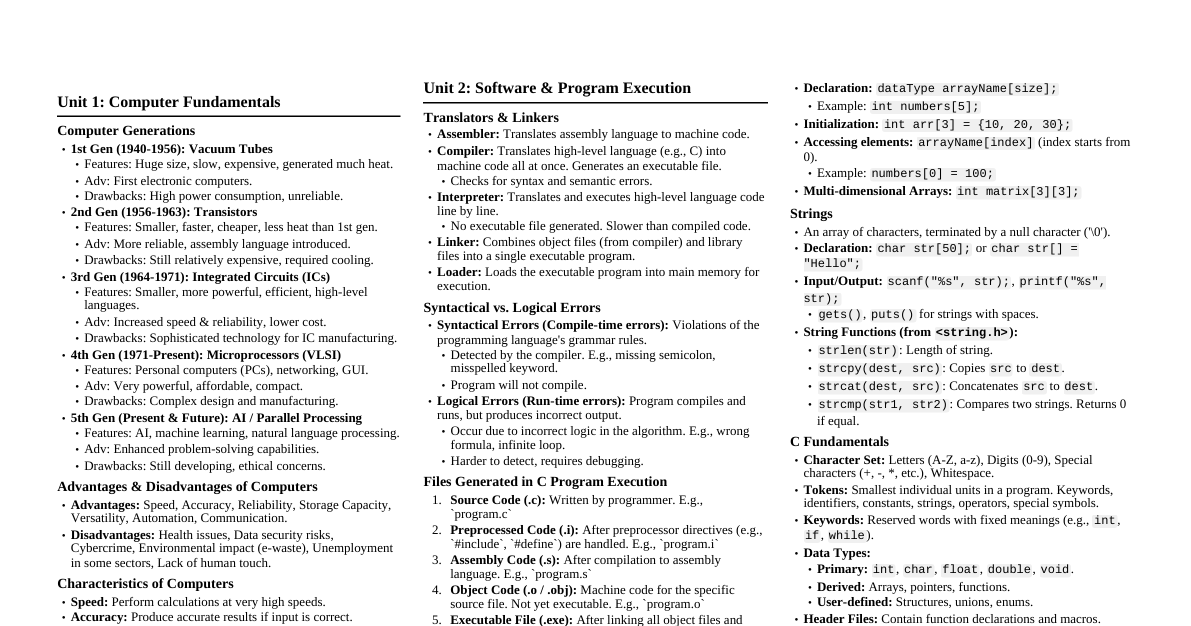
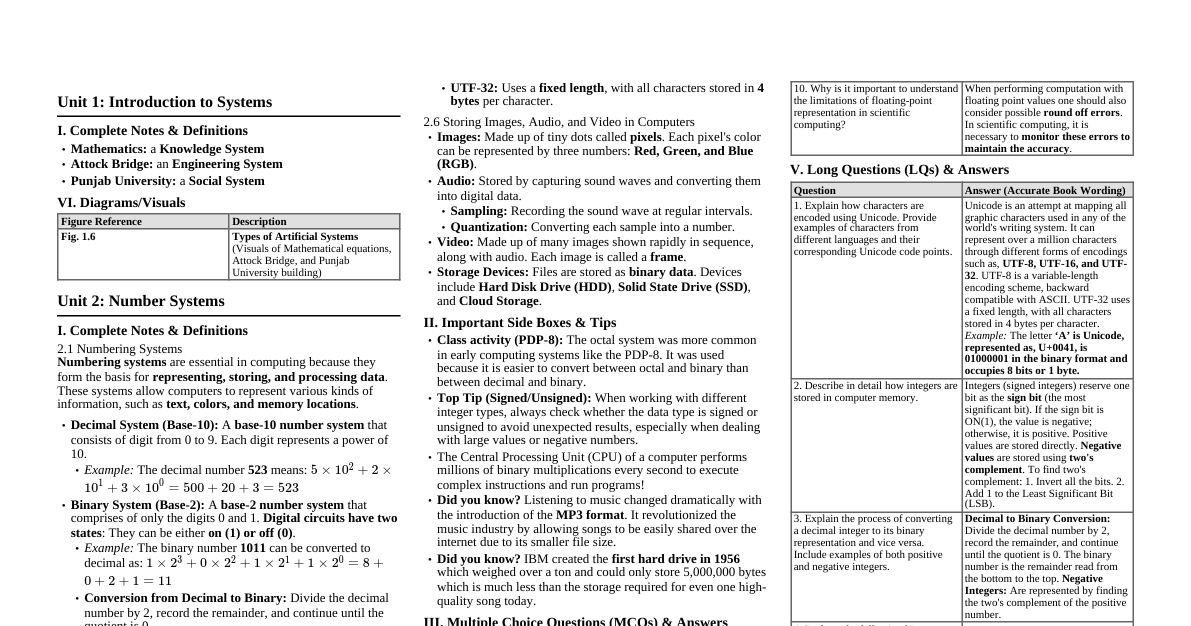
Computer Science Fundamentals
Shared 5/15/2026•24 views
### Introduction to C Programming The C programming language is a general-purpose, procedural computer programming language developed in 1972 by Dennis Ritchie at Bell Labs. It was primarily designed for implementing system software but is widely used for developing application software. C is known for its efficiency, low-level memory access, and portability. #### Key Features of C - **Procedural Language:** C is a procedural language, meaning it organizes code into functions that perform specific tasks. - **Mid-level Language:** It combines features of both high-level languages (human-readable) and low-level languages (close to hardware). - **Portability:** C programs are highly portable; code written on one system can often be compiled and run on another with minimal changes. - **Memory Management:** C provides direct memory management through pointers, allowing for efficient use of system resources. - **Fast Execution Speed:** Due to its low-level capabilities and compilation, C programs execute very quickly. - **Rich Set of Libraries:** C has a vast collection of standard library functions that provide common functionalities. - **Foundation for Other Languages:** Many modern languages (C++, Java, C#, Python, etc.) are influenced by C. #### Basic Structure of a C Program A typical C program has the following structure: ```c #include // Preprocessor directive to include standard input/output library // Global variable declaration (optional) int globalVar = 10; // Function declaration/prototype (optional, if function is defined after main) void my_function(); // main function - the entry point of every C program int main() { // Local variable declaration int localVar = 20; // Statements to be executed printf("Hello, World!\n"); // Output to console // Function call my_function(); // Return statement (0 typically indicates successful execution) return 0; } // Function definition void my_function() { printf("This is inside my_function.\n"); } ``` - **`#include `:** This is a preprocessor directive. It tells the C compiler to include the contents of the `stdio.h` (standard input/output header) file, which contains declarations for functions like `printf()` and `scanf()`. - **`main()` function:** This is the entry point of every C program. Execution always begins here. - **Comments:** Used to explain code. Single-line comments start with `//` and multi-line comments are enclosed in `/* ... */`. - **Statements:** Instructions to be executed, terminated by a semicolon (`;`). - **Return Value:** The `main` function typically returns an `int` (integer) value. A `return 0;` usually indicates successful program execution. ### Data Types and Variables Data types classify the type of data a variable can hold. Variables are named storage locations that hold values of a specific data type. #### Fundamental (Primitive) Data Types | Data Type | Description | Size (Typical) | Range (Typical) | Format Specifier | | :-------- | :------------------------------------------ | :------------- | :--------------------------------------------------- | :--------------- | | `char` | Single character | 1 byte | -128 to 127 or 0 to 255 | `%c` | | `int` | Integer (whole number) | 2 or 4 bytes | -32,768 to 32,767 or -2,147,483,648 to 2,147,483,647 | `%d` or `%i` | | `float` | Single-precision floating-point | 4 bytes | $\approx \pm 3.4 \times 10^{-38}$ to $\pm 3.4 \times 10^{38}$ | `%f` | | `double` | Double-precision floating-point | 8 bytes | $\approx \pm 1.7 \times 10^{-308}$ to $\pm 1.7 \times 10^{308}$ | `%lf` | | `void` | Absence of type (used for generic pointers, function return types) | N/A | N/A | N/A | #### Derived Data Types - **Arrays:** Collections of elements of the same data type. - **Pointers:** Variables that store memory addresses. - **Structures:** Collections of variables of different data types under a single name. - **Unions:** Similar to structures, but members share the same memory location. #### User-Defined Data Types - **`enum` (Enumeration):** A set of named integer constants. - **`typedef`:** Used to create aliases for existing data types. #### Type Modifiers These can be used with `int` and `char` (and sometimes `double`): - `short`: Smaller range, less memory (e.g., `short int`). - `long`: Larger range, more memory (e.g., `long int`, `long double`). - `signed`: Can hold positive and negative values (default for numbers). - `unsigned`: Can hold only non-negative values (0 and positive). **Example:** ```c #include int main() { char grade = 'A'; int age = 25; float price = 19.99; double pi = 3.1415926535; unsigned int studentID = 12345; long int population = 7000000000L; // L suffix for long printf("Grade: %c\n", grade); printf("Age: %d\n", age); printf("Price: %.2f\n", price); // .2f for 2 decimal places printf("Pi: %lf\n", pi); printf("Student ID: %u\n", studentID); // %u for unsigned int printf("Population: %ld\n", population); // %ld for long int return 0; } ``` #### Variable Declaration and Initialization - **Declaration:** Reserves memory for a variable. `dataType variableName;` Example: `int count;` - **Initialization:** Assigns an initial value to a declared variable. `dataType variableName = value;` Example: `int count = 0;` #### Constants Values that cannot be changed during program execution. 1. **`const` keyword:** `const int MAX_USERS = 100;` 2. **`#define` preprocessor directive:** `#define PI 3.14159` (No semicolon) ### Operators Operators are symbols that perform operations on variables and values. #### 1. Arithmetic Operators Used for mathematical calculations. | Operator | Description | Example | | :------- | :--------------- | :------------ | | `+` | Addition | `a + b` | | `-` | Subtraction | `a - b` | | `*` | Multiplication | `a * b` | | `/` | Division | `a / b` | | `%` | Modulus (remainder) | `a % b` | | `++` | Increment | `++a` or `a++` | | `--` | Decrement | `--a` or `a--` | - **`++` and `--`:** - **Prefix (`++a` / `--a`):** Increments/decrements the value *before* using it in the expression. - **Postfix (`a++` / `a--`):** Increments/decrements the value *after* using it in the expression. ```c int x = 5, y = 10; int result = x + y; // result = 15 int mod = y % x; // mod = 0 int preIncrement = ++x; // x becomes 6, preIncrement = 6 int postIncrement = y++; // postIncrement = 10, y becomes 11 ``` #### 2. Relational Operators Used to compare two values, resulting in `0` (false) or `1` (true). | Operator | Description | Example | | :------- | :------------------------------- | :---------- | | `==` | Equal to | `a == b` | | `!=` | Not equal to | `a != b` | | `>` | Greater than | `a > b` | | ` =` | Greater than or equal to | `a >= b` | | ` 0 && b 0 || b = 18 && hasLicense); // canDrive = 1 (true) int notTrue = !(age >` | Right shift | `A >> n` | ```c unsigned char a = 5; // 00000101 unsigned char b = 12; // 00001100 unsigned char andResult = a & b; // 00000100 (4) unsigned char orResult = a | b; // 00001101 (13) unsigned char xorResult = a ^ b; // 00001001 (9) unsigned char notResult = ~a; // 11111010 (for 8-bit unsigned char, 250) unsigned char leftShift = a > 2; // 00000011 (3) ``` #### 5. Assignment Operators Used to assign values to variables. | Operator | Example | Equivalent to | | :------- | :----------- | :------------ | | `=` | `a = 10` | `a = 10` | | `+=` | `a += b` | `a = a + b` | | `-=` | `a -= b` | `a = a - b` | | `*=` | `a *= b` | `a = a * b` | | `/=` | `a /= b` | `a = a / b` | | `%=` | `a %= b` | `a = a % b` | | `&=` | `a &= b` | `a = a & b` | | `|=` | `a \|= b` | `a = a \| b` | | `^=` | `a ^= b` | `a = a ^ b` | | ` >=` | `a >>= b` | `a = a >> b` | ```c int x = 10; x += 5; // x is now 15 x *= 2; // x is now 30 ``` #### 6. Ternary (Conditional) Operator A shorthand for `if-else` statements. `condition ? expression_if_true : expression_if_false;` ```c int age = 20; char *status = (age >= 18) ? "Adult" : "Minor"; // status points to "Adult" ``` #### 7. Other Operators - **`sizeof` operator:** Returns the size of a variable or data type in bytes. `sizeof(int);` or `sizeof(myVariable);` - **Address-of operator (`&`):** Returns the memory address of a variable. `int *ptr = &myVariable;` - **Dereference operator (`*`):** Accesses the value at a memory address pointed to by a pointer. `int value = *ptr;` - **Comma operator (`,`):** Evaluates expressions from left to right and returns the value of the rightmost expression. `int x = (a=10, b=20, a+b); // x becomes 30` ### Control Structures Control structures dictate the flow of execution in a program. #### 1. Conditional (Decision Making) Statements ##### `if` Statement Executes a block of code if a condition is true. ```c if (condition) { // code to be executed if condition is true } ``` ##### `if-else` Statement Executes one block if true, another if false. ```c if (condition) { // code if condition is true } else { // code if condition is false } ``` ##### `if-else if-else` Ladder Checks multiple conditions sequentially. ```c if (condition1) { // code if condition1 is true } else if (condition2) { // code if condition2 is true } else { // code if none of the conditions are true } ``` ##### `switch` Statement Allows a variable to be tested for equality against a list of values. ```c switch (expression) { case value1: // code block for value1 break; // Exit switch case value2: // code block for value2 break; default: // Optional // code block if no case matches } ``` - The `expression` must evaluate to an integer type (`int`, `char`, `enum`). - `break` statement is crucial to prevent "fall-through" to subsequent cases. - `default` case is optional and executes if no match is found. **Example:** ```c int day = 3; switch (day) { case 1: printf("Monday\n"); break; case 2: printf("Tuesday\n"); break; case 3: printf("Wednesday\n"); break; default: printf("Invalid day\n"); } // Output: Wednesday ``` #### 2. Loop (Iterative) Statements ##### `for` Loop Executes a block of code a specific number of times. ```c for (initialization; condition; increment/decrement) { // code to be executed repeatedly } ``` - **Initialization:** Executed once at the beginning. - **Condition:** Checked before each iteration. If false, loop terminates. - **Increment/Decrement:** Executed after each iteration. **Example:** ```c for (int i = 0; i ### Functions Functions are self-contained blocks of code that perform a specific task. They promote modularity, reusability, and easier debugging. #### Advantages of Functions - **Modularity:** Break down complex problems into smaller, manageable parts. - **Code Reusability:** Write code once and use it multiple times. - **Easier Debugging:** Isolate and fix errors in specific functions. - **Better Organization:** Improve code readability and maintainability. #### Function Declaration (Prototype) - Tells the compiler about a function's name, return type, and parameters *before* it's defined or called. - Required if a function is called before its definition. - Syntax: `return_type function_name(parameter_type1 param1, parameter_type2 param2, ...);` ```c // Function prototype int add(int a, int b); ``` #### Function Definition - Contains the actual code (body) of the function. - Syntax: ```c return_type function_name(parameter_type1 param1, parameter_type2 param2, ...) { // Function body // Statements return value; // Optional, depends on return_type } ``` #### Function Call - Executes the function by its name, passing arguments. - Syntax: `function_name(argument1, argument2, ...);` #### Types of Functions 1. **Library Functions:** Pre-defined functions available in C's standard library (e.g., `printf()`, `scanf()`, `sqrt()`, `strlen()`). 2. **User-Defined Functions:** Functions created by the programmer. #### Function Parameters and Arguments - **Parameters:** Variables declared in the function definition (e.g., `(int a, int b)` in `add`). - **Arguments:** Actual values passed to the function when it is called (e.g., `(5, 10)` in `add(5, 10)`). #### Return Value - A function can return a single value using the `return` keyword. - The `return` type must match the function's declared return type. - If a function doesn't return a value, its return type is `void`. **Example:** ```c #include // Function prototype void greet(); int sum(int num1, int num2); int multiply(int x, int y); int main() { greet(); // Function call int result_sum = sum(10, 5); // Function call with arguments printf("Sum: %d\n", result_sum); // Output: Sum: 15 int result_mult = multiply(4, 6); printf("Product: %d\n", result_mult); // Output: Product: 24 return 0; } // Function definition (no parameters, void return type) void greet() { printf("Hello from a function!\n"); } // Function definition (with parameters, int return type) int sum(int num1, int num2) { int total = num1 + num2; return total; // Returning an integer value } // Function definition (another example) int multiply(int x, int y) { return x * y; // Direct return of expression result } ``` #### Call by Value vs. Call by Reference ##### Call by Value - Arguments are passed as copies to the function. - Changes made to parameters inside the function do *not* affect the original variables in the calling function. - This is the default behavior for primitive data types. ```c #include void increment(int num) { num++; // 'num' is a copy, original 'value' is unaffected printf("Inside function: num = %d\n", num); } int main() { int value = 10; printf("Before function call: value = %d\n", value); // Output: 10 increment(value); printf("After function call: value = %d\n", value); // Output: 10 return 0; } ``` ##### Call by Reference (using Pointers) - The memory addresses of arguments are passed to the function. - Changes made to the values at these addresses inside the function *do* affect the original variables in the calling function. - Achieved using pointers. ```c #include void swap(int *ptr1, int *ptr2) { // Parameters are pointers to integers int temp = *ptr1; // Dereference to get value *ptr1 = *ptr2; // Change value at address ptr1 points to *ptr2 = temp; // Change value at address ptr2 points to } int main() { int a = 10, b = 20; printf("Before swap: a = %d, b = %d\n", a, b); // Output: a = 10, b = 20 swap(&a, &b); // Pass addresses of 'a' and 'b' printf("After swap: a = %d, b = %d\n", a, b); // Output: a = 20, b = 10 return 0; } ``` #### Recursion - A function that calls itself. - Requires a base case to stop the recursion and prevent infinite loops. - Often used for problems that can be broken down into smaller, similar subproblems (e.g., factorial, Fibonacci sequence, tree traversals). **Example: Factorial using recursion** ```c #include long long factorial(int n) { // Base case: factorial of 0 or 1 is 1 if (n == 0 || n == 1) { return 1; } // Recursive step: n * factorial(n-1) return n * factorial(n - 1); } int main() { int num = 5; printf("Factorial of %d is %lld\n", num, factorial(num)); // Output: Factorial of 5 is 120 return 0; } ``` ### Arrays An array is a collection of elements of the same data type, stored in contiguous memory locations, and accessed using a common name and an index. #### Declaring Arrays `dataType arrayName[arraySize];` - `arraySize` must be a positive integer constant. ```c int numbers[5]; // Declares an integer array named 'numbers' of size 5 float grades[10]; // Declares a float array named 'grades' of size 10 ``` #### Initializing Arrays 1. **During declaration:** `int numbers[5] = {10, 20, 30, 40, 50};` 2. **Without specifying size (compiler determines size):** `int numbers[] = {10, 20, 30, 40, 50}; // Size will be 5` 3. **Initializing only some elements (remaining are zero-initialized):** `int numbers[5] = {10, 20}; // numbers will be {10, 20, 0, 0, 0}` 4. **After declaration (element by element):** ```c int numbers[5]; numbers[0] = 10; numbers[1] = 20; // ... ``` #### Accessing Array Elements - Array elements are accessed using an index, which starts from `0` for the first element. - `arrayName[index]` ```c int numbers[5] = {10, 20, 30, 40, 50}; printf("First element: %d\n", numbers[0]); // Output: 10 printf("Third element: %d\n", numbers[2]); // Output: 30 numbers[1] = 25; // Modifying an element printf("Modified second element: %d\n", numbers[1]); // Output: 25 ``` - **Array bounds checking:** C does *not* perform automatic bounds checking. Accessing `numbers[5]` (out of bounds for a 5-element array) can lead to undefined behavior. #### Iterating Through Arrays Typically done using `for` loops. ```c #include int main() { int scores[] = {85, 90, 78, 92, 88}; int numElements = sizeof(scores) / sizeof(scores[0]); // Calculate array size printf("Array elements: "); for (int i = 0; i // Function to print array elements void printArray(int arr[], int size) { // 'arr' is a pointer to the first element printf("Array elements inside function: "); for (int i = 0; i = 0 && index int main() { int matrix[2][3] = {{1, 2, 3}, {4, 5, 6}}; printf("Matrix elements:\n"); for (int i = 0; i ### Pointers A pointer is a variable that stores the memory address of another variable. They are fundamental to C programming and enable powerful features like dynamic memory allocation, efficient array manipulation, and call-by-reference. #### Declaring Pointers `dataType *pointerName;` - The `*` indicates that `pointerName` is a pointer variable. - `dataType` is the type of data the pointer points to (not the type of the pointer itself, which is always an address). ```c int *ptr; // Pointer to an integer char *charPtr; // Pointer to a character float *fPtr; // Pointer to a float ``` #### Initializing Pointers Pointers should always be initialized to a valid address or `NULL`. 1. **Assigning address of a variable:** Use the **address-of operator (`&`)**. ```c int num = 10; int *ptr = # // ptr now holds the memory address of 'num' ``` 2. **Assigning `NULL`:** A `NULL` pointer points to nothing. It's a good practice to initialize pointers to `NULL` if they don't point to a valid memory location. `int *ptr = NULL;` (Using `NULL` requires `#include ` or ` `). #### Dereferencing Pointers - The **dereference operator (`*`)** is used to access the value stored at the memory address pointed to by a pointer. ```c int num = 10; int *ptr = # printf("Value of num: %d\n", num); // Output: 10 printf("Address of num: %p\n", &num); // Output: (some memory address) printf("Value of ptr (address of num): %p\n", ptr); // Output: (same memory address) printf("Value at address pointed by ptr: %d\n", *ptr); // Output: 10 *ptr = 20; // Change the value at the address ptr points to printf("New value of num: %d\n", num); // Output: 20 (num's value has changed) ``` - `%p` is the format specifier for printing memory addresses. #### Pointer Arithmetic Pointers can be incremented or decremented, but this is meaningful only for arrays. - When an integer is added to or subtracted from a pointer, the pointer's value (memory address) is increased or decreased by `integer * sizeof(dataType)`. ```c int arr[] = {10, 20, 30, 40, 50}; int *ptr = arr; // ptr points to arr[0] (address of 10) printf("Value at ptr: %d\n", *ptr); // Output: 10 printf("Address of ptr: %p\n", ptr); // Output: (address of 10) ptr++; // ptr now points to arr[1] (address of 20) printf("Value at ptr after increment: %d\n", *ptr); // Output: 20 printf("Address of ptr after increment: %p\n", ptr); // Output: (address of 20 - 4 bytes higher if int is 4 bytes) ptr = ptr + 2; // ptr now points to arr[3] (address of 40) printf("Value at ptr after +2: %d\n", *ptr); // Output: 40 ``` #### Pointers and Arrays - An array name without an index acts as a constant pointer to its first element. - `arr` is equivalent to `&arr[0]`. - `*(arr + i)` is equivalent to `arr[i]`. ```c int myArr[] = {100, 200, 300}; int *p = myArr; // p points to myArr[0] printf("myArr[0]: %d\n", *myArr); // Output: 100 printf("myArr[1]: %d\n", *(myArr + 1)); // Output: 200 printf("myArr[2]: %d\n", *(p + 2)); // Output: 300 ``` #### Pointers to Pointers (Double Pointers) A pointer that stores the address of another pointer. ```c int num = 10; int *ptr1 = # // ptr1 stores address of num int **ptr2 = &ptr1; // ptr2 stores address of ptr1 printf("Value of num: %d\n", num); // Output: 10 printf("Value via ptr1: %d\n", *ptr1); // Output: 10 printf("Value via ptr2: %d\n", **ptr2); // Output: 10 printf("Address of num: %p\n", &num); printf("Address of num via ptr1: %p\n", ptr1); printf("Address of ptr1: %p\n", &ptr1); printf("Address of ptr1 via ptr2: %p\n", ptr2); ``` #### Pointers and Functions - **Passing Pointers to Functions (Call by Reference):** Allows functions to modify variables in the calling scope. (See **Call by Reference** in the Functions section). - **Returning Pointers from Functions:** A function can return a pointer. Be cautious not to return the address of a local variable, as it will be deallocated after the function returns. ```c #include #include // For malloc // Function that returns a pointer to an integer (dynamically allocated) int* createInt(int value) { int *newInt = (int*) malloc(sizeof(int)); // Allocate memory on heap if (newInt == NULL) { printf("Memory allocation failed!\n"); exit(1); } *newInt = value; return newInt; // Return the address of the dynamically allocated memory } // DANGER: Returning address of a local variable (will lead to undefined behavior) // int* badFunction() { // int localVal = 100; // return &localVal; // 'localVal' will be destroyed after function returns // } int main() { int *myNumPtr = createInt(50); printf("Value created by function: %d\n", *myNumPtr); // Output: 50 free(myNumPtr); // Free dynamically allocated memory // int *danglingPtr = badFunction(); // DON'T DO THIS! // printf("Value from bad function: %d\n", *danglingPtr); // Undefined behavior return 0; } ``` #### `void` Pointers (Generic Pointers) - A `void` pointer (`void *`) can hold the address of any data type. - Cannot be dereferenced directly without explicit type-casting. - Cannot perform pointer arithmetic directly. ```c #include int main() { int i = 10; char c = 'A'; float f = 3.14; void *genericPtr; // Declare a void pointer genericPtr = &i; printf("Value of i via genericPtr: %d\n", *(int*)genericPtr); // Cast to int* before dereferencing genericPtr = &c; printf("Value of c via genericPtr: %c\n", *(char*)genericPtr); // Cast to char* genericPtr = &f; printf("Value of f via genericPtr: %.2f\n", *(float*)genericPtr); // Cast to float* return 0; } ``` ### Strings In C, strings are arrays of characters terminated by a null character (`\0`). The null character signifies the end of the string. #### Declaring and Initializing Strings 1. **Using a character array:** `char str[20];` // Declares an array of 20 characters. Can hold a string of max 19 chars + null terminator. `char str[] = "Hello";` // Compiler determines size (6: 'H','e','l','l','o','\0') `char str[6] = {'H', 'e', 'l', 'l', 'o', '\0'};` // Explicitly including null terminator **Important:** When declaring `char str[size]`, `size` must be at least one greater than the number of characters in the string literal to accommodate the null terminator. 2. **Using a character pointer:** `char *strPtr = "World";` // `strPtr` points to the string literal "World". - String literals are usually stored in read-only memory. Modifying `*strPtr` directly can lead to a runtime error. - This is more memory-efficient if you only need to read the string. ```c #include int main() { char greeting[] = "Hello, C!"; // Character array char *message = "Welcome!"; // Character pointer to a string literal printf("Greeting: %s\n", greeting); printf("Message: %s\n", message); // greeting[0] = 'h'; // This is valid, modifies the array // *message = 'w'; // This is NOT valid, attempts to modify a string literal (undefined behavior) return 0; } ``` - `%s` is the format specifier for printing strings. #### Reading Strings from Input 1. **`scanf()`:** Reads characters until whitespace is encountered. - **Danger:** Can cause buffer overflow if input is longer than array size. - Can only read a single word. ```c char name[20]; printf("Enter your first name: "); scanf("%s", name); // No '&' needed for array names printf("Hello, %s!\n", name); ``` 2. **`gets()`:** Reads an entire line (including spaces) until a newline character is encountered. - **Extremely dangerous:** Does *not* check for buffer overflow. **Avoid using `gets()`**. 3. **`fgets()`:** **Recommended for safe string input.** Reads a specified number of characters from a stream. `char *fgets(char *str, int n, FILE *stream);` - `str`: Pointer to the character array where input is stored. - `n`: Maximum number of characters to read (including null terminator). - `stream`: Input stream, usually `stdin` (standard input). - Includes the newline character if there's space. ```c char fullName[30]; printf("Enter your full name: "); fgets(fullName, sizeof(fullName), stdin); // Remove trailing newline if present fullName[strcspn(fullName, "\n")] = 0; printf("Welcome, %s!\n", fullName); ``` #### String Manipulation Functions (from ` `) | Function | Description | Example ### Matrix Multiplication Matrix multiplication is a fundamental operation in linear algebra. It combines two matrices to produce a third matrix. #### Definition Given two matrices $A$ and $B$, their product $C = AB$ is defined if the number of columns in $A$ is equal to the number of rows in $B$. - If $A$ is an $m \times n$ matrix (m rows, n columns) - And $B$ is an $n \times p$ matrix (n rows, p columns) - Then $C$ will be an $m \times p$ matrix (m rows, p columns) The element $C_{ij}$ (the element in the $i$-th row and $j$-th column of $C$) is calculated by taking the dot product of the $i$-th row of $A$ and the $j$-th column of $B$. $$C_{ij} = \sum_{k=1}^{n} A_{ik} B_{kj}$$ #### Example Let's consider two matrices $A$ and $B$: $$A = \begin{pmatrix} 1 & 2 \\ 3 & 4 \end{pmatrix}$$ $$B = \begin{pmatrix} 5 & 6 \\ 7 & 8 \end{pmatrix}$$ Here, $A$ is $2 \times 2$ and $B$ is $2 \times 2$. The resulting matrix $C$ will also be $2 \times 2$. To calculate $C_{11}$: (first row of A $\cdot$ first column of B) $C_{11} = (1 \times 5) + (2 \times 7) = 5 + 14 = 19$ To calculate $C_{12}$: (first row of A $\cdot$ second column of B) $C_{12} = (1 \times 6) + (2 \times 8) = 6 + 16 = 22$ To calculate $C_{21}$: (second row of A $\cdot$ first column of B) $C_{21} = (3 \times 5) + (4 \times 7) = 15 + 28 = 43$ To calculate $C_{22}$: (second row of A $\cdot$ second column of B) $C_{22} = (3 \times 6) + (4 \times 8) = 18 + 32 = 50$ So, the product matrix $C$ is: $$C = \begin{pmatrix} 19 & 22 \\ 43 & 50 \end{pmatrix}$$ #### Properties - **Not Commutative:** In general, $AB \neq BA$. - **Associative:** $(AB)C = A(BC)$. - **Distributive:** $A(B+C) = AB + AC$ and $(A+B)C = AC + BC$. - **Identity Matrix:** For an $n \times n$ identity matrix $I$, $AI = IA = A$. - **Scalar Multiplication:** $k(AB) = (kA)B = A(kB)$. #### C Implementation for Matrix Multiplication This C code demonstrates how to multiply two matrices. ```c #include #define R1 2 // Number of rows in Matrix A #define C1 2 // Number of columns in Matrix A #define R2 2 // Number of rows in Matrix B #define C2 2 // Number of columns in Matrix B int main() { int A[R1][C1] = {{1, 2}, {3, 4}}; int B[R2][C2] = {{5, 6}, {7, 8}}; int C[R1][C2]; // Resultant matrix // Check if multiplication is possible if (C1 != R2) { printf("Matrix multiplication not possible!\n"); return 1; // Indicate an error } // Perform matrix multiplication printf("Multiplying Matrix A and Matrix B...\n"); for (int i = 0; i ### Structures Structures (`struct`) in C allow you to group variables of different data types under a single name. This is useful for creating complex data types that represent real-world entities. #### Declaring a Structure `struct structureName { dataType member1; dataType member2; // ... };` ```c struct Person { char name[50]; int age; float height; }; // Semicolon is required after closing brace ``` - This declaration creates a *template* or *blueprint* for a `Person` structure. It does not allocate memory. #### Defining Structure Variables 1. **During declaration:** `struct Person person1;` 2. **During structure definition (less common):** ```c struct Student { int id; char grade; } student1, student2; // student1 and student2 are variables of type Student ``` 3. **Using `typedef` (recommended for cleaner code):** `typedef struct structureName { /* ... */ } NewTypeName;` Then you can declare variables using `NewTypeName variableName;` ```c #include #include // For strcpy // Define a structure using typedef typedef struct { char title[100]; char author[50]; int pages; float price; } Book; // NewTypeName is 'Book' int main() { // Declare a variable of type Book Book book1; // Access members using the dot (.) operator strcpy(book1.title, "The C Programming Language"); // Copy string strcpy(book1.author, "Dennis Ritchie"); book1.pages = 272; book1.price = 35.99; printf("Book Title: %s\n", book1.title); printf("Author: %s\n", book1.author); printf("Pages: %d\n", book1.pages); printf("Price: $%.2f\n", book1.price); // Declare and initialize another structure variable Book book2 = {"Data Structures in C", "Aaron Tenenbaum", 600, 50.00}; printf("\nBook 2 Title: %s\n", book2.title); printf("Author: %s\n", book2.author); return 0; } ``` #### Accessing Structure Members - **Dot operator (`.`):** Used with structure variables. `structureVariable.memberName` - **Arrow operator (`->`):** Used with pointers to structures. `structurePointer->memberName` (equivalent to `(*structurePointer).memberName`) #### Pointers to Structures ```c #include #include #include // For malloc typedef struct { char name[50]; int id; float gpa; } Student; int main() { Student s1 = {"Alice", 101, 3.8}; Student *sPtr; // Declare a pointer to a Student structure sPtr = &s1; // sPtr now points to s1 // Access members using arrow operator printf("Student Name: %s\n", sPtr->name); printf("Student ID: %d\n", sPtr->id); printf("Student GPA: %.1f\n", sPtr->gpa); // Dynamically allocate memory for a structure Student *s2 = (Student*) malloc(sizeof(Student)); if (s2 == NULL) { printf("Memory allocation failed!\n"); return 1; } strcpy(s2->name, "Bob"); s2->id = 102; s2->gpa = 3.5; printf("\nDynamically allocated student:\n"); printf("Name: %s, ID: %d, GPA: %.1f\n", s2->name, s2->id, s2->gpa); free(s2); // Free the dynamically allocated memory s2 = NULL; // Good practice to set freed pointers to NULL return 0; } ``` #### Structures as Function Arguments - **Pass by Value:** A copy of the structure is passed. Changes inside the function do not affect the original. - **Pass by Reference (using Pointers):** The address of the structure is passed. Changes inside the function *do* affect the original. This is generally preferred for large structures to avoid copying overhead. ```c #include #include typedef struct { char model[20]; int year; float price; } Car; // Function to print car details (pass by value) void printCar(Car c) { printf("Car Details (inside printCar):\n"); printf(" Model: %s\n", c.model); printf(" Year: %d\n", c.year); printf(" Price: $%.2f\n", c.price); // c.price = 0; // This change only affects the copy, not the original } // Function to update car price (pass by reference) void updatePrice(Car *cPtr, float newPrice) { cPtr->price = newPrice; // Modifies the original structure printf("Price updated to $%.2f (inside updatePrice)\n", cPtr->price); } int main() { Car myCar = {"Toyota Camry", 2020, 25000.00}; printf("Original Car:\n"); printCar(myCar); updatePrice(&myCar, 23500.00); // Pass address of myCar printf("\nCar after price update:\n"); printCar(myCar); // Shows the updated price return 0; } ``` #### Arrays of Structures You can create arrays where each element is a structure. ```c #include #include typedef struct { char name[50]; int age; } Person; int main() { // Declare an array of 3 Person structures Person people[3]; // Initialize elements of the array strcpy(people[0].name, "Alice"); people[0].age = 30; strcpy(people[1].name, "Bob"); people[1].age = 24; strcpy(people[2].name, "Charlie"); people[2].age = 35; // Iterate through the array of structures printf("List of People:\n"); for (int i = 0; i #include typedef struct { int day; int month; int year; } Date; typedef struct { char name[50]; Date dob; // Nested structure } Employee; int main() { Employee emp1; strcpy(emp1.name, "John Doe"); emp1.dob.day = 15; emp1.dob.month = 8; emp1.dob.year = 1990; printf("Employee Name: %s\n", emp1.name); printf("Date of Birth: %d/%d/%d\n", emp1.dob.day, emp1.dob.month, emp1.dob.year); return 0; } ``` ### Unions Unions are similar to structures, but all members of a union share the same memory location. This means a union can only store one member's value at any given time. Unions are useful for memory management, especially when dealing with different types of data that don't need to be active simultaneously. #### Declaring a Union `union unionName { dataType member1; dataType member2; // ... };` ```c union Data { int i; float f; char str[20]; }; // Semicolon required ``` #### Key Characteristics - **Memory Sharing:** All members of a union occupy the same memory space. The size of the union is equal to the size of its largest member. - **Single Active Member:** Only one member can hold a value at any given time. If you assign a value to one member, the values of other members become undefined (corrupted). - **Memory Efficiency:** Useful when you need to store different types of data but only one at a time, saving memory compared to a structure that would allocate space for all members. #### Using Unions ```c #include #include union Data { int i; float f; char str[20]; }; int main() { union Data data; // Declare a union variable // Assign value to 'i' data.i = 10; printf("Data.i: %d\n", data.i); // Output: 10 printf("Data.f (after i assignment): %f\n", data.f); // Undefined/garbage printf("Data.str (after i assignment): %s\n", data.str); // Undefined/garbage // Assign value to 'f' (this overwrites 'i's value in memory) data.f = 22.5; printf("\nData.f: %.2f\n", data.f); // Output: 22.50 printf("Data.i (after f assignment): %d\n", data.i); // Undefined/garbage printf("Data.str (after f assignment): %s\n", data.str); // Undefined/garbage // Assign value to 'str' (this overwrites 'f's value) strcpy(data.str, "C Programming"); printf("\nData.str: %s\n", data.str); // Output: C Programming printf("Data.i (after str assignment): %d\n", data.i); // Undefined/garbage printf("Data.f (after str assignment): %f\n", data.f); // Undefined/garbage // Print size of union printf("\nSize of union Data: %zu bytes\n", sizeof(union Data)); // (Will be 20 bytes, the size of the largest member 'str') return 0; } ``` #### Anonymous Unions Unions without a name. Their members can be accessed directly without the union variable name. ```c #include struct MixedData { int type; // To indicate which member of the union is active union { // Anonymous union int integerValue; float floatValue; }; // No name for the union here }; int main() { struct MixedData d; d.type = 0; // 0 for integer d.integerValue = 123; // Access directly printf("Integer value: %d\n", d.integerValue); d.type = 1; // 1 for float d.floatValue = 45.67f; // Access directly printf("Float value: %.2f\n", d.floatValue); return 0; } ``` #### Unions vs. Structures Summary | Feature | Structures (`struct`) | Unions (`union`) | | :------------- | :-------------------------------------------------- | :-------------------------------------------------- | | **Memory** | Each member gets its own memory space. | All members share the same memory location. | | **Size** | Sum of sizes of all members (plus padding). | Size of the largest member. | | **Members** | All members can hold values simultaneously. | Only one member can hold a value at any given time. | | **Purpose** | Group related data of different types. | Save memory by storing different data types in the same space, one at a time. | | **Access** | `structVar.member`, `structPtr->member` | `unionVar.member`, `unionPtr->member` | ### Enumerations (`enum`) Enumerations (`enum`) in C allow you to define a set of named integer constants. They improve code readability and maintainability by replacing "magic numbers" with descriptive names. #### Declaring an Enumeration `enum enumName { CONSTANT1, CONSTANT2, // ... };` ```c enum Weekday { MONDAY, // Default value 0 TUESDAY, // Default value 1 WEDNESDAY, // Default value 2 THURSDAY, FRIDAY, SATURDAY, SUNDAY }; // Semicolon required ``` #### Assigning Integer Values - By default, the first constant is assigned `0`, the next `1`, and so on. - You can explicitly assign values to constants. Subsequent unassigned constants will increment from the last assigned value. ```c enum Colors { RED = 1, GREEN = 2, BLUE = 4 // Explicitly assigned }; enum Status { SUCCESS = 0, FAILURE = -1, PENDING // PENDING will be -0 }; enum Level { LOW, // 0 MEDIUM, // 1 HIGH = 5, CRITICAL // 6 }; ``` #### Using Enumerations Enum constants can be used anywhere an integer constant is expected. ```c #include // Define an enum for months enum Month { JAN = 1, FEB, MAR, APR, MAY, JUN, JUL, AUG, SEP, OCT, NOV, DEC }; int main() { enum Weekday today = WEDNESDAY; enum Colors favoriteColor = BLUE; enum Month currentMonth = JUL; if (today == WEDNESDAY) { printf("It's hump day!\n"); // Output: It's hump day! } printf("WEDNESDAY has integer value: %d\n", today); // Output: 2 printf("BLUE has integer value: %d\n", favoriteColor); // Output: 4 printf("Current month (JUL) is: %d\n", currentMonth); // Output: 7 // You can iterate through enums if they are sequential for (enum Month m = JAN; m ### Input/Output Operations C provides a rich set of standard library functions for performing input and output operations, mostly defined in the ` ` header file. #### Standard I/O Streams - `stdin`: Standard input stream (usually keyboard). - `stdout`: Standard output stream (usually monitor). - `stderr`: Standard error stream (usually monitor, for error messages). #### Formatted I/O ##### `printf()` - Formatted Output Used to print formatted output to `stdout`. `int printf(const char *format, ...);` - `format`: A string containing text and format specifiers. - `...`: Optional arguments corresponding to the format specifiers. - Returns the number of characters printed, or a negative value on error. **Common Format Specifiers:** | Specifier | Output Type | | :-------- | :------------------------ | | `%d` | Signed decimal integer | | `%i` | Signed decimal integer | | `%u` | Unsigned decimal integer | | `%ld` | Long decimal integer | | `%lu` | Unsigned long decimal int | | `%lld` | Long long decimal int | | `%llu` | Unsigned long long dec int| | `%f` | Floating-point (decimal) | | `%lf` | Double floating-point (for `scanf` for `double`, `printf` uses `%f`) | | `%e` | Floating-point (scientific notation) | | `%g` | Floating-point (compact form: `%f` or `%e`) | | `%c` | Character | | `%s` | String | | `%p` | Pointer address | | `%x` | Hexadecimal integer (lowercase) | | `%X` | Hexadecimal integer (uppercase) | | `%o` | Octal integer | | `%%` | Prints a literal `%` sign | **Format Modifiers:** - **Width:** `%5d` (minimum 5 characters, right-aligned) - **Precision:** `%.2f` (2 decimal places for floats), `%.5s` (max 5 chars for string) - **Left-justification:** `%-5d` - **Zero-padding:** `%05d` (pad with leading zeros) ```c #include int main() { int count = 123; float temp = 25.75; char grade = 'B'; char name[] = "Alice"; printf("Count: %d, Temperature: %.1f, Grade: %c, Name: %s\n", count, temp, grade, name); printf("Padded count: %05d\n", count); // Output: 00123 printf("Left-aligned name: %-10s|\n", name); // Output: Alice | return 0; } ``` ##### `scanf()` - Formatted Input Used to read formatted input from `stdin`. `int scanf(const char *format, ...);` - `format`: A string containing format specifiers. - `...`: Pointers to variables where input will be stored. **Crucially, variables must be passed by address (`&variableName`)**. - Returns the number of input items successfully matched and assigned, or `EOF` if an input failure occurs before any data was read. ```c #include int main() { int age; float salary; char initial; char city[20]; // For string, array name is already an address printf("Enter age, salary, initial, and city: "); // scanf reads until whitespace for numbers and strings int scanCount = scanf("%d %f %c %s", &age, &salary, &initial, city); printf("You entered: Age=%d, Salary=%.2f, Initial=%c, City=%s\n", age, salary, initial, city); printf("Items successfully read: %d\n", scanCount); // Be careful with leftover newlines after reading characters or numbers // A common issue: // char ch; // scanf("%d", &age); // User types 25\n // scanf("%c", &ch); // ch will read the leftover '\n' // To fix: add a space before %c: scanf(" %c", &ch); return 0; } ``` #### Character I/O ##### `getchar()` Reads a single character from `stdin`. `int getchar(void);` - Returns the character read (as an `int`) or `EOF` on error/end-of-file. ##### `putchar()` Writes a single character to `stdout`. `int putchar(int char_to_write);` - Returns the character written (as an `int`) or `EOF` on error. ```c #include int main() { char ch; printf("Enter a character: "); ch = getchar(); // Read a character printf("You entered: "); putchar(ch); // Print the character putchar('\n'); // Print a newline return 0; } ``` #### String I/O ##### `gets()` (DANGEROUS - AVOID!) Reads a line from `stdin` into a string. No buffer overflow protection. `char *gets(char *str);` ##### `fgets()` (SAFE alternative to `gets()`) Reads a line from a specified stream into a string, with buffer size limit. `char *fgets(char *str, int n, FILE *stream);` ```c #include #include // For strcspn int main() { char line[50]; printf("Enter a line of text: "); fgets(line, sizeof(line), stdin); // fgets includes the newline character if there's space. // To remove it: line[strcspn(line, "\n")] = 0; printf("You entered: %s\n", line); return 0; } ``` ##### `puts()` Writes a string to `stdout`, followed by a newline character. `int puts(const char *str);` - Returns a non-negative value on success, `EOF` on error. ```c #include int main() { char message[] = "Hello from puts!"; puts(message); // Output: Hello from puts! (followed by a newline) return 0; } ``` ### File Input/Output File I/O allows programs to read data from files and write data to files, providing persistence for data beyond the program's execution. File operations are performed using functions defined in ` `. #### 1. Opening a File (`fopen()`) Before any file operation, a file must be opened. `FILE *fopen(const char *filename, const char *mode);` - `filename`: Path to the file. - `mode`: String specifying the access type. - Returns a `FILE` pointer on success, or `NULL` on failure. **File Modes:** | Mode | Description | | :---- | :-------------------------------------------------------------------------- | | `"r"` | **Read:** Opens an existing file for reading. File must exist. | | `"w"` | **Write:** Opens a file for writing. Creates if it doesn't exist. Truncates (empties) if it exists. | | `"a"` | **Append:** Opens a file for writing. Creates if it doesn't exist. Writes to the end of the file if it exists. | | `"r+"`| **Read/Write:** Opens an existing file for both reading and writing. | | `"w+"`| **Read/Write:** Opens a file for both reading and writing. Creates if it doesn't exist. Truncates if it exists. | | `"a+"`| **Read/Append:** Opens a file for both reading and appending. Creates if it doesn't exist. Writes to the end. | **Binary Modes:** Append `b` to the mode string (e.g., `"rb"`, `"wb"`, `"ab"`). Binary mode is crucial for non-text files to prevent character translation issues. ```c #include int main() { FILE *filePtr; // Open a file for writing (creates or truncates) filePtr = fopen("example.txt", "w"); if (filePtr == NULL) { perror("Error opening file for writing"); // Prints system error message return 1; } printf("File 'example.txt' opened for writing.\n"); fclose(filePtr); // Close the file // Open a file for reading (must exist) filePtr = fopen("nonexistent.txt", "r"); if (filePtr == NULL) { perror("Error opening nonexistent.txt for reading"); // Output: Error opening nonexistent.txt for reading: No such file or directory } else { printf("File opened for reading.\n"); fclose(filePtr); } return 0; } ``` #### 2. Closing a File (`fclose()`) Releases the file resources and flushes any buffered data. `int fclose(FILE *stream);` - Returns `0` on success, `EOF` on error. #### 3. Writing to Files ##### `fputc()` - Write a Character `int fputc(int character, FILE *stream);` - Writes `character` to `stream`. ##### `fputs()` - Write a String `int fputs(const char *str, FILE *stream);` - Writes `str` to `stream`. Does *not* automatically add a newline. ##### `fprintf()` - Formatted Write `int fprintf(FILE *stream, const char *format, ...);` - Similar to `printf()`, but writes to the specified `stream`. ```c #include int main() { FILE *fp = fopen("output.txt", "w"); if (fp == NULL) { perror("Error opening output.txt"); return 1; } fputc('H', fp); fputc('i', fp); fputc('\n', fp); fputs("This is a string written by fputs.\n", fp); int num = 123; float pi = 3.14159; fprintf(fp, "Formatted output: Number = %d, Pi = %.2f\n", num, pi); fclose(fp); printf("Data written to output.txt\n"); return 0; } ``` #### 4. Reading from Files ##### `fgetc()` - Read a Character `int fgetc(FILE *stream);` - Reads a character from `stream`. Returns `EOF` at end-of-file or on error. ##### `fgets()` - Read a String `char *fgets(char *str, int n, FILE *stream);` - Reads up to `n-1` characters or until a newline from `stream` into `str`. Includes newline if read. ##### `fscanf()` - Formatted Read `int fscanf(FILE *stream, const char *format, ...);` - Similar to `scanf()`, but reads from the specified `stream`. ```c #include #include // For exit() int main() { FILE *fp = fopen("output.txt", "r"); // Assuming output.txt from previous example exists if (fp == NULL) { perror("Error opening output.txt for reading"); return 1; } char ch; printf("Reading character by character:\n"); while ((ch = fgetc(fp)) != EOF) { putchar(ch); } printf("\n"); // Rewind file pointer to the beginning for next read operation rewind(fp); char line[100]; printf("Reading line by line:\n"); while (fgets(line, sizeof(line), fp) != NULL) { printf("%s", line); // printf already adds newline, so be careful if fgets already has one } printf("\n"); rewind(fp); // Rewind again int readNum; float readPi; // Note: fscanf leaves file pointer after read, might need to handle remaining line printf("Reading formatted data:\n"); if (fscanf(fp, "Hi\nThis is a string written by fputs.\nFormatted output: Number = %d, Pi = %f\n", &readNum, &readPi) == 2) { printf("Read formatted: Number = %d, Pi = %.2f\n", readNum, readPi); } else { printf("Failed to read formatted data.\n"); } fclose(fp); return 0; } ``` #### 5. Random Access File I/O ##### `fseek()` Sets the file position indicator for the stream. `int fseek(FILE *stream, long offset, int origin);` - `offset`: Number of bytes to move. - `origin`: Position from which `offset` is applied: - `SEEK_SET` (0): Beginning of the file. - `SEEK_CUR` (1): Current position. - `SEEK_END` (2): End of the file. - Returns `0` on success, non-zero on failure. ##### `ftell()` Returns the current file position indicator. `long ftell(FILE *stream);` - Returns the current offset in bytes from the beginning of the file, or `-1L` on error. ##### `rewind()` Sets the file position indicator to the beginning of the file. `void rewind(FILE *stream);` - Equivalent to `fseek(stream, 0L, SEEK_SET);` but doesn't return a value. ```c #include #include int main() { FILE *fp = fopen("random_access.txt", "w+"); // Open for read and write, creates/truncates if (fp == NULL) { perror("Error opening random_access.txt"); return 1; } fputs("Hello World!", fp); // Write some data long currentPos = ftell(fp); printf("Current position after writing: %ld\n", currentPos); // Will be 12 (length of "Hello World!") fseek(fp, 6, SEEK_SET); // Move 6 bytes from the beginning fputs("C", fp); // Overwrite 'W' with 'C' fseek(fp, 0, SEEK_SET); // Go back to the beginning char buffer[20]; fgets(buffer, sizeof(buffer), fp); printf("Content after fseek and overwrite: %s\n", buffer); // Output: Hello Corld! fclose(fp); return 0; } ``` ### Dynamic Memory Allocation Dynamic memory allocation allows a program to request memory at runtime (during execution) rather than at compile time. This is essential when the exact amount of memory needed is not known beforehand, such as when dealing with user input, variable-sized arrays, or data structures like linked lists. Functions for dynamic memory allocation are found in the ` ` header. #### 1. `malloc()` (Memory Allocation) Allocates a block of memory of a specified size and returns a `void` pointer to the beginning of the allocated block. The allocated memory is *not* initialized (contains garbage values). `void *malloc(size_t size);` - `size`: The number of bytes to allocate. - Returns `NULL` if memory allocation fails. ```c #include #include // Required for malloc, free int main() { int *ptr; int n = 5; // Allocate memory for 5 integers ptr = (int*) malloc(n * sizeof(int)); // Cast to (int*) is good practice // Check if malloc was successful if (ptr == NULL) { printf("Memory allocation failed!\n"); return 1; } printf("Memory allocated successfully using malloc.\n"); // Initialize and print the allocated memory for (int i = 0; i #include int main() { int *arr; int n = 3; // Allocate memory for 3 integers, initialized to 0 arr = (int*) calloc(n, sizeof(int)); if (arr == NULL) { printf("Memory allocation failed!\n"); return 1; } printf("Memory allocated successfully using calloc (initialized to zero):\n"); for (int i = 0; i #include int main() { int *arr; int n = 2; // Initial allocation for 2 integers arr = (int*) malloc(n * sizeof(int)); if (arr == NULL) { return 1; } arr[0] = 10; arr[1] = 20; printf("Initial array: %d %d\n", arr[0], arr[1]); // Reallocate to hold 4 integers n = 4; int *newArr = (int*) realloc(arr, n * sizeof(int)); if (newArr == NULL) { printf("Reallocation failed!\n"); free(arr); // Free original memory if realloc fails return 1; } arr = newArr; // Update the pointer to the new block arr[2] = 30; arr[3] = 40; printf("Reallocated array: %d %d %d %d\n", arr[0], arr[1], arr[2], arr[3]); // Reallocate to a smaller size (e.g., 2 integers) n = 2; newArr = (int*) realloc(arr, n * sizeof(int)); if (newArr == NULL) { printf("Reallocation failed!\n"); free(arr); return 1; } arr = newArr; printf("Shrunk array: %d %d\n", arr[0], arr[1]); free(arr); arr = NULL; return 0; } ``` #### 4. `free()` (Deallocate Memory) Deallocates the memory block pointed to by `ptr`, which must have been allocated by `malloc()`, `calloc()`, or `realloc()`. `void free(void *ptr);` - Accessing memory after `free()` (a "dangling pointer") leads to undefined behavior. - Freeing `NULL` is safe and does nothing. #### Common Dynamic Memory Errors - **Memory Leak:** Failing to `free()` allocated memory, leading to a gradual depletion of available memory, especially in long-running programs. - **Dangling Pointer:** Accessing memory after it has been freed. - **Double Free:** Calling `free()` on the same memory block more than once. - **Buffer Overflow/Underflow:** Writing beyond the boundaries of an allocated block. - **Using Uninitialized Memory:** Using the contents of `malloc`-allocated memory before writing to it. ### Preprocessor Directives The C Preprocessor is a program that processes the source code before it is passed to the compiler. It handles directives that begin with a `#` symbol. These directives manipulate the text of the source code. #### 1. `#include` Directive Used to include the contents of another file into the current source file. - **`#include `:** Used for standard library header files. The preprocessor searches in system-defined directories. `#include ` `#include ` - **`#include "filename"`:** Used for user-defined header files. The preprocessor searches in the current directory first, then in system-defined directories. `#include "myheader.h"` #### 2. `#define` Directive Used to define macros. Macros are text substitutions performed by the preprocessor. ##### Object-like Macros Simple text replacement. `#define MACRO_NAME replacement_text` ```c #include #define PI 3.14159 // No semicolon #define MAX_SIZE 100 #define MESSAGE "Hello from a macro!" int main() { float radius = 5.0; float area = PI * radius * radius; printf("Area: %.2f\n", area); // Output: Area: 78.54 int arr[MAX_SIZE]; // Array of size 100 printf("%s\n", MESSAGE); // Output: Hello from a macro! return 0; } ``` ##### Function-like Macros Define macros that accept arguments. `#define MACRO_NAME(arg1, arg2) replacement_text_using_args` **Important Considerations for Function-like Macros:** - **Parenthesize arguments:** Always put parentheses around macro arguments to avoid operator precedence issues. - **Parenthesize the entire macro definition:** To ensure the macro's result is evaluated correctly in complex expressions. ```c #include // Bad macro (potential issues) #define SQUARE_BAD(x) x*x // Good macro (parentheses used) #define SQUARE(x) ((x)*(x)) #define MAX(a, b) ((a) > (b) ? (a) : (b)) int main() { int val = 5; printf("SQUARE_BAD(val+1): %d\n", SQUARE_BAD(val + 1)); // Expands to 5 + 1 * 5 + 1 = 5 + 5 + 1 = 11 (incorrect) printf("SQUARE(val+1): %d\n", SQUARE(val + 1)); // Expands to ((5+1)*(5+1)) = 36 (correct) printf("MAX(10, 20): %d\n", MAX(10, 20)); // Output: 20 return 0; } ``` #### 3. `#undef` Directive Undefines a macro. `#undef MACRO_NAME` ```c #include #define DEBUG_MODE int main() { #ifdef DEBUG_MODE printf("Debug mode is active.\n"); // This will print #endif #undef DEBUG_MODE // Undefine the macro #ifdef DEBUG_MODE printf("Debug mode is still active (should not print).\n"); #endif return 0; } ``` #### 4. Conditional Compilation Directives Used to include or exclude parts of the code based on conditions. - **`#ifdef MACRO_NAME`**: If `MACRO_NAME` is defined, compile the code block. - **`#ifndef MACRO_NAME`**: If `MACRO_NAME` is *not* defined, compile the code block. - **`#if expression`**: If `expression` evaluates to non-zero (true), compile the code block. - **`#elif expression`**: Else if. - **`#else`**: Else. - **`#endif`**: Marks the end of a conditional compilation block. ```c #include #define OS_WINDOWS #define VERSION 2 int main() { #ifdef OS_WINDOWS printf("Compiling for Windows.\n"); #elif defined(OS_LINUX) printf("Compiling for Linux.\n"); #else printf("Compiling for unknown OS.\n"); #endif #if VERSION >= 2 printf("This is version 2 or higher.\n"); #endif return 0; } ``` - This is very common for platform-specific code, debugging code, or including different versions of functionality. #### 5. Other Preprocessor Directives - **`#error message`**: Generates a compilation error with the specified message. `#error "This feature is deprecated."` - **`#pragma`**: Provides special instructions to the compiler (compiler-specific). `#pragma once` (common in headers to prevent multiple inclusions, though `#ifndef` guards are more standard) `#pragma warning(disable:4996)` (Visual Studio specific to disable certain warnings) #### Predefined Macros C provides several predefined macros: | Macro | Description | Example | | :--------- | :---------------------------------------- | :----------------------------------------- | | `__FILE__` | Current filename as a string literal. | `printf("File: %s\n", __FILE__);` | | `__LINE__` | Current line number as an integer. | `printf("Line: %d\n", __LINE__);` | | `__DATE__` | Current date as a string literal (e.g., "Jan 01 2023"). | `printf("Date: %s\n", __DATE__);` | | `__TIME__` | Current time as a string literal (e.g., "12:34:56"). | `printf("Time: %s\n", __TIME__);` | | `__STDC__` | Defined as 1 if the compiler conforms to the C standard. | `printf("STDC: %d\n", __STDC__);` | | `__func__` (C99)| Name of the current function as a string literal. | `printf("Function: %s\n", __func__);` | ### `typedef` Keyword The `typedef` keyword in C is used to create aliases (alternative names) for existing data types. It does not create new types, but rather provides a convenient way to refer to existing types with shorter or more meaningful names. This can significantly improve code readability and portability. #### Syntax `typedef existing_data_type new_name;` #### 1. Aliasing Primitive Data Types You can create aliases for basic data types like `int`, `float`, `char`, etc. ```c #include typedef unsigned int UINT; typedef long long int LLI; typedef char CHAR; int main() { UINT studentID = 12345; LLI worldPopulation = 8000000000LL; CHAR grade = 'A'; printf("Student ID: %u\n", studentID); printf("World Population: %lld\n", worldPopulation); printf("Grade: %c\n", grade); return 0; } ``` - This is useful for making code more portable, as you can change the underlying type (e.g., `UINT`) in one place if needed for different architectures, without altering every variable declaration. #### 2. Aliasing Structures This is one of the most common and useful applications of `typedef`. It allows you to declare structure variables without repeatedly using the `struct` keyword. ##### Without `typedef`: ```c struct Person { char name[50]; int age; }; // To declare a variable: struct Person p1; ``` ##### With `typedef`: ```c typedef struct Person { char name[50]; int age; } Person_t; // Conventionally, _t suffix is used for typedefs // Or, even more commonly, an anonymous struct with typedef: typedef struct { char name[50]; int age; } Person; // Now 'Person' is the new type name, no 'struct' prefix needed ``` **Example:** ```c #include #include // Define a structure and create a typedef for it typedef struct { char title[100]; char author[50]; int pages; } Book; // 'Book' is now an alias for 'struct anonymous_name' int main() { Book myBook; // Declare a variable of type Book (no 'struct' keyword) strcpy(myBook.title, "Effective C"); strcpy(myBook.author, "Robert C. Seacord"); myBook.pages = 300; printf("Book Title: %s\n", myBook.title); printf("Author: %s\n", myBook.author); printf("Pages: %d\n", myBook.pages); return 0; } ``` #### 3. Aliasing Unions Similar to structures, `typedef` can be used to alias unions. ```c #include typedef union { int i; float f; } Data; int main() { Data d; d.i = 10; printf("Integer: %d\n", d.i); d.f = 20.5; printf("Float: %.1f\n", d.f); return 0; } ``` #### 4. Aliasing Enumerations `typedef` is also commonly used with `enum` to avoid the `enum` keyword when declaring variables. ```c #include typedef enum { RED, GREEN, BLUE } Color; // 'Color' is now an alias for 'enum anonymous_name' int main() { Color myColor = GREEN; if (myColor == GREEN) { printf("My color is green!\n"); } printf("Green value: %d\n", myColor); // Output: 1 return 0; } ``` #### 5. Aliasing Pointers `typedef` can create aliases for pointer types, which can make complex pointer declarations more readable. ```c #include typedef int *IntPtr; // IntPtr is now an alias for 'int *' typedef char **CharPtrPtr; // CharPtrPtr is an alias for 'char **' int main() { int num = 100; IntPtr p = # // Same as int *p = # printf("Value via IntPtr: %d\n", *p); // Output: 100 char *names[] = {"Alice", "Bob", "Charlie"}; CharPtrPtr pp = names; // pp points to the first element of names array (which is a char*) printf("Name via CharPtrPtr: %s\n", *pp); // Output: Alice printf("Next Name: %s\n", *(pp + 1)); // Output: Bob return 0; } ``` **Caution with pointer `typedef`:** `typedef int* PINT;` `PINT a, b;` is equivalent to `int *a, *b;` However, `int* a, b;` is equivalent to `int *a, b;` (where `b` is an `int`, not `int*`). Using `typedef` for pointers can sometimes hide the fact that you're dealing with pointers, which some consider a disadvantage. #### Advantages of `typedef` - **Readability:** Makes code easier to understand by using more descriptive names. - **Portability:** Simplifies adapting code to different platforms by changing type definitions in one central place. - **Maintainability:** Easier to modify data types if they are aliased. - **Reduces Typing:** Less verbose for complex type declarations (e.g., function pointers). ### Memory Layout of a C Program Understanding how a C program's memory is organized is crucial for writing efficient, robust, and bug-free code, especially when dealing with pointers and dynamic memory allocation. The memory layout is typically divided into several segments: ``` +------------------+ High Address | Command Line Args| | & Env Variables | +------------------+ | Stack | (Grows downwards) | (Local variables, | function calls, | return addresses) | | | V | . . . . . . . . . . . | ^ | | | | Heap | (Grows upwards) | (Dynamic memory, | malloc/calloc/realloc) +------------------+ | BSS Segment | (Uninitialized global/static variables, initialized to 0 by OS) +------------------+ | Data Segment | (Initialized global/static variables) +------------------+ | Text Segment | (Program instructions/code) +------------------+ Low Address ``` #### 1. Text Segment (Code Segment) - Stores the executable instructions of the program. - Often read-only to prevent accidental modification by the program itself. - Can be shared among multiple instances of the same program (e.g., multiple users running `vi`). #### 2. Data Segment (Initialized Data Segment) - Stores global and static variables that are explicitly initialized by the programmer. - These variables exist for the entire duration of the program. **Example:** ```c int global_initialized_var = 10; // Stored in Data Segment static int static_initialized_var = 20; // Stored in Data Segment ``` #### 3. BSS Segment (Uninitialized Data Segment) - Stores global and static variables that are *not* explicitly initialized. - The operating system initializes these variables to zero before the program starts execution. - It only stores the size of the variables, not their actual values, which saves space in the executable file. **Example:** ```c int global_uninitialized_var; // Stored in BSS Segment (initialized to 0 by OS) static int static_uninitialized_var; // Stored in BSS Segment (initialized to 0 by OS) ``` #### 4. Heap Segment - Used for dynamic memory allocation (e.g., using `malloc()`, `calloc()`, `realloc()`). - Memory is allocated and deallocated at runtime by the programmer. - Grows upwards towards higher memory addresses. - If `malloc` fails, it returns `NULL`. - Failure to `free` allocated memory leads to memory leaks. **Example:** ```c int *dynamic_array; dynamic_array = (int*) malloc(10 * sizeof(int)); // Memory allocated on the Heap // ... use dynamic_array ... free(dynamic_array); // Deallocate from Heap ``` #### 5. Stack Segment - Used for local variables (automatic variables), function parameters, and return addresses for function calls. - Memory is allocated and deallocated automatically by the compiler. - Grows downwards towards lower memory addresses. - Follows a Last-In, First-Out (LIFO) principle. - When a function is called, a new "stack frame" is pushed onto the stack. When the function returns, its stack frame is popped. - **Stack Overflow:** Occurs when the stack runs out of memory, usually due to excessively deep recursion or very large local variables. **Example:** ```c void myFunction(int param1) { // param1 on stack int local_var = 10; // local_var on stack // ... } int main() { int main_local_var = 5; // main_local_var on stack myFunction(main_local_var); return 0; } ``` #### Command Line Arguments and Environment Variables - These are typically stored just above the stack, at the highest memory addresses. - Command-line arguments are passed to the `main` function (e.g., `argc`, `argv`). - Environment variables provide system-wide configuration information. #### Summary Table | Segment | Contents | Lifetime | Access | Growth Direction | | :---------------- | :-------------------------------------- | :---------------- | :----------- | :--------------- | | **Text (Code)** | Executable instructions | Program lifetime | Read-only | Fixed | | **Data** | Initialized global/static variables | Program lifetime | Read/Write | Fixed | | **BSS** | Uninitialized global/static variables | Program lifetime | Read/Write | Fixed | | **Heap** | Dynamically allocated memory (`malloc`) | Programmer-managed| Read/Write | Upwards | | **Stack** | Local variables, function params, return addresses | Function call | Read/Write | Downwards | ### Command Line Arguments Command line arguments are parameters supplied to the program when it is invoked from the command line. They allow you to pass information to your program without hardcoding values or prompting the user interactively. #### `main()` Function Signature To accept command line arguments, the `main` function must be declared with two parameters: `int main(int argc, char *argv[]) { ... }` or `int main(int argc, char **argv) { ... }` - **`argc` (argument count):** An integer that stores the number of command line arguments, including the program name itself. - **`argv` (argument vector):** An array of character pointers (strings). Each element `argv[i]` points to a command line argument string. - `argv[0]` is always the name of the executable program. - `argv[1]` is the first argument provided by the user. - `argv[argc - 1]` is the last argument. - `argv[argc]` is a `NULL` pointer, marking the end of the array. #### Example Program Let's create a program that takes a name and an age as command-line arguments. ```c // save this as 'greet.c' #include #include // For atoi() int main(int argc, char *argv[]) { printf("Number of arguments: %d\n", argc); // Print all arguments printf("All arguments:\n"); for (int i = 0; i \n", argv[0]); return 1; // Indicate error } // Access specific arguments char *name = argv[1]; int age = atoi(argv[2]); // Convert string to integer using atoi() printf("\nHello, %s! You are %d years old.\n", name, age); // Demonstrate atoi failure (if non-numeric age is given) char *invalid_age_str = "twenty"; int invalid_age = atoi(invalid_age_str); printf("atoi(\"twenty\") returns: %d (0 typically indicates conversion failure for non-numeric start)\n", invalid_age); return 0; // Indicate success } ``` #### How to Compile and Run (in a terminal/command prompt) 1. **Compile:** `gcc greet.c -o greet` (or `cl greet.c` on Windows with MSVC) 2. **Run without arguments:** `./greet` Output: ``` Number of arguments: 1 All arguments: argv[0]: ./greet Usage: ./greet ``` 3. **Run with arguments:** `./greet Alice 30` Output: ``` Number of arguments: 3 All arguments: argv[0]: ./greet argv[1]: Alice argv[2]: 30 Hello, Alice! You are 30 years old. atoi("twenty") returns: 0 (0 typically indicates conversion failure for non-numeric start) ``` 4. **Run with multi-word arguments (using quotes):** `./greet "Bob Smith" 25` Output: ``` Number of arguments: 3 All arguments: argv[0]: ./greet argv[1]: Bob Smith argv[2]: 25 Hello, Bob Smith! You are 25 years old. atoi("twenty") returns: 0 (0 typically indicates conversion failure for non-numeric start) ``` #### Converting String Arguments to Numbers Command line arguments are always received as strings (`char *`). If you need to use them as numbers, you must convert them. The ` ` header provides functions for this: - **`int atoi(const char *str);`**: Converts a string to an integer. Returns 0 if conversion fails or if string is empty. - **`long atol(const char *str);`**: Converts a string to a long integer. - **`double atof(const char *str);`**: Converts a string to a double-precision floating-point number. - **`long int strtol(const char *str, char **endptr, int base);`**: More robust conversion of string to long integer. `endptr` can be used to detect conversion errors, and `base` specifies the number base (e.g., 10 for decimal). - **`double strtod(const char *str, char **endptr);`**: More robust conversion of string to double. **Example using `strtol` for error checking:** ```c #include #include // For strtol #include // For checking errors int main(int argc, char *argv[]) { if (argc \n", argv[0]); return 1; } char *endptr; errno = 0; // Clear errno before call long num = strtol(argv[1], &endptr, 10); // Check for various error conditions if (errno == ERANGE) { fprintf(stderr, "Error: Number out of range.\n"); return 1; } if (endptr == argv[1]) { fprintf(stderr, "Error: No digits found in argument.\n"); return 1; } if (*endptr != '\0') { fprintf(stderr, "Error: Extra characters after number: %s\n", endptr); return 1; } printf("Successfully converted number: %ld\n", num); return 0; } ``` ### Error Handling Robust C programs need to handle errors gracefully. Errors can arise from various sources: invalid user input, file operation failures, memory allocation failures, network issues, or logical errors. C provides mechanisms to detect and respond to these situations. #### 1. Return Values Many standard library functions indicate success or failure through their return values. - **`NULL` pointer:** Functions like `fopen()`, `malloc()`, `realloc()` return `NULL` on failure. - **`EOF`:** Input functions like `fgetc()`, `getchar()` return `EOF` (End-Of-File macro, typically -1) on error or when the end of the input stream is reached. - **`0` or non-zero:** Many functions return `0` for success and a non-zero value for failure (or vice-versa). For example, `fclose()` returns `0` on success. - **Number of items read/written:** `scanf()`, `printf()`, `fscanf()`, `fprintf()` return the number of items successfully processed. **Example:** ```c #include #include // For malloc int main() { FILE *fp = fopen("nonexistent.txt", "r"); if (fp == NULL) { printf("Error: Could not open file.\n"); // Handle error, e.g., exit or try another file return 1; } fclose(fp); int *arr = (int*) malloc(1000000000 * sizeof(int)); // Try to allocate a huge array if (arr == NULL) { printf("Error: Memory allocation failed.\n"); // Handle error return 1; } free(arr); int num; printf("Enter an integer: "); if (scanf("%d", &num) != 1) { // Check if exactly one integer was read printf("Error: Invalid input. Please enter an integer.\n"); // Clear input buffer if necessary while (getchar() != '\n'); return 1; } printf("You entered: %d\n", num); return 0; } ``` #### 2. `errno` and `perror()` / `strerror()` The ` ` header defines a global integer variable `errno` and functions to interpret its value. - **`errno`**: A global variable that is set by system calls and some library functions when an error occurs. Its value indicates the type of error. It is *not* cleared on success, only set on failure. You should reset `errno` to 0 before a call if you need to check its value. - **`void perror(const char *s);`**: Prints a system-defined error message corresponding to the current `errno` value, preceded by the string `s` and a colon. - **`char *strerror(int errnum);`**: Returns a pointer to a string describing the error code `errnum`. **Example:** ```c #include #include #include // Required for errno int main() { FILE *fp; // Try to open a file that doesn't exist for reading fp = fopen("nonexistent_file.xyz", "r"); if (fp == NULL) { perror("Error opening file"); // Output: Error opening file: No such file or directory (or similar) printf("errno value: %d\n", errno); // Prints the specific error code // You could also use strerror: // printf("Error message from strerror: %s\n", strerror(errno)); return 1; } fclose(fp); return 0; } ``` #### 3. `exit()` and `abort()` These functions terminate program execution. - **`void exit(int status);`**: Terminates the program normally. It performs cleanup like flushing file buffers and closing open files. The `status` argument is returned to the operating system. Conventionally, `0` indicates success, and non-zero indicates an error. - `EXIT_SUCCESS` (0) and `EXIT_FAILURE` (non-zero) are macros defined in ` `. - **`void abort(void);`**: Terminates the program abnormally. It usually causes a core dump (a file containing the memory image of the process at the time of termination), which can be useful for debugging. No cleanup is guaranteed. **Example:** ```c #include #include // For exit() and EXIT_FAILURE void critical_function() { FILE *fp = fopen("critical_data.txt", "r"); if (fp == NULL) { perror("FATAL ERROR: Could not open critical_data.txt"); exit(EXIT_FAILURE); // Terminate program with error status } // ... process file ... fclose(fp); } int main() { critical_function(); printf("This line will not be reached if critical_function fails.\n"); return EXIT_SUCCESS; } ``` #### 4. `assert()` Macro The `assert()` macro (from ` `) is used for debugging. It checks a condition; if the condition is false, it prints an error message to `stderr` and terminates the program via `abort()`. - `void assert(int expression);` - `assert()` statements are typically removed in release builds by compiling with the `NDEBUG` macro defined (`#define NDEBUG` or `gcc -DNDEBUG`). **Example:** ```c #include #include // Required for assert() double divide(double a, double b) { assert(b != 0); // Assert that the divisor is not zero return a / b; } int main() { printf("Result: %.2f\n", divide(10.0, 2.0)); // Works fine // This will cause the program to abort and print an error message: // Assertion `b != 0` failed. printf("Result: %.2f\n", divide(10.0, 0.0)); printf("This line will not be reached.\n"); return 0; } ``` `assert()` is good for checking conditions that *should never happen* if the program logic is correct. It's not typically used for user input validation. ### `typedef` vs. `#define` Both `typedef` and `#define` can be used to give new names to types or values, but they operate at different stages of compilation and have fundamental differences. #### `#define` (Preprocessor Directive) - **Operation:** A preprocessor directive that performs simple text substitution *before* compilation. - **Scope:** Global (unless `#undef`ined). - **Type Checking:** None. It's purely text replacement. - **Flexibility:** Can define constants, short functions (macros), and conditional compilation. ##### Examples of `#define` ```c #define MAX_VALUE 100 // Defines a constant #define PI 3.14159 // Defines a constant #define SQUARE(x) ((x)*(x)) // Defines a function-like macro #define PTR_INT int* // Defines a text substitution for pointer type ``` ##### Drawbacks of `#define` 1. **No Type Checking:** The preprocessor doesn't understand C types. `#define PTR_INT int*` `PTR_INT a, b;` expands to `int* a, b;` which means `a` is a pointer to `int`, but `b` is just an `int`. This is a common source of bugs. 2. **Operator Precedence Issues (for macros):** Requires careful use of parentheses to avoid unexpected behavior. (See **Function-like Macros** in Preprocessor section). 3. **Debugging Difficulties:** Debuggers typically see the expanded code, not the macro itself, making debugging harder. 4. **No Scope Limit:** Once defined, it's active until `#undef` or end of file. #### `typedef` (C Keyword) - **Operation:** A C keyword that creates an alias for an existing data type. It is processed by the compiler. - **Scope:** Respects block scope (like any other variable declaration). - **Type Checking:** Yes. The compiler performs type checking with `typedef` aliases. - **Flexibility:** Limited to creating type aliases. ##### Examples of `typedef` ```c typedef unsigned int UINT; // Alias for unsigned int typedef struct { // Alias for an anonymous struct char name[50]; int id; } Student; typedef int (*ComparisonFunc)(const void*, const void*); // Alias for a function pointer typedef int* IntPtr; // Alias for a pointer type ``` ##### Advantages of `typedef` 1. **Type Safety:** `typedef` is type-aware. `IntPtr a, b;` correctly declares both `a` and `b` as `int*` pointers. 2. **Readability:** Improves code readability by using meaningful names for complex types (e.g., structures, function pointers). 3. **Portability:** Makes it easier to adapt code for different platforms by changing type definitions in one place. 4. **Better Debugging:** Debuggers recognize `typedef` names. 5. **Proper Scope:** Can be defined within a function or block, limiting its scope. #### Key Differences Summary | Feature | `#define` | `typedef` | | :------------- | :----------------------------------------------- | :----------------------------------------------- | | **Stage** | Preprocessor (text substitution) | Compiler (type alias creation) | | **Syntax** | `#define NAME value/expression` | `typedef existing_type NEW_NAME;` | | **Type Aware** | No (pure text replacement) | Yes (compiler performs type checking) | | **Scope** | Global (until `#undef` or end of file) | Block scope (like variables) | | **Usage** | Constants, macros, conditional compilation | Type aliases (primitive, struct, union, enum, pointers, function pointers) | | **Pointers** | Can lead to errors: `PTR_INT a, b;` -> `int* a, b;` | Correct: `IntPtr a, b;` -> `int *a, int *b;` | #### When to Use Which - **Use `#define` for:** - Defining symbolic constants (e.g., `MAX_SIZE`, `PI`). - Creating small, simple, inline function-like macros (but be extremely careful with parentheses). - Conditional compilation (`#ifdef`, `#ifndef`). - **Use `typedef` for:** - Creating aliases for complex data types (structures, unions, enums). - Making code more readable and portable. - Defining aliases for pointer types (especially complex ones like function pointers) to ensure correct type declaration for multiple variables. - Any situation where you want to treat the alias as a true type, benefiting from compiler type checking. In general, for defining new type names, `typedef` is the safer and more robust choice in C. ### Storage Classes Storage classes in C determine the scope, lifetime, and linkage of variables and functions. They specify how and where a variable will be stored. There are four main storage classes in C: 1. `auto` 2. `register` 3. `static` 4. `extern` #### 1. `auto` Storage Class - **Default storage class for local variables.** - **Scope:** Local to the block in which it is declared. - **Lifetime:** Exists only while the block is active. Destroyed when the block is exited. - **Initialization:** Contains garbage values if not explicitly initialized. - **Storage:** Stored in the stack memory. ```c #include void myFunction() { auto int a = 10; // Explicitly declared auto, but 'int b = 20;' is also auto by default int b = 20; printf("Inside myFunction: a = %d, b = %d\n", a, b); } // a and b are destroyed here int main() { int c; // This is an auto variable // printf("%d", c); // Undefined behavior, c is not initialized myFunction(); // printf("%d", a); // Error: a is out of scope return 0; } ``` - The `auto` keyword is rarely used explicitly because it's the default. #### 2. `register` Storage Class - **Hint to the compiler:** Suggests that the variable should be stored in a CPU register for faster access, if possible. - **Scope:** Local to the block. - **Lifetime:** Exists only while the block is active. - **Initialization:** Contains garbage values if not explicitly initialized. - **Storage:** CPU register (if available), otherwise main memory (like `auto`). - **Restriction:** You cannot take the address of a `register` variable (`&variable`) because registers don't have memory addresses. ```c #include int main() { register int counter = 0; // Suggest to store 'counter' in a register for (counter = 0; counter void incrementCounter() { static int count = 0; // Initialized once when the program starts count++; printf("Count: %d\n", count); } // 'count' retains its value for the next call int main() { incrementCounter(); // Output: Count: 1 incrementCounter(); // Output: Count: 2 incrementCounter(); // Output: Count: 3 return 0; } ``` ##### Global `static` Variable / Function (File Scope) - Restricts visibility to the current translation unit (source file). **file1.c:** ```c #include static int file_level_static_var = 100; // Visible only in file1.c static void file_level_static_func() { // Visible only in file1.c printf("Called static function from file1.c\n"); } void call_static_from_file1() { printf("file_level_static_var from file1: %d\n", file_level_static_var); file_level_static_func(); } ``` **file2.c:** ```c #include // extern int file_level_static_var; // ERROR: Cannot access static variable from another file // extern void file_level_static_func(); // ERROR: Cannot access static function from another file void call_static_from_file1(); // Declaration for function in file1.c int main() { call_static_from_file1(); // This will work, as call_static_from_file1 is not static return 0; } ``` - Compile with: `gcc file1.c file2.c -o myprogram` - The `static` keyword at global scope is crucial for information hiding and preventing name conflicts in large projects. #### 4. `extern` Storage Class - **Declaration, not definition:** Declares a variable or function that is defined in another source file or elsewhere in the current file. - **Scope:** Global (can be accessed from any file). - **Lifetime:** Throughout the entire program execution (if it refers to a global variable). - **Initialization:** Not initialized by `extern`. It refers to an existing definition. - **Storage:** Refers to a variable stored in the data segment or BSS segment. **file_global.c:** ```c // Define a global variable int global_count = 0; // Define a global function void increment_global_count() { global_count++; } ``` **main.c:** ```c #include // Declare global_count as external (defined in file_global.c) extern int global_count; // Declare increment_global_count as external (defined in file_global.c) extern void increment_global_count(); int main() { printf("Initial global_count: %d\n", global_count); // Output: 0 increment_global_count(); increment_global_count(); printf("Updated global_count: %d\n", global_count); // Output: 2 return 0; } ``` - Compile with: `gcc file_global.c main.c -o myprogram` - `extern` is used to tell the compiler "this variable/function exists, but its definition is elsewhere; don't allocate memory for it here." This helps resolve references across multiple source files. #### Summary Table | Storage Class | Scope | Lifetime | Default Value | Storage Location | Linkage | | :------------ | :------------------------ | :---------------------- | :------------------ | :----------------- | :--------------- | | **`auto`** | Local (within block) | Block execution | Garbage | Stack | None | | **`register`**| Local (within block) | Block execution | Garbage | CPU Register/Stack | None | | **`static`** | Local (within block for vars) OR File (for global vars/funcs) | Program execution | Zero | Data/BSS Segment | Internal (file) | | **`extern`** | Global (across files) | Program execution (refers to existing global) | Refers to definition| Data/BSS Segment | External (global) | ### `const` Keyword The `const` keyword in C stands for "constant." It is used to declare variables or pointers whose values cannot be changed after initialization. `const` helps in writing more robust and maintainable code by enforcing read-only access where appropriate. #### 1. `const` with Variables Declares a variable whose value cannot be modified. It must be initialized at the time of declaration. ```c #include int main() { const int MAX_USERS = 10; // MAX_USERS is a constant integer // MAX_USERS = 20; // ERROR: assignment of read-only variable 'MAX_USERS' const float PI = 3.14159; // PI is a constant float printf("Max users: %d, Pi: %.5f\n", MAX_USERS, PI); // const can also be used for array sizes (since C99) const int ARRAY_SIZE = 5; int arr[ARRAY_SIZE]; // Valid since C99 // ARRAY_SIZE = 6; // ERROR: cannot modify ARRAY_SIZE return 0; } ``` - `const` variables are stored in the data segment, or sometimes optimized into the text segment if they are truly constant and known at compile time. #### 2. `const` with Pointers This is where `const` can get a bit tricky, as it can modify either the pointer itself, the data it points to, or both. ##### a) Pointer to a `const` Value (Data is Constant) The data pointed to by the pointer cannot be changed through this pointer. The pointer itself *can* be changed to point to another location. `const dataType *pointerName;` or `dataType const *pointerName;` (less common but equivalent) ```c #include int main() { int num1 = 10; int num2 = 20; const int *ptr_to_const = &num1; // ptr_to_const points to a const int printf("Value pointed to by ptr_to_const: %d\n", *ptr_to_const); // Output: 10 // *ptr_to_const = 15; // ERROR: assignment of read-only location `*ptr_to_const` (cannot change data through this pointer) ptr_to_const = &num2; // VALID: pointer itself can point to another location printf("Value pointed to by ptr_to_const after re-assignment: %d\n", *ptr_to_const); // Output: 20 // Note: You can still change num1 directly: num1 = 30; printf("num1 directly changed: %d\n", num1); // Output: 30 return 0; } ``` - This is commonly used when passing pointers to functions where the function should not modify the original data (e.g., `const char *str` in `strlen()`). ##### b) `const` Pointer (Pointer is Constant) The pointer itself cannot be changed to point to another location after initialization. The data it points to *can* be changed. `dataType *const pointerName;` ```c #include int main() { int num1 = 10; int num2 = 20; int *const const_ptr = &num1; // const_ptr is a constant pointer to an int printf("Value pointed to by const_ptr: %d\n", *const_ptr); // Output: 10 *const_ptr = 15; // VALID: can change the data through this pointer printf("Value pointed to by const_ptr after modification: %d\n", *const_ptr); // Output: 15 printf("num1 is now: %d\n", num1); // Output: 15 // const_ptr = &num2; // ERROR: assignment of read-only variable 'const_ptr' (cannot re-assign the pointer itself) return 0; } ``` ##### c) `const` Pointer to a `const` Value (Both are Constant) Neither the pointer nor the data it points to can be changed. `const dataType *const pointerName;` ```c #include int main() { int num1 = 10; int num2 = 20; const int *const const_ptr_to_const = &num1; // Both pointer and data are constant printf("Value: %d\n", *const_ptr_to_const); // Output: 10 // *const_ptr_to_const = 15; // ERROR: assignment of read-only location // const_ptr_to_const = &num2; // ERROR: assignment of read-only variable return 0; } ``` #### 3. `const` with Function Parameters Using `const` in function parameters is a way to guarantee to the caller that the function will not modify the data pointed to by the parameter. This is a form of "const-correctness." ```c #include #include // For strlen // Function that promises not to modify the string it receives void printString(const char *str) { // str[0] = 'X'; // ERROR: assignment of read-only location printf("String: %s\n", str); } // Function that promises not to modify the integer array void printArray(const int arr[], int size) { // 'const int arr[]' is equivalent to 'const int *arr' for (int i = 0; i const int* getConstPointer(int *val) { return val; // Returns a const pointer to the original int } int main() { int x = 10; const int *ptr = getConstPointer(&x); printf("Value: %d\n", *ptr); // Output: 10 // *ptr = 20; // ERROR: assignment of read-only location return 0; } ``` ### Structure Padding and Alignment Structure padding is a technique used by compilers to align members of a structure in memory on word boundaries (e.g., 2, 4, 8 bytes). This is done to optimize memory access performance. While it makes memory access faster, it can lead to structures consuming more memory than the sum of their individual members' sizes. #### Why Padding? - **Performance:** CPUs often fetch data in chunks (e.g., 4 or 8 bytes). If a data item (like an `int`) is not aligned at an address that is a multiple of its size, the CPU might need to perform multiple memory accesses, which is slower. - **Hardware Requirements:** Some hardware architectures *require* data to be aligned; otherwise, it can lead to exceptions or incorrect behavior. #### How Padding Works The compiler inserts "padding bytes" (unused bytes) between members of a structure to ensure that each member starts at an address that is a multiple of its alignment requirement. The overall size of the structure will also be padded to be a multiple of the largest member's alignment requirement (or the natural word size of the architecture). #### Example Consider a structure with members of different sizes: ```c #include // On a typical 64-bit system: // char: 1 byte, alignment 1 // int: 4 bytes, alignment 4 // double: 8 bytes, alignment 8 struct Example1 { char c1; // 1 byte int i; // 4 bytes char c2; // 1 byte }; struct Example2 { char c1; // 1 byte char c2; // 1 byte int i; // 4 bytes }; struct Example3 { int i; // 4 bytes char c1; // 1 byte char c2; // 1 byte }; struct Example4 { // To demonstrate largest alignment char c; // 1 byte double d; // 8 bytes int i; // 4 bytes }; int main() { printf("Size of char: %zu, Alignment: %zu\n", sizeof(char), _Alignof(char)); printf("Size of int: %zu, Alignment: %zu\n", sizeof(int), _Alignof(int)); printf("Size of double: %zu, Alignment: %zu\n", sizeof(double), _Alignof(double)); printf("----------------------------------------\n"); printf("Size of Example1: %zu bytes\n", sizeof(struct Example1)); // Expected: c1(1) + pad(3) + i(4) + c2(1) + pad(3) = 12 bytes // (Total size padded to multiple of 4, the largest alignment requirement) printf("Size of Example2: %zu bytes\n", sizeof(struct Example2)); // Expected: c1(1) + c2(1) + pad(2) + i(4) = 8 bytes // (Total size padded to multiple of 4) printf("Size of Example3: %zu bytes\n", sizeof(struct Example3)); // Expected: i(4) + c1(1) + c2(1) + pad(2) = 8 bytes // (Total size padded to multiple of 4) printf("Size of Example4: %zu bytes\n", sizeof(struct Example4)); // Expected: c(1) + pad(7) + d(8) + i(4) + pad(4) = 24 bytes // (Total size padded to multiple of 8, the largest alignment requirement) return 0; } ``` **Typical Output (on a 64-bit system where `int` is 4 bytes, `double` is 8 bytes):** ``` Size of char: 1, Alignment: 1 Size of int: 4, Alignment: 4 Size of double: 8, Alignment: 8 ---------------------------------------- Size of Example1: 12 bytes (1 (c1) + 3 (pad) + 4 (i) + 1 (c2) + 3 (pad) = 12) Size of Example2: 8 bytes (1 (c1) + 1 (c2) + 2 (pad) + 4 (i) = 8) Size of Example3: 8 bytes (4 (i) + 1 (c1) + 1 (c2) + 2 (pad) = 8) Size of Example4: 24 bytes (1 (c) + 7 (pad) + 8 (d) + 4 (i) + 4 (pad) = 24) ``` #### Reducing Padding You can often reduce padding by ordering structure members from largest to smallest data type. Compare `Example1` (12 bytes) and `Example3` (8 bytes). By placing the `int` first, we saved 4 bytes. #### Compiler-Specific Directives to Control Padding Most compilers provide directives to control or disable padding, though this can sometimes negatively impact performance or portability. - **GCC/Clang:** `__attribute__((__packed__))` ```c struct PackedExample { char c1; int i; char c2; } __attribute__((__packed__)); // Size would be 1+4+1 = 6 bytes ``` - **MSVC:** `#pragma pack(push, 1)` / `#pragma pack(pop)` ```c #pragma pack(push, 1) // Set alignment to 1 byte struct PackedExample { char c1; int i; char c2; }; #pragma pack(pop) // Restore default alignment // Size would be 1+4+1 = 6 bytes ``` **Caution:** Disabling padding can lead to slower memory access or even crashes on some architectures, so use it judiciously and primarily when memory constraints are severe (e.g., embedded systems) or when interacting with external data formats that specify exact byte layouts. #### `_Alignof` Operator (C11) The `_Alignof` operator (or `alignof` from ` `) returns the alignment requirement of a type. ```c #include #include // For size_t, and _Alignof pre-C11 int main() { printf("Alignment of char: %zu\n", _Alignof(char)); printf("Alignment of int: %zu\n", _Alignof(int)); printf("Alignment of double: %zu\n", _Alignof(double)); printf("Alignment of struct Example1: %zu\n", _Alignof(struct Example1)); // The alignment of a struct is typically the alignment of its largest member. return 0; } ``` ### Bit Fields Bit fields allow you to pack multiple members into a single integer type (like `unsigned int` or `int`), specifying the exact number of bits each member should occupy. This is particularly useful for: - **Memory Optimization:** When memory is scarce (e.g., embedded systems). - **Hardware Interfaces:** Reading/writing to registers where specific bits have defined meanings. - **Compact Data Storage:** Storing flags or small integer values efficiently. #### Declaring Bit Fields Bit fields are declared within a structure or union. ```c struct structureName { type member1 : width1; // member1 takes width1 bits type member2 : width2; // member2 takes width2 bits // ... }; ``` - **`type`**: Must be an integer type (`int`, `unsigned int`, `signed int`, or `_Bool` in C99, `char` in C911). `unsigned int` is often preferred to avoid issues with sign extension. - **`memberN`**: The name of the bit field. - **`widthN`**: The number of bits the member will occupy. This value cannot exceed the total number of bits in the underlying `type`. #### Example ```c #include // Represents a packet header or status register struct PacketHeader { unsigned int version : 4; // 4 bits for version (0-15) unsigned int type : 1; // 1 bit for type (0 or 1) unsigned int flags : 3; // 3 bits for flags (0-7) unsigned int id : 8; // 8 bits for ID (0-255) // Total bits: 4+1+3+8 = 16 bits = 2 bytes. // However, padding rules still apply. The compiler might use an int (4 bytes) // as the underlying storage unit if that's more efficient. }; // Example with a boolean flag struct SensorStatus { unsigned int isActive : 1; unsigned int error : 1; unsigned int level : 6; // 0-63 }; int main() { struct PacketHeader p; p.version = 5; p.type = 1; p.flags = 3; p.id = 123; printf("Packet Version: %u\n", p.version); // Output: 5 printf("Packet Type: %u\n", p.type); // Output: 1 printf("Packet Flags: %u\n", p.flags); // Output: 3 printf("Packet ID: %u\n", p.id); // Output: 123 // Attempt to assign a value larger than the bit field can hold p.version = 16; // 16 is 10000 in binary, requires 5 bits. Only 4 bits available. printf("Packet Version (overflowed): %u\n", p.version); // Output: 0 (or some truncated value) printf("Size of PacketHeader struct: %zu bytes\n", sizeof(struct PacketHeader)); // On a system where int is 4 bytes, this will likely be 4 bytes due to padding to int boundary. // If packed, it could be 2 bytes. struct SensorStatus s; s.isActive = 1; s.error = 0; s.level = 42; printf("\nSensor Status: Active=%u, Error=%u, Level=%u\n", s.isActive, s.error, s.level); printf("Size of SensorStatus struct: %zu bytes\n", sizeof(struct SensorStatus)); // Likely 4 bytes return 0; } ``` #### Important Considerations and Limitations 1. **Memory Alignment and Size:** - The compiler decides how to pack bit fields into underlying storage units (e.g., `int`, `char`). - The `sizeof` a structure with bit fields might not be the exact sum of the specified bits divided by 8, due to padding and alignment rules. It will usually be the smallest number of bytes required to hold the fields, rounded up to the nearest natural word size. - You cannot take the address of a bit field (`&p.version` is illegal) because individual bits don't have unique memory addresses. - Bit fields cannot be arrays. 2. **Unsigned vs. Signed:** - It's generally recommended to use `unsigned int` for bit fields to avoid issues with sign extension when reading or assigning values. - If `signed int` is used, the interpretation of the most significant bit as a sign bit can lead to unexpected behavior for negative numbers if the width is small. 3. **Order of Bits:** - The order in which bits are packed into an integer (left-to-right or right-to-left) is **implementation-defined** (endianness). This means bit field code might not be portable across different compilers or architectures. 4. **Unnamed Bit Fields:** - You can declare unnamed bit fields to reserve space or for alignment purposes. - `unsigned int : 5;` // Reserves 5 bits, but no variable name to access them. - `unsigned int : 0;` // Forces the next bit field to start on a new alignment unit (e.g., a new `int` boundary). 5. **Portability:** - Due to implementation-defined behavior (bit ordering, actual size), bit fields can make code less portable. For highly portable bit manipulation, using bitwise operators (`&`, `|`, `^`, ` >`) on regular integer types is often preferred. #### When to Use Bit Fields - When memory is a critical constraint. - When working directly with hardware registers that map to specific bit patterns. - When mapping to specific network packet formats or file formats that have fixed bit-level layouts (though careful testing and potentially conditional compilation may be needed for portability). ### Linked Lists A linked list is a linear data structure where elements are not stored at contiguous memory locations. Instead, each element (called a **node**) contains a data part and a pointer (or link) to the next node in the sequence. #### Advantages - **Dynamic Size:** Can grow or shrink at runtime, unlike arrays. - **Efficient Insertions/Deletions:** Adding or removing elements is efficient (O(1) after finding the position) compared to arrays (O(N) for shifting elements). - **No Memory Waste:** Only allocates memory for the nodes actually needed. #### Disadvantages - **Random Access Not Allowed:** To access an element, you must traverse the list from the beginning (O(N) time complexity). - **Extra Memory for Pointers:** Each node requires extra memory to store the pointer to the next node. #### Types of Linked Lists 1. **Singly Linked List:** Each node points to the next node only. 2. **Doubly Linked List:** Each node has pointers to both the next and the previous node. 3. **Circular Linked List:** The last node points back to the first node. #### Singly Linked List Implementation in C ##### 1. Node Structure A node typically consists of a `data` member and a `next` pointer which points to the next node of the same type. ```c #include #include // For malloc and free // Define the structure for a node struct Node { int data; // Data part struct Node *next; // Pointer to the next node }; // Using typedef for convenience typedef struct Node node_t; ``` ##### 2. Creating a New Node A helper function to allocate memory for a new node and initialize its members. ```c node_t* createNode(int value) { node_t *newNode = (node_t*) malloc(sizeof(node_t)); if (newNode == NULL) { printf("Memory allocation failed!\n"); exit(1); // Exit if memory cannot be allocated } newNode->data = value; newNode->next = NULL; // New node initially points to NULL return newNode; } ``` ##### 3. Basic Operations ###### a) Traversing the List Iterating through the list from the head until a `NULL` pointer is encountered. ```c void printList(node_t *head) { node_t *current = head; printf("Linked List: "); while (current != NULL) { printf("%d -> ", current->data); current = current->next; } printf("NULL\n"); } ``` ###### b) Inserting at the Beginning (Head) 1. Create a new node. 2. Set the new node's `next` pointer to the current `head`. 3. Update the `head` to point to the new node. ```c node_t* insertAtBeginning(node_t *head, int value) { node_t *newNode = createNode(value); newNode->next = head; // New node points to the old head return newNode; // New node becomes the new head } ``` ###### c) Inserting at the End 1. Create a new node. 2. If the list is empty, the new node becomes the head. 3. Otherwise, traverse to the last node and set its `next` pointer to the new node. ```c node_t* insertAtEnd(node_t *head, int value) { node_t *newNode = createNode(value); if (head == NULL) { return newNode; // New node is the head if list was empty } node_t *current = head; while (current->next != NULL) { current = current->next; } current->next = newNode; // Last node now points to the new node return head; } ``` ###### d) Deleting a Node (by value) 1. If the head node contains the value, update the head and free the old head. 2. Otherwise, traverse the list to find the node to delete and its *previous* node. 3. Update the previous node's `next` pointer to skip the deleted node. 4. Free the memory of the deleted node. ```c node_t* deleteNode(node_t *head, int value) { if (head == NULL) { printf("List is empty, cannot delete.\n"); return NULL; } node_t *current = head; node_t *prev = NULL; // If head node itself holds the value to be deleted if (current != NULL && current->data == value) { head = current->next; // Change head free(current); // Free old head return head; } // Search for the value to be deleted, keep track of the previous node while (current != NULL && current->data != value) { prev = current; current = current->next; } // If value was not present in list if (current == NULL) { printf("Value %d not found in list.\n", value); return head; } // Unlink the node from the linked list prev->next = current->next; free(current); // Free the node return head; } ``` ###### e) Searching for an Element Traverse the list and compare the data of each node. ```c int searchList(node_t *head, int value) { node_t *current = head; int position = 0; while (current != NULL) { if (current->data == value) { return position; // Return index if found } current = current->next; position++; } return -1; // Return -1 if not found } ``` ###### f) Freeing the Entire List Important to prevent memory leaks. ```c void freeList(node_t *head) { node_t *current = head; node_t *next; while (current != NULL) { next = current->next; // Save next node free(current); // Free current node current = next; // Move to next node } printf("List freed.\n"); } ``` ##### 4. Main Function Example ```c int main() { node_t *head = NULL; // Initialize an empty list head = insertAtEnd(head, 10); head = insertAtBeginning(head, 5); head = insertAtEnd(head, 20); head = insertAtBeginning(head, 2); printList(head); // Output: Linked List: 2 -> 5 -> 10 -> 20 -> NULL printf("Searching for 10: found at position %d\n", searchList(head, 10)); // Output: 2 printf("Searching for 100: found at position %d\n", searchList(head, 100)); // Output: -1 head = deleteNode(head, 5); printList(head); // Output: Linked List: 2 -> 10 -> 20 -> NULL head = deleteNode(head, 2); printList(head); // Output: Linked List: 10 -> 20 -> NULL head = deleteNode(head, 100); // Value not found printList(head); // Output: Linked List: 10 -> 20 -> NULL freeList(head); // Free all nodes head = NULL; // Set head to NULL after freeing return 0; } ``` ### Doubly Linked Lists A doubly linked list is a type of linked list where each node contains a data part and two pointers: one to the next node in the sequence (`next`) and one to the previous node (`prev`). #### Advantages - **Bidirectional Traversal:** Can be traversed in both forward and backward directions. - **Efficient Deletion:** Deleting a given node is more efficient without needing to find its predecessor. - **Easier Insertion:** Inserting before a given node is straightforward. #### Disadvantages - **More Memory:** Each node requires extra memory for the `prev` pointer. - **More Complex Operations:** Insertion and deletion operations are slightly more complex due to maintaining two pointers. #### Doubly Linked List Implementation in C ##### 1. Node Structure ```c #include #include // For malloc and free struct DNode { int data; struct DNode *prev; // Pointer to the previous node struct DNode *next; // Pointer to the next node }; typedef struct DNode dnode_t; ``` ##### 2. Creating a New Node ```c dnode_t* createDNode(int value) { dnode_t *newNode = (dnode_t*) malloc(sizeof(dnode_t)); if (newNode == NULL) { printf("Memory allocation failed!\n"); exit(1); } newNode->data = value; newNode->prev = NULL; newNode->next = NULL; return newNode; } ``` ##### 3. Basic Operations ###### a) Traversing the List (Forward) ```c void printDListForward(dnode_t *head) { dnode_t *current = head; printf("Doubly Linked List (Forward): "); while (current != NULL) { printf("%d ", current->data); current = current->next; } printf("NULL\n"); } ``` ###### b) Traversing the List (Backward - requires finding the tail first) ```c void printDListBackward(dnode_t *head) { dnode_t *current = head; if (current == NULL) { printf("Doubly Linked List (Backward): NULL\n"); return; } // Traverse to the last node while (current->next != NULL) { current = current->next; } printf("Doubly Linked List (Backward): "); while (current != NULL) { printf("%d ", current->data); current = current->prev; } printf("NULL\n"); } ``` ###### c) Inserting at the Beginning (Head) 1. Create a new node. 2. Set `newNode->next` to the current `head`. 3. If `head` is not `NULL`, set `head->prev` to `newNode`. 4. Update `head` to `newNode`. ```c dnode_t* insertDAtBeginning(dnode_t *head, int value) { dnode_t *newNode = createDNode(value); newNode->next = head; if (head != NULL) { head->prev = newNode; } return newNode; // New node is the new head } ``` ###### d) Inserting at the End 1. Create a new node. 2. If the list is empty, the new node becomes the head. 3. Otherwise, traverse to the last node. 4. Set `lastNode->next` to `newNode`. 5. Set `newNode->prev` to `lastNode`. ```c dnode_t* insertDAtEnd(dnode_t *head, int value) { dnode_t *newNode = createDNode(value); if (head == NULL) { return newNode; // New node is the head if list was empty } dnode_t *current = head; while (current->next != NULL) { current = current->next; } current->next = newNode; newNode->prev = current; return head; } ``` ###### e) Deleting a Node (by value) 1. Handle empty list case. 2. If the head node contains the value: - Update `head` to `head->next`. - If the new `head` is not `NULL`, set `newHead->prev` to `NULL`. - Free the old head. 3. Otherwise, traverse to find the node to delete (`current`). 4. If `current` is found: - Link `current->prev->next` to `current->next`. - If `current->next` is not `NULL`, link `current->next->prev` to `current->prev`. - Free `current`. ```c dnode_t* deleteDNode(dnode_t *head, int value) { if (head == NULL) { printf("List is empty, cannot delete.\n"); return NULL; } dnode_t *current = head; // If head node itself holds the value to be deleted if (current->data == value) { head = current->next; if (head != NULL) { head->prev = NULL; } free(current); return head; } // Search for the value while (current != NULL && current->data != value) { current = current->next; } // If value was not present in list if (current == NULL) { printf("Value %d not found in list.\n", value); return head; } // Unlink the node if (current->prev != NULL) { current->prev->next = current->next; } if (current->next != NULL) { current->next->prev = current->prev; } free(current); return head; } ``` ###### f) Freeing the Entire List Same as singly linked list. ```c void freeDList(dnode_t *head) { dnode_t *current = head; dnode_t *next; while (current != NULL) { next = current->next; free(current); current = next; } printf("Doubly Linked List freed.\n"); } ``` ##### 4. Main Function Example ```c int main() { dnode_t *head = NULL; head = insertDAtEnd(head, 10); head = insertDAtBeginning(head, 5); head = insertDAtEnd(head, 20); head = insertDAtBeginning(head, 2); printDListForward(head); // Output: 2 5 10 20 NULL printDListBackward(head); // Output: 20 10 5 2 NULL head = deleteDNode(head, 5); printDListForward(head); // Output: 2 10 20 NULL head = deleteDNode(head, 20); printDListForward(head); // Output: 2 10 NULL head = deleteDNode(head, 2); printDListForward(head); // Output: 10 NULL head = deleteDNode(head, 10); // List becomes empty printDListForward(head); // Output: NULL freeDList(head); // Safe to call on NULL head head = NULL; return 0; } ``` ### Circular Linked Lists A circular linked list is a variation of a linked list where the last node points back to the first node, forming a circle. There is no `NULL` pointer at the end of the list. #### Advantages - **Continuous Looping:** Useful for applications that require continuous cycling through elements (e.g., round-robin scheduling, music playlists). - **Start from Any Node:** Can traverse the entire list starting from any node. - **Efficient End Access:** Accessing the last node is efficient if a pointer to the last node is maintained (as `last->next` would be the head). #### Disadvantages - **More Complex Operations:** Insertion and deletion logic need careful handling to maintain the circular link. - **Infinite Loop Risk:** Careless traversal can lead to an infinite loop if the termination condition is not correctly handled. #### Types of Circular Linked Lists 1. **Circular Singly Linked List:** Each node points to the next, and the last node points to the first. 2. **Circular Doubly Linked List:** Each node has `next` and `prev` pointers, and the `next` of the last node points to the first, while the `prev` of the first node points to the last. #### Circular Singly Linked List Implementation in C We will focus on the circular singly linked list. Often, a pointer to the *last* node is maintained instead of the head, because `last->next` then gives access to the head, and traversal is still possible. ##### 1. Node Structure Same as singly linked list. ```c #include #include // For malloc and free struct CNode { int data; struct CNode *next; }; typedef struct CNode cnode_t; ``` ##### 2. Creating a New Node ```c cnode_t* createCNode(int value) { cnode_t *newNode = (cnode_t*) malloc(sizeof(cnode_t)); if (newNode == NULL) { printf("Memory allocation failed!\n"); exit(1); } newNode->data = value; newNode->next = NULL; // Will be set to point to itself or head later return newNode; } ``` ##### 3. Basic Operations (using a `last` pointer) ###### a) Traversing the List Start from `last->next` (which is the head) and continue until you reach the head again. ```c void printCList(cnode_t *last) { if (last == NULL) { printf("Circular Linked List: Empty\n"); return; } cnode_t *current = last->next; // Start from head printf("Circular Linked List: "); do { printf("%d -> ", current->data); current = current->next; } while (current != last->next); // Loop until back to head printf("(Head)\n"); // Indicate completion of cycle } ``` ###### b) Inserting at the Beginning (Head) 1. Create a new node. 2. If the list is empty: - `newNode->next = newNode` (points to itself). - `last = newNode`. 3. Otherwise: - `newNode->next = last->next` (new node points to old head). - `last->next = newNode` (last node points to new head). - `last` remains unchanged. ```c cnode_t* insertCAtBeginning(cnode_t *last, int value) { cnode_t *newNode = createCNode(value); if (last == NULL) { // List is empty newNode->next = newNode; last = newNode; } else { newNode->next = last->next; // New node points to current head last->next = newNode; // Last node points to new head } return last; // Last node remains the same, but head has changed } ``` ###### c) Inserting at the End 1. Create a new node. 2. If the list is empty: - `newNode->next = newNode`. - `last = newNode`. 3. Otherwise: - `newNode->next = last->next` (new node points to current head). - `last->next = newNode` (old last node points to new node). - `last = newNode` (new node becomes the new last). ```c cnode_t* insertCAtEnd(cnode_t *last, int value) { cnode_t *newNode = createCNode(value); if (last == NULL) { // List is empty newNode->next = newNode; } else { newNode->next = last->next; // New node points to current head last->next = newNode; // Old last node points to new node } return newNode; // New node is the new last } ``` ###### d) Deleting a Node (by value) This is more complex. Need to handle empty list, single-node list, head deletion, and general deletion. ```c cnode_t* deleteCNode(cnode_t *last, int value) { if (last == NULL) { printf("List is empty, cannot delete.\n"); return NULL; } cnode_t *current = last->next; // Start from head cnode_t *prev = last; // Previous node, initially last node // Handle single node list if (current == last && current->data == value) { free(current); return NULL; // List is now empty } // Traverse to find the node to delete do { if (current->data == value) { // Found node to delete prev->next = current->next; // Unlink // If the deleted node was the 'last' node if (current == last) { last = prev; // Update 'last' to the previous node } free(current); printf("Deleted value %d.\n", value); return last; } prev = current; current = current->next; } while (current != last->next); // Loop until back to head printf("Value %d not found in list.\n", value); return last; } ``` ###### e) Freeing the Entire List ```c void freeCList(cnode_t *last) { if (last == NULL) { printf("Circular Linked List (empty) freed.\n"); return; } cnode_t *head = last->next; cnode_t *current = head; cnode_t *next_node; do { next_node = current->next; free(current); current = next_node; } while (current != head); // Loop until back to the original head printf("Circular Linked List freed.\n"); } ``` ##### 4. Main Function Example ```c int main() { cnode_t *last = NULL; // Pointer to the last node last = insertCAtEnd(last, 10); last = insertCAtBeginning(last, 5); last = insertCAtEnd(last, 20); last = insertCAtBeginning(last, 2); printCList(last); // Output: 2 -> 5 -> 10 -> 20 -> (Head) last = deleteCNode(last, 5); printCList(last); // Output: 2 -> 10 -> 20 -> (Head) last = deleteCNode(last, 20); // Deleting the current 'last' node printCList(last); // Output: 2 -> 10 -> (Head) last = deleteCNode(last, 2); printCList(last); // Output: 10 -> (Head) last = deleteCNode(last, 10); // Deleting the last remaining node printCList(last); // Output: Circular Linked List: Empty freeCList(last); // Safe to call on NULL last = NULL; return 0; } ``` ### Queues A queue is a linear data structure that follows the **First-In, First-Out (FIFO)** principle. The element inserted first is the first one to be removed. It's like a line of people waiting for a service; the person who arrives first is served first. #### Key Operations - **Enqueue (Push):** Adds an element to the rear (end) of the queue. - **Dequeue (Pop):** Removes an element from the front (beginning) of the queue. - **Front/Peek:** Returns the element at the front of the queue without removing it. - **isEmpty:** Checks if the queue is empty. - **isFull:** (For array-based queues) Checks if the queue is full. #### Implementations Queues can be implemented using: 1. **Arrays:** Simple, but fixed size and can suffer from "front-shifting" or "circular array" complexities. 2. **Linked Lists:** Dynamic size, more efficient for insertions/deletions. #### 1. Queue using a Linked List (Dynamic Size) This is generally preferred for its flexibility. We'll use a structure to hold pointers to the `front` and `rear` of the queue. ##### Node Structure Same as for a singly linked list. ```c #include #include // For malloc, free struct QNode { int data; struct QNode *next; }; // Using typedef for convenience typedef struct QNode qnode_t; // Structure for the Queue itself, holding front and rear pointers struct Queue { qnode_t *front; qnode_t *rear; }; typedef struct Queue queue_t; ``` ##### a) Creating a New Node (Helper) ```c qnode_t* createQNode(int value) { qnode_t *newNode = (qnode_t*) malloc(sizeof(qnode_t)); if (newNode == NULL) { printf("Memory allocation failed!\n"); exit(1); } newNode->data = value; newNode->next = NULL; return newNode; } ``` ##### b) Initializing a Queue ```c queue_t* createQueue() { queue_t *q = (queue_t*) malloc(sizeof(queue_t)); if (q == NULL) { printf("Memory allocation failed for queue!\n"); exit(1); } q->front = NULL; q->rear = NULL; return q; } ``` ##### c) `isEmpty()` Checks if the queue is empty. ```c int isEmpty(queue_t *q) { return (q->front == NULL); } ``` ##### d) `enqueue()` (Add to Rear) 1. Create a new node. 2. If the queue is empty, both `front` and `rear` point to the new node. 3. Otherwise, set `rear->next` to the new node, and update `rear` to the new node. ```c void enqueue(queue_t *q, int value) { qnode_t *newNode = createQNode(value); if (isEmpty(q)) { q->front = newNode; q->rear = newNode; } else { q->rear->next = newNode; q->rear = newNode; } printf("Enqueued %d\n", value); } ``` ##### e) `dequeue()` (Remove from Front) 1. Check if the queue is empty. If so, return an error or special value. 2. Store the `front` node to be deleted. 3. Update `front` to point to the next node. 4. If `front` becomes `NULL` (meaning the last element was dequeued), also set `rear` to `NULL`. 5. Free the original `front` node. ```c int dequeue(queue_t *q) { if (isEmpty(q)) { printf("Queue is empty, cannot dequeue.\n"); return -1; // Or throw an error, depending on design } qnode_t *temp = q->front; int dequeuedValue = temp->data; q->front = q->front->next; if (q->front == NULL) { // If the queue becomes empty q->rear = NULL; } free(temp); printf("Dequeued %d\n", dequeuedValue); return dequeuedValue; } ``` ##### f) `front()` / `peek()` Returns the data of the front element without removing it. ```c int peek(queue_t *q) { if (isEmpty(q)) { printf("Queue is empty, no front element.\n"); return -1; } return q->front->data; } ``` ##### g) Displaying the Queue ```c void displayQueue(queue_t *q) { if (isEmpty(q)) { printf("Queue: Empty\n"); return; } qnode_t *current = q->front; printf("Queue (Front to Rear): "); while (current != NULL) { printf("%d ", current->data); current = current->next; } printf("\n"); } ``` ##### h) Freeing the Queue Free all nodes and then the queue structure itself. ```c void destroyQueue(queue_t *q) { qnode_t *current = q->front; qnode_t *next; while (current != NULL) { next = current->next; free(current); current = next; } free(q); // Free the queue structure itself printf("Queue destroyed.\n"); } ``` ##### Main Function Example ```c int main() { queue_t *myQueue = createQueue(); enqueue(myQueue, 10); enqueue(myQueue, 20); enqueue(myQueue, 30); displayQueue(myQueue); // Output: Queue (Front to Rear): 10 20 30 printf("Front element: %d\n", peek(myQueue)); // Output: 10 dequeue(myQueue); // Output: Dequeued 10 displayQueue(myQueue); // Output: Queue (Front to Rear): 20 30 enqueue(myQueue, 40); displayQueue(myQueue); // Output: Queue (Front to Rear): 20 30 40 dequeue(myQueue); // Output: Dequeued 20 dequeue(myQueue); // Output: Dequeued 30 dequeue(myQueue); // Output: Dequeued 40 displayQueue(myQueue); // Output: Queue: Empty dequeue(myQueue); // Output: Queue is empty, cannot dequeue. destroyQueue(myQueue); myQueue = NULL; // Good practice return 0; } ``` #### 2. Queue using an Array (Fixed Size) This implementation uses a fixed-size array and maintains `front` and `rear` indices. To efficiently handle dequeue operations without shifting elements, a **circular array** (or ring buffer) approach is often used. ##### Structure for Array-based Queue ```c #define MAX_QUEUE_SIZE 5 struct ArrayQueue { int items[MAX_QUEUE_SIZE]; int front; int rear; int count; // Number of elements currently in the queue }; typedef struct ArrayQueue array_queue_t; ``` ##### a) Initializing an Array Queue ```c void initArrayQueue(array_queue_t *q) { q->front = -1; // Indicates empty queue q->rear = -1; q->count = 0; } ``` ##### b) `isEmpty()` and `isFull()` ```c int isArrayQueueEmpty(array_queue_t *q) { return (q->count == 0); } int isArrayQueueFull(array_queue_t *q) { return (q->count == MAX_QUEUE_SIZE); } ``` ##### c) `enqueueArray()` 1. Check if full. 2. Increment `rear` (circularly: `(rear + 1) % MAX_QUEUE_SIZE`). 3. If `front` is -1, set `front` to 0 (first element). 4. Add item. Increment `count`. ```c void enqueueArray(array_queue_t *q, int value) { if (isArrayQueueFull(q)) { printf("Queue is full, cannot enqueue %d.\n", value); return; } q->rear = (q->rear + 1) % MAX_QUEUE_SIZE; q->items[q->rear] = value; if (q->front == -1) { q->front = 0; // First element being added } q->count++; printf("Enqueued %d\n", value); } ``` ##### d) `dequeueArray()` 1. Check if empty. 2. Get value from `items[front]`. 3. Increment `front` (circularly: `(front + 1) % MAX_QUEUE_SIZE`). 4. Decrement `count`. 5. If `count` is 0, reset `front` and `rear` to -1. ```c int dequeueArray(array_queue_t *q) { if (isArrayQueueEmpty(q)) { printf("Queue is empty, cannot dequeue.\n"); return -1; } int dequeuedValue = q->items[q->front]; q->front = (q->front + 1) % MAX_QUEUE_SIZE; q->count--; if (q->count == 0) { q->front = -1; // Reset when empty q->rear = -1; } printf("Dequeued %d\n", dequeuedValue); return dequeuedValue; } ``` ##### e) `peekArray()` ```c int peekArray(array_queue_t *q) { if (isArrayQueueEmpty(q)) { printf("Queue is empty, no front element.\n"); return -1; } return q->items[q->front]; } ``` ##### f) Displaying the Array Queue ```c void displayArrayQueue(array_queue_t *q) { if (isArrayQueueEmpty(q)) { printf("Array Queue: Empty\n"); return; } printf("Array Queue (Front to Rear): "); int i = q->front; int c = 0; while (c count) { printf("%d ", q->items[i]); i = (i + 1) % MAX_QUEUE_SIZE; c++; } printf("\n"); } ``` ##### Main Function Example (Array Queue) ```c int main_array_queue() { array_queue_t myArrQueue; initArrayQueue(&myArrQueue); enqueueArray(&myArrQueue, 10); enqueueArray(&myArrQueue, 20); enqueueArray(&myArrQueue, 30); displayArrayQueue(&myArrQueue); // Output: 10 20 30 printf("Front element: %d\n", peekArray(&myArrQueue)); // Output: 10 dequeueArray(&myArrQueue); // Output: Dequeued 10 displayArrayQueue(&myArrQueue); // Output: 20 30 enqueueArray(&myArrQueue, 40); enqueueArray(&myArrQueue, 50); enqueueArray(&myArrQueue, 60); // Queue is full, cannot enqueue displayArrayQueue(&myArrQueue); // Output: 20 30 40 50 dequeueArray(&myArrQueue); dequeueArray(&myArrQueue); dequeueArray(&myArrQueue); dequeueArray(&myArrQueue); displayArrayQueue(&myArrQueue); // Output: Empty return 0; } ``` ### Stacks A stack is a linear data structure that follows the **Last-In, First-Out (LIFO)** principle. The element inserted last is the first one to be removed. It's like a pile of plates; you can only add a new plate to the top, and you can only take a plate from the top. #### Key Operations - **Push:** Adds an element to the top of the stack. - **Pop:** Removes an element from the top of the stack. - **Peek/Top:** Returns the element at the top of the stack without removing it. - **isEmpty:** Checks if the stack is empty. - **isFull:** (For array-based stacks) Checks if the stack is full. #### Implementations Stacks can be implemented using: 1. **Arrays:** Simple, but fixed size. 2. **Linked Lists:** Dynamic size, more efficient for push/pop operations. #### 1. Stack using a Linked List (Dynamic Size) This implementation is flexible and does not suffer from fixed-size limitations. We will use a single pointer to the `top` of the stack. ##### Node Structure Same as for a singly linked list. ```c #include #include // For malloc, free struct SNode { int data; struct SNode *next; }; typedef struct SNode snode_t; ``` ##### a) Creating a New Node (Helper) ```c snode_t* createSNode(int value) { snode_t *newNode = (snode_t*) malloc(sizeof(snode_t)); if (newNode == NULL) { printf("Memory allocation failed!\n"); exit(1); } newNode->data = value; newNode->next = NULL; return newNode; } ``` ##### b) `isEmpty()` Checks if the stack is empty. ```c int isStackEmpty(snode_t *top) { return (top == NULL); } ``` ##### c) `push()` (Add to Top) 1. Create a new node. 2. Set `newNode->next` to the current `top`. 3. Update `top` to point to the new node. ```c snode_t* push(snode_t *top, int value) { snode_t *newNode = createSNode(value); newNode->next = top; // New node points to the old top printf("Pushed %d\n", value); return newNode; // New node is the new top } ``` ##### d) `pop()` (Remove from Top) 1. Check if the stack is empty. If so, return an error or special value. 2. Store the `top` node to be deleted. 3. Update `top` to point to the next node. 4. Free the original `top` node. ```c int pop(snode_t **topRef) { // Pass address of top pointer to modify it if (isStackEmpty(*topRef)) { printf("Stack is empty, cannot pop.\n"); return -1; // Or throw an error } snode_t *temp = *topRef; int poppedValue = temp->data; *topRef = temp->next; // Update the actual top pointer free(temp); printf("Popped %d\n", poppedValue); return poppedValue; } ``` ##### e) `peek()` / `top()` Returns the data of the top element without removing it. ```c int peekStack(snode_t *top) { if (isStackEmpty(top)) { printf("Stack is empty, no top element.\n"); return -1; } return top->data; } ``` ##### f) Displaying the Stack ```c void displayStack(snode_t *top) { if (isStackEmpty(top)) { printf("Stack: Empty\n"); return; } snode_t *current = top; printf("Stack (Top to Bottom): "); while (current != NULL) { printf("%d ", current->data); current = current->next; } printf("\n"); } ``` ##### g) Freeing the Stack Free all nodes to prevent memory leaks. ```c void freeStack(snode_t *top) { snode_t *current = top; snode_t *next; while (current != NULL) { next = current->next; free(current); current = next; } printf("Stack freed.\n"); } ``` ##### Main Function Example ```c int main() { snode_t *top = NULL; // Initialize an empty stack top = push(top, 10); top = push(top, 20); top = push(top, 30); displayStack(top); // Output: Stack (Top to Bottom): 30 20 10 printf("Top element: %d\n", peekStack(top)); // Output: 30 pop(&top); // Pass address of top to modify it displayStack(top); // Output: Stack (Top to Bottom): 20 10 top = push(top, 40); displayStack(top); // Output: Stack (Top to Bottom): 40 20 10 pop(&top); pop(&top); pop(&top); displayStack(top); // Output: Stack: Empty pop(&top); // Output: Stack is empty, cannot pop. freeStack(top); // Safe to call on NULL top top = NULL; return 0; } ``` #### 2. Stack using an Array (Fixed Size) This implementation uses a fixed-size array and a `top` index to keep track of the top-most element. ##### Structure for Array-based Stack ```c #define MAX_STACK_SIZE 5 struct ArrayStack { int items[MAX_STACK_SIZE]; int top; // Index of the top element }; typedef struct ArrayStack array_stack_t; ``` ##### a) Initializing an Array Stack ```c void initArrayStack(array_stack_t *s) { s->top = -1; // -1 indicates an empty stack } ``` ##### b) `isStackEmptyArray()` and `isStackFullArray()` ```c int isStackEmptyArray(array_stack_t *s) { return (s->top == -1); } int isStackFullArray(array_stack_t *s) { return (s->top == MAX_STACK_SIZE - 1); } ``` ##### c) `pushArray()` 1. Check if full. 2. Increment `top`. 3. Add item to `items[top]`. ```c void pushArray(array_stack_t *s, int value) { if (isStackFullArray(s)) { printf("Stack is full, cannot push %d.\n", value); return; } s->top++; s->items[s->top] = value; printf("Pushed %d\n", value); } ``` ##### d) `popArray()` 1. Check if empty. 2. Get value from `items[top]`. 3. Decrement `top`. ```c int popArray(array_stack_t *s) { if (isStackEmptyArray(s)) { printf("Stack is empty, cannot pop.\n"); return -1; } int poppedValue = s->items[s->top]; s->top--; printf("Popped %d\n", poppedValue); return poppedValue; } ``` ##### e) `peekArrayStack()` ```c int peekArrayStack(array_stack_t *s) { if (isStackEmptyArray(s)) { printf("Stack is empty, no top element.\n"); return -1; } return s->items[s->top]; } ``` ##### f) Displaying the Array Stack ```c void displayArrayStack(array_stack_t *s) { if (isStackEmptyArray(s)) { printf("Array Stack: Empty\n"); return; } printf("Array Stack (Top to Bottom): "); for (int i = s->top; i >= 0; i--) { printf("%d ", s->items[i]); } printf("\n"); } ``` ##### Main Function Example (Array Stack) ```c int main_array_stack() { array_stack_t myArrStack; initArrayStack(&myArrStack); pushArray(&myArrStack, 10); pushArray(&myArrStack, 20); pushArray(&myArrStack, 30); displayArrayStack(&myArrStack); // Output: 30 20 10 printf("Top element: %d\n", peekArrayStack(&myArrStack)); // Output: 30 popArray(&myArrStack); // Output: Popped 30 displayArrayStack(&myArrStack); // Output: 20 10 pushArray(&myArrStack, 40); pushArray(&myArrStack, 50); pushArray(&myArrStack, 60); // Stack is full, cannot push displayArrayStack(&myArrStack); // Output: 50 40 20 10 popArray(&myArrStack); popArray(&myArrStack); popArray(&myArrStack); popArray(&myArrStack); displayArrayStack(&myArrStack); // Output: Empty popArray(&myArrStack); // Output: Stack is empty, cannot pop. return 0; } ``` ### Trees A tree is a non-linear data structure that simulates a hierarchical tree structure, with a root value and subtrees of children with a parent node, represented as a set of linked nodes. #### Key Terminology - **Root:** The topmost node of the tree. - **Child:** A node directly connected to another node when moving away from the root. - **Parent:** A node that has one or more children. - **Siblings:** Nodes that share the same parent. - **Leaf Node:** A node with no children. - **Internal Node:** A node with at least one child. - **Edge:** The connection between two nodes. - **Path:** A sequence of nodes along the edges. - **Depth:** The length of the path from the root to the node. - **Height:** The length of the path from the node to the deepest leaf. The height of the tree is the height of the root. - **Subtree:** A node and all its descendants. #### Binary Trees A binary tree is a tree data structure in which each node has at most two children, referred to as the left child and the right child. #### Binary Search Trees (BST) A special type of binary tree where for every node: - All values in the left subtree are less than the node's value. - All values in the right subtree are greater than the node's value. - Both the left and right subtrees are also BSTs. This property makes searching, insertion, and deletion operations efficient (average case O(log N)). #### Binary Search Tree Implementation in C ##### 1. Node Structure Each node will contain data, a pointer to its left child, and a pointer to its right child. ```c #include #include // For malloc, free struct BSTNode { int data; struct BSTNode *left; struct BSTNode *right; }; typedef struct BSTNode bst_node_t; ``` ##### 2. Creating a New Node (Helper) ```c bst_node_t* createBSTNode(int value) { bst_node_t *newNode = (bst_node_t*) malloc(sizeof(bst_node_t)); if (newNode == NULL) { printf("Memory allocation failed!\n"); exit(1); } newNode->data = value; newNode->left = NULL; newNode->right = NULL; return newNode; } ``` ##### 3. Insertion in BST To insert a new node, start from the root and recursively traverse down until an appropriate empty spot is found. ```c bst_node_t* insert(bst_node_t *root, int value) { if (root == NULL) { return createBSTNode(value); // If tree is empty, new node becomes root } if (value data) { root->left = insert(root->left, value); // Insert in left subtree } else if (value > root->data) { root->right = insert(root->right, value); // Insert in right subtree } // If value == root->data, typically do nothing (no duplicates) or handle as per requirement return root; // Return the (possibly updated) root } ``` ##### 4. Searching in BST Traverse the tree, comparing the target value with the current node's data. ```c bst_node_t* search(bst_node_t *root, int value) { if (root == NULL || root->data == value) { return root; // Found or not found (empty tree) } if (value data) { return search(root->left, value); // Search in left subtree } else { return search(root->right, value); // Search in right subtree } } ``` ##### 5. Traversal Methods (Visiting all nodes) ###### a) Inorder Traversal (Left -> Root -> Right) Prints nodes in ascending order for a BST. ```c void inorderTraversal(bst_node_t *root) { if (root != NULL) { inorderTraversal(root->left); printf("%d ", root->data); inorderTraversal(root->right); } } ``` ###### b) Preorder Traversal (Root -> Left -> Right) Useful for creating a copy of the tree or expressing the tree structure. ```c void preorderTraversal(bst_node_t *root) { if (root != NULL) { printf("%d ", root->data); preorderTraversal(root->left); preorderTraversal(root->right); } } ``` ###### c) Postorder Traversal (Left -> Right -> Root) Useful for deleting the tree (freeing nodes from bottom-up). ```c void postorderTraversal(bst_node_t *root) { if (root != NULL) { postorderTraversal(root->left); postorderTraversal(root->right); printf("%d ", root->data); } } ``` ##### 6. Finding Minimum and Maximum in BST - **Minimum:** Always the leftmost node. - **Maximum:** Always the rightmost node. ```c bst_node_t* findMin(bst_node_t *node) { if (node == NULL) return NULL; while (node->left != NULL) { node = node->left; } return node; } bst_node_t* findMax(bst_node_t *node) { if (node == NULL) return NULL; while (node->right != NULL) { node = node->right; } return node; } ``` ##### 7. Deletion in BST Deletion is the most complex operation, involving three cases: 1. **Node is a leaf:** Simply remove and free it. 2. **Node has one child:** Replace the node with its child. 3. **Node has two children:** Find the inorder successor (smallest in the right subtree) or inorder predecessor (largest in the left subtree), copy its data to the node to be deleted, and then delete the successor/predecessor node (which will fall into case 1 or 2). ```c bst_node_t* deleteNode(bst_node_t *root, int value) { if (root == NULL) { return root; // Base case: value not found or empty tree } // 1. Traverse to find the node to delete if (value data) { root->left = deleteNode(root->left, value); } else if (value > root->data) { root->right = deleteNode(root->right, value); } else { // Found the node to delete (value == root->data) // Case 1: Node with only one child or no child if (root->left == NULL) { bst_node_t *temp = root->right; free(root); return temp; } else if (root->right == NULL) { bst_node_t *temp = root->left; free(root); return temp; } // Case 2: Node with two children // Get the inorder successor (smallest in the right subtree) bst_node_t *temp = findMin(root->right); // Copy the inorder successor's content to this node root->data = temp->data; // Delete the inorder successor root->right = deleteNode(root->right, temp->data); } return root; } ``` ##### 8. Freeing the Entire Tree Using postorder traversal to delete nodes from bottom-up. ```c void freeBST(bst_node_t *root) { if (root != NULL) { freeBST(root->left); freeBST(root->right); free(root); } } ``` ##### 9. Main Function Example ```c int main() { bst_node_t *root = NULL; root = insert(root, 50); insert(root, 30); insert(root, 20); insert(root, 40); insert(root, 70); insert(root, 60); insert(root, 80); printf("Inorder traversal: "); inorderTraversal(root); // Output: 20 30 40 50 60 70 80 printf("\n"); printf("Preorder traversal: "); preorderTraversal(root); // Output: 50 30 20 40 70 60 80 printf("\n"); printf("Postorder traversal: "); postorderTraversal(root); // Output: 20 40 30 60 80 70 50 printf("\n"); printf("\nSearching for 40: %s\n", search(root, 40) ? "Found" : "Not Found"); // Found printf("Searching for 90: %s\n", search(root, 90) ? "Found" : "Not Found"); // Not Found bst_node_t *minNode = findMin(root); if (minNode) printf("Minimum value: %d\n", minNode->data); // Output: 20 bst_node_t *maxNode = findMax(root); if (maxNode) printf("Maximum value: %d\n", maxNode->data); // Output: 80 printf("\nDeleting 20 (leaf node):\n"); root = deleteNode(root, 20); printf("Inorder traversal: "); inorderTraversal(root); // Output: 30 40 50 60 70 80 printf("\n"); printf("\nDeleting 70 (node with one child):\n"); root = deleteNode(root, 70); printf("Inorder traversal: "); inorderTraversal(root); // Output: 30 40 50 60 80 printf("\n"); printf("\nDeleting 50 (node with two children - root):\n"); root = deleteNode(root, 50); printf("Inorder traversal: "); inorderTraversal(root); // Output: 30 40 60 80 printf("\n"); freeBST(root); // Free all memory root = NULL; return 0; } ``` ### Graphs A graph is a non-linear data structure consisting of a finite set of vertices (or nodes) and a set of edges that connect pairs of vertices. Graphs are used to model relationships between objects. #### Key Terminology - **Vertex (Node):** A fundamental entity in a graph. - **Edge (Arc/Link):** A connection between two vertices. - **Adjacency:** Two vertices are adjacent if they are connected by an edge. - **Path:** A sequence of distinct vertices such that each consecutive pair is connected by an edge. - **Cycle:** A path that starts and ends at the same vertex. - **Degree of a Vertex:** The number of edges incident to a vertex. #### Types of Graphs - **Undirected Graph:** Edges have no direction (e.g., A-B is the same as B-A). - **Directed Graph (Digraph):** Edges have a direction (e.g., A -> B is not the same as B -> A). - **Weighted Graph:** Edges have associated numerical values (weights/costs). - **Unweighted Graph:** Edges have no weights. - **Connected Graph:** A path exists between every pair of vertices. - **Disconnected Graph:** Not connected. - **Complete Graph:** Every pair of distinct vertices is connected by a unique edge. #### Graph Representations There are two main ways to represent a graph in memory: #### 1. Adjacency Matrix - A 2D array `adj[V][V]` where `V` is the number of vertices. - `adj[i][j] = 1` if there's an edge from vertex `i` to vertex `j`, otherwise `0`. - For weighted graphs, `adj[i][j]` would store the weight. - **Space Complexity:** O($V^2$) - **Time Complexity:** - Adding an edge: O(1) - Checking if an edge exists: O(1) - Finding all neighbors: O(V) - **Best for:** Dense graphs (many edges). #### 2. Adjacency List - An array of linked lists (or dynamic arrays). - `adj[i]` contains a list of all vertices adjacent to vertex `i`. - **Space Complexity:** O($V + E$) where `E` is the number of edges. - **Time Complexity:** - Adding an edge: O(1) - Checking if an edge exists: O(degree of vertex) - Finding all neighbors: O(degree of vertex) - **Best for:** Sparse graphs (few edges). #### Adjacency List Implementation in C (Undirected, Unweighted) ##### 1. Node Structure for Adjacency List Each node in the linked list will represent an adjacent vertex. ```c #include #include // For malloc, free // Structure for an adjacency list node struct AdjListNode { int dest; // Destination vertex struct AdjListNode *next; }; // Structure for an adjacency list (head of the linked list) struct AdjList { struct AdjListNode *head; }; // Structure for the Graph struct Graph { int V; // Number of vertices struct AdjList *array; // Array of adjacency lists }; typedef struct AdjListNode adj_list_node_t; typedef struct AdjList adj_list_t; typedef struct Graph graph_t; ``` ##### 2. Creating a New Adjacency List Node (Helper) ```c adj_list_node_t* newAdjListNode(int dest) { adj_list_node_t *newNode = (adj_list_node_t*) malloc(sizeof(adj_list_node_t)); if (newNode == NULL) { printf("Memory allocation failed!\n"); exit(1); } newNode->dest = dest; newNode->next = NULL; return newNode; } ``` ##### 3. Creating a Graph ```c graph_t* createGraph(int V) { graph_t *graph = (graph_t*) malloc(sizeof(graph_t)); if (graph == NULL) { printf("Memory allocation failed for graph!\n"); exit(1); } graph->V = V; // Create an array of adjacency lists. Size V. graph->array = (adj_list_t*) malloc(V * sizeof(adj_list_t)); if (graph->array == NULL) { printf("Memory allocation failed for adjacency lists array!\n"); exit(1); } // Initialize each adjacency list as empty for (int i = 0; i array[i].head = NULL; } return graph; } ``` ##### 4. Adding an Edge (for Undirected Graph) For an undirected graph, an edge from `src` to `dest` also means an edge from `dest` to `src`. ```c void addEdge(graph_t *graph, int src, int dest) { // Add an edge from src to dest adj_list_node_t *newNode = newAdjListNode(dest); newNode->next = graph->array[src].head; graph->array[src].head = newNode; // Add an edge from dest to src (for undirected graph) newNode = newAdjListNode(src); newNode->next = graph->array[dest].head; graph->array[dest].head = newNode; } ``` ##### 5. Printing the Graph ```c void printGraph(graph_t *graph) { for (int v = 0; v V; ++v) { adj_list_node_t *current = graph->array[v].head; printf("\nAdjacency list of vertex %d\n head ", v); while (current) { printf("-> %d", current->dest); current = current->next; } printf("\n"); } } ``` ##### 6. Freeing the Graph Free all adjacency list nodes, then the array of lists, then the graph structure. ```c void freeGraph(graph_t *graph) { for (int i = 0; i V; ++i) { adj_list_node_t *current = graph->array[i].head; adj_list_node_t *next; while (current != NULL) { next = current->next; free(current); current = next; } } free(graph->array); free(graph); printf("Graph freed.\n"); } ``` ##### 7. Main Function Example ```c int main() { int V = 5; // 5 vertices (0, 1, 2, 3, 4) graph_t *graph = createGraph(V); addEdge(graph, 0, 1); addEdge(graph, 0, 4); addEdge(graph, 1, 2); addEdge(graph, 1, 3); addEdge(graph, 1, 4); addEdge(graph, 2, 3); addEdge(graph, 3, 4); printGraph(graph); /* Expected Output: Adjacency list of vertex 0 head -> 4-> 1 Adjacency list of vertex 1 head -> 4-> 3-> 2-> 0 Adjacency list of vertex 2 head -> 3-> 1 Adjacency list of vertex 3 head -> 4-> 2-> 1 Adjacency list of vertex 4 head -> 3-> 1-> 0 */ freeGraph(graph); graph = NULL; return 0; } ``` ### Graph Traversal Graph traversal algorithms are used to visit all the nodes in a graph. The two most common algorithms are Breadth-First Search (BFS) and Depth-First Search (DFS). #### Prerequisites For graph traversal, we typically need: - A graph representation (e.g., adjacency list). - A way to keep track of visited nodes to avoid infinite loops in graphs with cycles. An array of booleans (`visited[]`) is common. #### 1. Breadth-First Search (BFS) - Visits all the vertices of a graph in a breadthwise fashion, exploring all of the neighbor nodes at the present depth prior to moving on to the nodes at the next depth level. - Uses a **Queue** data structure. - **Applications:** Shortest path in unweighted graphs, peer-to-peer networking, web crawlers. ##### BFS Implementation in C Requires a Queue implementation (refer to the `Queues` section). For simplicity, we'll include a basic array-based queue here. ```c // Minimal Array-based Queue for BFS #define MAX_Q_SIZE 100 int bfs_queue[MAX_Q_SIZE]; int bfs_front = -1; int bfs_rear = -1; int is_bfs_queue_empty() { return bfs_front == -1; } void enqueue_bfs(int val) { if (bfs_rear == MAX_Q_SIZE - 1) return; // Queue full if (bfs_front == -1) bfs_front = 0; bfs_queue[++bfs_rear] = val; } int dequeue_bfs() { if (is_bfs_queue_empty()) return -1; // Queue empty int item = bfs_queue[bfs_front]; if (bfs_front == bfs_rear) { // Last element bfs_front = bfs_rear = -1; } else { bfs_front++; } return item; } // Reset queue void reset_bfs_queue() { bfs_front = bfs_rear = -1; } void BFS(graph_t *graph, int startVertex) { int *visited = (int*) calloc(graph->V, sizeof(int)); // 0 for unvisited, 1 for visited if (visited == NULL) { exit(1); } reset_bfs_queue(); // Ensure queue is empty before starting enqueue_bfs(startVertex); visited[startVertex] = 1; printf("BFS Traversal starting from vertex %d: ", startVertex); while (!is_bfs_queue_empty()) { int currentVertex = dequeue_bfs(); printf("%d ", currentVertex); // Get all adjacent vertices of the dequeued vertex adj_list_node_t *temp = graph->array[currentVertex].head; while (temp) { int adjVertex = temp->dest; if (!visited[adjVertex]) { visited[adjVertex] = 1; enqueue_bfs(adjVertex); } temp = temp->next; } } printf("\n"); free(visited); } ``` #### 2. Depth-First Search (DFS) - Visits all the vertices of a graph in a depthwise fashion, exploring as far as possible along each branch before backtracking. - Uses a **Stack** data structure (implicitly through recursion, or explicitly with an array/linked list stack). - **Applications:** Topological sorting, cycle detection, finding connected components. ##### DFS Implementation in C (Recursive) ```c void DFS_recursive(graph_t *graph, int vertex, int *visited) { visited[vertex] = 1; printf("%d ", vertex); adj_list_node_t *temp = graph->array[vertex].head; while (temp) { int adjVertex = temp->dest; if (!visited[adjVertex]) { DFS_recursive(graph, adjVertex, visited); } temp = temp->next; } } void DFS(graph_t *graph, int startVertex) { int *visited = (int*) calloc(graph->V, sizeof(int)); // 0 for unvisited, 1 for visited if (visited == NULL) { exit(1); } printf("DFS Traversal starting from vertex %d: ", startVertex); DFS_recursive(graph, startVertex, visited); printf("\n"); free(visited); } ``` #### Main Function Example for Traversal ```c int main_traversal() { int V = 5; graph_t *graph = createGraph(V); addEdge(graph, 0, 1); addEdge(graph, 0, 4); addEdge(graph, 1, 2); addEdge(graph, 1, 3); addEdge(graph, 1, 4); addEdge(graph, 2, 3); addEdge(graph, 3, 4); printGraph(graph); printf("\n--- Graph Traversal ---\n"); BFS(graph, 0); // Example: BFS Traversal starting from vertex 0: 0 1 4 2 3 DFS(graph, 0); // Example: DFS Traversal starting from vertex 0: 0 4 3 2 1 freeGraph(graph); graph = NULL; return 0; } ``` *(Note: For the above `main_traversal` to run, you would typically integrate it into the `main` function or call it from `main`. You also need to ensure the `graph_t` struct and `addEdge`, `createGraph`, `freeGraph` functions from the previous section are available.)* ### Sorting Algorithms Sorting is the process of arranging elements in a list or array in a particular order (ascending or descending). C provides various sorting algorithms, each with different time and space complexities. #### 1. Bubble Sort - **Concept:** Repeatedly steps through the list, compares adjacent elements, and swaps them if they are in the wrong order. Passes through the list are repeated until no swaps are needed, indicating the list is sorted. - **Time Complexity:** - Worst-case: O($N^2$) - Average-case: O($N^2$) - Best-case (already sorted): O($N$) - **Space Complexity:** O(1) (in-place) - **Stability:** Stable (maintains relative order of equal elements). ```c #include void bubbleSort(int arr[], int n) { int i, j, temp; int swapped; for (i = 0; i arr[j+1]) { // Swap arr[j] and arr[j+1] temp = arr[j]; arr[j] = arr[j+1]; arr[j+1] = temp; swapped = 1; } } // If no two elements were swapped by inner loop, then break if (swapped == 0) break; } } ``` #### 2. Selection Sort - **Concept:** Divides the array into a sorted and an unsorted part. It repeatedly finds the minimum element from the unsorted part and puts it at the beginning of the sorted part. - **Time Complexity:** - Worst-case: O($N^2$) - Average-case: O($N^2$) - Best-case: O($N^2$) - **Space Complexity:** O(1) (in-place) - **Stability:** Unstable (relative order of equal elements may change). ```c void selectionSort(int arr[], int n) { int i, j, min_idx, temp; for (i = 0; i = 0 && arr[j] > key) { arr[j+1] = arr[j]; j = j - 1; } arr[j+1] = key; } } ``` #### 4. Quick Sort - **Concept:** A divide-and-conquer algorithm. It picks an element as a pivot and partitions the array around the picked pivot. - **Time Complexity:** - Worst-case: O($N^2$) (occurs when pivot choice is bad, e.g., always smallest/largest) - Average-case: O($N \log N$) - Best-case: O($N \log N$) - **Space Complexity:** O($\log N$) (for recursion stack) - **Stability:** Unstable. ```c // Helper function for Quick Sort: partitions the array int partition(int arr[], int low, int high) { int pivot = arr[high]; // Choose the last element as pivot int i = (low - 1); // Index of smaller element for (int j = low; j ### Searching Algorithms Searching algorithms are used to find the location of a target element within a data structure. #### 1. Linear Search (Sequential Search) - **Concept:** Checks each element in the list sequentially until a match is found or the entire list has been searched. - **Data Structure:** Can be applied to unsorted or sorted arrays/lists. - **Time Complexity:** - Worst-case: O($N$) (element not found or at the end). - Average-case: O($N$). - Best-case: O(1) (element at the beginning). - **Space Complexity:** O(1) - **Suitability:** Simple for small lists, or when the list is unsorted. ```c #include int linearSearch(int arr[], int n, int target) { for (int i = 0; i = low) { int mid = low + (high - low) / 2; // If the element is present at the middle itself if (arr[mid] == target) { return mid; } // If element is smaller than mid, then it can only be present in left subarray if (arr[mid] > target) { return binarySearchRecursive(arr, low, mid - 1, target); } // Else the element can only be present in right subarray return binarySearchRecursive(arr, mid + 1, high, target); } return -1; // Target not found } ``` #### Main Function Example (Searching) ```c int main() { int arr[] = {2, 5, 8, 12, 16, 23, 38, 56, 72, 91}; int n = sizeof(arr) / sizeof(arr[0]); int target1 = 23; int target2 = 72; int target3 = 10; printf("Array elements: "); for (int i = 0; i ### Hashing Hashing is a technique used to map data of arbitrary size to data of a fixed size, typically an integer. This mapping is done by a **hash function**, which computes an index (or "hash value") into an array of buckets or slots, from which the desired value can be found. The data structure that uses hashing is called a **hash table** or **hash map**. #### Key Concepts - **Hash Function:** A function that takes an input (or "key") and returns a fixed-size integer value (the "hash code" or "hash value"). A good hash function: - Is fast to compute. - Distributes keys evenly across the hash table. - Minimizes collisions. - **Hash Table:** An array-like data structure that stores key-value pairs using hash functions to compute an index into an array of buckets or slots. - **Collision:** Occurs when two different keys hash to the same index in the hash table. - **Collision Resolution:** Techniques to handle collisions. #### Collision Resolution Techniques ##### 1. Chaining (Open Hashing) - Each bucket in the hash table is a linked list (or another dynamic data structure). - When a collision occurs, the new key-value pair is simply added to the linked list at that bucket. - **Advantages:** Simple to implement, never "full" if memory is available, average case performance is good. - **Disadvantages:** Requires extra space for pointers, can degrade to O(N) if many collisions result in long linked lists. ##### 2. Open Addressing (Closed Hashing) - All elements are stored directly within the hash table array itself. - When a collision occurs, the algorithm probes for an alternative empty slot in the array. - **Probe Sequence:** The sequence of slots examined to find an empty slot or the target key. - **Linear Probing:** `h(key) + i`, `h(key) + i + 1`, `h(key) + i + 2`, ... (modulo table size). Suffers from **primary clustering** (long runs of occupied slots). - **Quadratic Probing:** `h(key) + i^2`, `h(key) + (i+1)^2`, ... (modulo table size). Reduces primary clustering but can suffer from **secondary clustering**. - **Double Hashing:** Uses a second hash function to determine the step size for probing: `(h1(key) + i * h2(key)) % table_size`. - **Advantages:** No pointers needed, better cache performance. - **Disadvantages:** Table can become full, performance degrades rapidly with high load factor, deletion is complex (requires "lazy deletion" with dummy markers). #### Hash Table Implementation in C (using Chaining) We'll implement a simple hash table where each bucket is a linked list. ##### 1. Node Structure for Linked List (Key-Value Pair) ```c #include #include // For malloc, free #include // For strcpy, strcmp // Node for the linked list in each hash table bucket struct HashNode { int key; char value[50]; // Example: value is a string struct HashNode *next; }; // Structure for a Hash Table struct HashTable { int capacity; // Size of the hash table array struct HashNode **table; // Array of pointers to HashNode (heads of linked lists) }; typedef struct HashNode hash_node_t; typedef struct HashTable hash_table_t; ``` ##### 2. Hash Function A simple modulo hash function. ```c // Simple hash function for integer keys int hashFunction(int key, int capacity) { return key % capacity; } ``` ##### 3. Creating a New Hash Node (Helper) ```c hash_node_t* createHashNode(int key, const char *value) { hash_node_t *newNode = (hash_node_t*) malloc(sizeof(hash_node_t)); if (newNode == NULL) { printf("Memory allocation failed!\n"); exit(1); } newNode->key = key; strcpy(newNode->value, value); newNode->next = NULL; return newNode; } ``` ##### 4. Creating a Hash Table ```c hash_table_t* createHashTable(int capacity) { hash_table_t *ht = (hash_table_t*) malloc(sizeof(hash_table_t)); if (ht == NULL) { printf("Memory allocation failed for hash table!\n"); exit(1); } ht->capacity = capacity; ht->table = (hash_node_t**) calloc(capacity, sizeof(hash_node_t*)); // Initialize all pointers to NULL if (ht->table == NULL) { printf("Memory allocation failed for hash table array!\n"); exit(1); } return ht; } ``` ##### 5. Insertion (`insertHT()`) 1. Compute the hash index. 2. Create a new node. 3. Add the new node to the beginning of the linked list at that index (simple and efficient). ```c void insertHT(hash_table_t *ht, int key, const char *value) { int index = hashFunction(key, ht->capacity); hash_node_t *newNode = createHashNode(key, value); // Add to the beginning of the linked list newNode->next = ht->table[index]; ht->table[index] = newNode; printf("Inserted (Key: %d, Value: %s) at index %d\n", key, value, index); } ``` ##### 6. Search (`searchHT()`) 1. Compute the hash index. 2. Traverse the linked list at that index to find the key. ```c char* searchHT(hash_table_t *ht, int key) { int index = hashFunction(key, ht->capacity); hash_node_t *current = ht->table[index]; while (current != NULL) { if (current->key == key) { return current->value; // Key found, return its value } current = current->next; } return NULL; // Key not found } ``` ##### 7. Deletion (`deleteHT()`) 1. Compute the hash index. 2. Traverse the linked list to find the node to delete and its predecessor. 3. Unlink the node and free its memory. ```c void deleteHT(hash_table_t *ht, int key) { int index = hashFunction(key, ht->capacity); hash_node_t *current = ht->table[index]; hash_node_t *prev = NULL; while (current != NULL && current->key != key) { prev = current; current = current->next; } if (current == NULL) { printf("Key %d not found for deletion.\n", key); return; } if (prev == NULL) { // Node to be deleted is the head of the list ht->table[index] = current->next; } else { // Node is in the middle or end prev->next = current->next; } free(current); printf("Deleted key %d from index %d.\n", key, index); } ``` ##### 8. Display Hash Table ```c void displayHT(hash_table_t *ht) { printf("\n--- Hash Table Contents ---\n"); for (int i = 0; i capacity; i++) { hash_node_t *current = ht->table[i]; printf("Bucket %d: ", i); while (current != NULL) { printf("(%d, %s) -> ", current->key, current->value); current = current->next; } printf("NULL\n"); } printf("---------------------------\n"); } ``` ##### 9. Free Hash Table Free all nodes in all linked lists, then the `table` array, then the `hash_table_t` structure. ```c void freeHashTable(hash_table_t *ht) { for (int i = 0; i capacity; i++) { hash_node_t *current = ht->table[i]; hash_node_t *next; while (current != NULL) { next = current->next; free(current); current = next; } } free(ht->table); free(ht); printf("Hash table freed.\n"); } ``` ##### 10. Main Function Example ```c int main() { int capacity = 10; // A small hash table for demonstration hash_table_t *myHashTable = createHashTable(capacity); insertHT(myHashTable, 10, "Apple"); // index 0 insertHT(myHashTable, 20, "Banana"); // index 0 (collision with 10) insertHT(myHashTable, 5, "Cherry"); // index 5 insertHT(myHashTable, 15, "Date"); // index 5 (collision with 5) insertHT(myHashTable, 22, "Elderberry"); // index 2 displayHT(myHashTable); /* Expected Output (order might vary based on insert order at head of list): Bucket 0: (20, Banana) -> (10, Apple) -> NULL Bucket 1: NULL Bucket 2: (22, Elderberry) -> NULL Bucket 3: NULL Bucket 4: NULL Bucket 5: (15, Date) -> (5, Cherry) -> NULL ... */ printf("\nSearching for key 15: %s\n", searchHT(myHashTable, 15)); // Output: Date printf("Searching for key 10: %s\n", searchHT(myHashTable, 10)); // Output: Apple printf("Searching for key 100: %s\n", searchHT(myHashTable, 100) ? searchHT(myHashTable, 100) : "Not Found"); // Not Found deleteHT(myHashTable, 10); displayHT(myHashTable); /* Expected Output after deleting 10: Bucket 0: (20, Banana) -> NULL ... */ deleteHT(myHashTable, 100); // Key not found for deletion. freeHashTable(myHashTable); myHashTable = NULL; return 0; } ``` ### Standard String Functions (` `) The ` ` header file in C provides a set of powerful functions for manipulating null-terminated strings (character arrays). #### 1. `strlen()` - String Length Calculates the length of a string (number of characters before the null terminator `\0`). `size_t strlen(const char *str);` - Returns the number of characters in `str`. ```c #include #include int main() { char s1[] = "Hello"; char s2[] = "World C"; char s3[] = ""; // Empty string printf("Length of \"%s\": %zu\n", s1, strlen(s1)); // Output: 5 printf("Length of \"%s\": %zu\n", s2, strlen(s2)); // Output: 7 printf("Length of \"%s\": %zu\n", s3, strlen(s3)); // Output: 0 return 0; } ``` #### 2. `strcpy()` - String Copy Copies the string pointed to by `src` (including the null terminator) to the array pointed to by `dest`. `char *strcpy(char *dest, const char *src);` - Returns a pointer to `dest`. - **Danger:** Does not check for buffer overflow. `dest` must be large enough to hold `src`. #### 3. `strncpy()` - String Copy (N characters) Copies at most `n` characters from `src` to `dest`. If `src` is shorter than `n`, `dest` is padded with null bytes. If `src` is longer than `n`, `dest` will *not* be null-terminated. `char *strncpy(char *dest, const char *src, size_t n);` - Returns a pointer to `dest`. - **Caution:** If `src` length is `>= n`, `dest` will *not* be null-terminated. Always manually null-terminate if `n` is a limit. ```c #include #include int main() { char source[] = "Programming"; char destination1[20]; char destination2[5]; // Too small for "Programming" strcpy(destination1, source); printf("strcpy: %s\n", destination1); // Output: Programming strncpy(destination2, source, sizeof(destination2) - 1); destination2[sizeof(destination2) - 1] = '\0'; // Manual null termination printf("strncpy (limited): %s\n", destination2); // Output: Prog (truncated) // Example of potential issue if not null-terminated: char dest_no_null[5]; strncpy(dest_no_null, "Hello World", 5); // dest_no_null will contain 'H','e','l','l','o' // printf("No null term: %s\n", dest_no_null); // UNDEFINED BEHAVIOR, might print garbage or crash return 0; } ``` #### 4. `strcat()` - String Concatenation Appends the string pointed to by `src` to the end of the string pointed to by `dest`. The null terminator of `dest` is overwritten by the first character of `src`. `char *strcat(char *dest, const char *src);` - Returns a pointer to `dest`. - **Danger:** Does not check for buffer overflow. `dest` must be large enough to hold both strings. #### 5. `strncat()` - String Concatenation (N characters) Appends at most `n` characters from `src` to `dest`. A null terminator is always appended to `dest`. `char *strncat(char *dest, const char *src, size_t n);` - Returns a pointer to `dest`. ```c #include #include int main() { char str1[50] = "Hello"; char str2[] = " World"; char str3[50] = "First"; char str4[] = "SecondPart"; strcat(str1, str2); printf("strcat: %s\n", str1); // Output: Hello World strncat(str3, str4, 6); // Appends "Second" (first 6 chars of str4) printf("strncat: %s\n", str3); // Output: FirstSecond return 0; } ``` #### 6. `strcmp()` - String Compare Compares two strings lexicographically. `int strcmp(const char *str1, const char *str2);` - Returns: - `0` if `str1` is equal to `str2`. - A negative value if `str1` is less than `str2`. - A positive value if `str1` is greater than `str2`. #### 7. `strncmp()` - String Compare (N characters) Compares at most `n` characters of two strings. `int strncmp(const char *str1, const char *str2, size_t n);` ```c #include #include int main() { char s1[] = "apple"; char s2[] = "apply"; char s3[] = "apple pie"; int cmp1 = strcmp(s1, s2); printf("\"%s\" vs \"%s\": %d\n", s1, s2, cmp1); // Output: negative (apple apple) int cmp4 = strncmp(s1, s3, 5); // Compare first 5 characters printf("strncmp(\"%s\", \"%s\", 5): %d\n", s1, s3, cmp4); // Output: 0 return 0; } ``` #### 8. `strchr()` - Find First Occurrence of Character Searches for the first occurrence of a character `c` in the string `str`. `char *strchr(const char *str, int c);` - Returns a pointer to the first occurrence of `c` in `str`, or `NULL` if not found. #### 9. `strrchr()` - Find Last Occurrence of Character Searches for the last occurrence of a character `c` in the string `str`. `char *strrchr(const char *str, int c);` - Returns a pointer to the last occurrence of `c` in `str`, or `NULL` if not found. ```c #include #include int main() { char text[] = "hello world"; char *ptr_h = strchr(text, 'o'); printf("First 'o' at: %s\n", ptr_h); // Output: o world char *ptr_d = strrchr(text, 'o'); printf("Last 'o' at: %s\n", ptr_d); // Output: orld char *ptr_z = strchr(text, 'z'); if (ptr_z == NULL) { printf("'z' not found.\n"); } return 0; } ``` #### 10. `strstr()` - Find First Occurrence of Substring Searches for the first occurrence of the substring `needle` in the string `haystack`. `char *strstr(const char *haystack, const char *needle);` - Returns a pointer to the first occurrence of `needle` in `haystack`, or `NULL` if not found. ```c #include #include int main() { char mainStr[] = "This is a test string for substring search."; char subStr1[] = "test"; char subStr2[] = "example"; char *result1 = strstr(mainStr, subStr1); if (result1 != NULL) { printf("\"%s\" found at: \"%s\"\n", subStr1, result1); // Output: test string for substring search. } char *result2 = strstr(mainStr, subStr2); if (result2 == NULL) { printf("\"%s\" not found.\n", subStr2); } return 0; } ``` #### 11. `strtok()` - String Tokenization Breaks a string into a sequence of tokens. `char *strtok(char *str, const char *delim);` - `str`: The string to be tokenized. (Must be modifiable, as `strtok` modifies it by inserting null terminators). Pass `NULL` for subsequent calls to continue tokenizing the same string. - `delim`: A string containing delimiter characters. - Returns a pointer to the next token, or `NULL` if no more tokens are found. - **Caution:** `strtok` is not reentrant (it uses internal static state), making it unsuitable for multi-threaded applications. Use `strtok_r` (POSIX) or `strtok_s` (C11, MSVC) for thread-safe alternatives. ```c #include #include int main() { char sentence[] = "Hello, world! This is a test."; const char *delimiter = " ,.!"; // Delimiters: space, comma, dot, exclamation mark char *token; printf("Tokens:\n"); token = strtok(sentence, delimiter); // First call to strtok while (token != NULL) { printf(" %s\n", token); token = strtok(NULL, delimiter); // Subsequent calls use NULL } /* Output: Hello world This is a test */ return 0; } ``` ### Standard Math Functions (` `) The ` ` header in C provides a wide range of mathematical functions for common operations. When compiling programs that use ` `, you might need to link with the math library using the `-lm` flag (e.g., `gcc your_program.c -o your_program -lm`). #### 1. Trigonometric Functions All angles are in radians. - `double sin(double x);` - `double cos(double x);` - `double tan(double x);` - `double asin(double x);` (arcsin, returns angle in radians, range $-\pi/2$ to $\pi/2$) - `double acos(double x);` (arccos, returns angle in radians, range $0$ to $\pi$) - `double atan(double x);` (arctan, returns angle in radians, range $-\pi/2$ to $\pi/2$) - `double atan2(double y, double x);` (arctan of y/x, handles quadrants correctly, range $-\pi$ to $\pi$) #### 2. Hyperbolic Functions - `double sinh(double x);` - `double cosh(double x);` - `double tanh(double x);` #### 3. Exponential and Logarithmic Functions - `double exp(double x);` (e raised to the power x) - `double log(double x);` (natural logarithm, base e) - `double log10(double x);` (base 10 logarithm) - `double pow(double base, double exp);` (base raised to the power exp) - `double sqrt(double x);` (square root) - `double cbrt(double x);` (cube root - C99) #### 4. Power Functions - `double ceil(double x);` (smallest integer value greater than or equal to x) - `double floor(double x);` (largest integer value less than or equal to x) - `double round(double x);` (rounds to the nearest integer, half away from zero - C99) - `double fabs(double x);` (absolute value of a floating-point number) - `double fmod(double numer, double denom);` (floating-point remainder of `numer / denom`) #### 5. Other Useful Functions - `double hypot(double x, double y);` (calculates $\sqrt{x^2 + y^2}$ - C99) - `double fmax(double x, double y);` (returns the larger of two floating-point arguments - C99) - `double fmin(double x, double y);` (returns the smaller of two floating-point arguments - C99) #### Example Usage ```c #include #include // For math functions #define PI 3.1415926535 int main() { double angle_deg = 45.0; double angle_rad = angle_deg * PI / 180.0; // Trigonometric printf("sin(%.2f rad) = %.4f\n", angle_rad, sin(angle_rad)); // Output: 0.7071 printf("cos(%.2f rad) = %.4f\n", angle_rad, cos(angle_rad)); // Output: 0.7071 printf("tan(%.2f rad) = %.4f\n", angle_rad, tan(angle_rad)); // Output: 1.0000 // Inverse trigonometric printf("asin(0.7071) = %.2f rad (%.2f deg)\n", asin(0.7071), asin(0.7071) * 180.0 / PI); // Output: 0.79 rad (45.00 deg) // Exponential and Logarithmic printf("exp(1.0) = %.4f (e)\n", exp(1.0)); // Output: 2.7183 printf("log(2.7183) = %.4f\n", log(2.7183)); // Output: 1.0000 printf("log10(100.0) = %.4f\n", log10(100.0)); // Output: 2.0000 printf("pow(2.0, 3.0) = %.4f\n", pow(2.0, 3.0)); // Output: 8.0000 printf("sqrt(25.0) = %.4f\n", sqrt(25.0)); // Output: 5.0000 printf("cbrt(27.0) = %.4f\n", cbrt(27.0)); // Output: 3.0000 // Rounding and Absolute printf("ceil(3.14) = %.0f\n", ceil(3.14)); // Output: 4 printf("floor(3.99) = %.0f\n", floor(3.99)); // Output: 3 printf("round(3.5) = %.0f\n", round(3.5)); // Output: 4 printf("fabs(-10.5) = %.1f\n", fabs(-10.5)); // Output: 10.5 printf("fmod(10.5, 3.0) = %.1f\n", fmod(10.5, 3.0)); // Output: 1.5 (10.5 = 3*3 + 1.5) // Other printf("hypot(3.0, 4.0) = %.1f\n", hypot(3.0, 4.0)); // Output: 5.0 printf("fmax(10.0, 20.0) = %.1f\n", fmax(10.0, 20.0)); // Output: 20.0 return 0; } ``` #### Floating-Point Types Most math functions operate on `double` arguments and return `double` values. - For `float` versions, append `f` (e.g., `sinf()`, `sqrtf()`). - For `long double` versions, append `l` (e.g., `sinl()`, `sqrtl()`). #### Error Handling - Math functions can set `errno` (from ` `) to `EDOM` (domain error, e.g., `sqrt(-1)`) or `ERANGE` (range error, e.g., result too large for `exp(large_num)`). - They might also return special floating-point values like `NaN` (Not a Number) or `+/-Inf` (Infinity). ### Time and Date Functions (` `) The ` ` header provides functions for manipulating time and date information in C. This is crucial for tasks like logging, benchmarking, scheduling, or displaying current time. #### Key Concepts - **Calendar Time:** Represents the current date and time. - **Epoch Time (Unix Time):** The number of seconds that have elapsed since 00:00:00 Coordinated Universal Time (UTC), Thursday, 1 January 1970. - **`time_t`:** An arithmetic type (usually `long int`) capable of representing time. - **`struct tm`:** A structure that holds calendar time broken down into components (year, month, day, hour, minute, second, etc.). #### 1. Getting Current Time (`time()`) Returns the current calendar time as a `time_t` value. `time_t time(time_t *timer);` - If `timer` is not `NULL`, the return value is also stored in `*timer`. - Returns `(time_t)-1` on failure. ```c #include #include int main() { time_t current_time; current_time = time(NULL); // Pass NULL to get the value directly printf("Current Epoch Time: %ld\n", (long)current_time); // Output: e.g., 1678886400 time_t other_time; time(&other_time); // Store time in other_time printf("Another Epoch Time: %ld\n", (long)other_time); return 0; } ``` #### 2. Converting `time_t` to `struct tm` - **`struct tm *localtime(const time_t *timer);`**: Converts `time_t` to local calendar time (adjusts