CS-I Fundamentals Cheatsheet
Cheatsheet Content
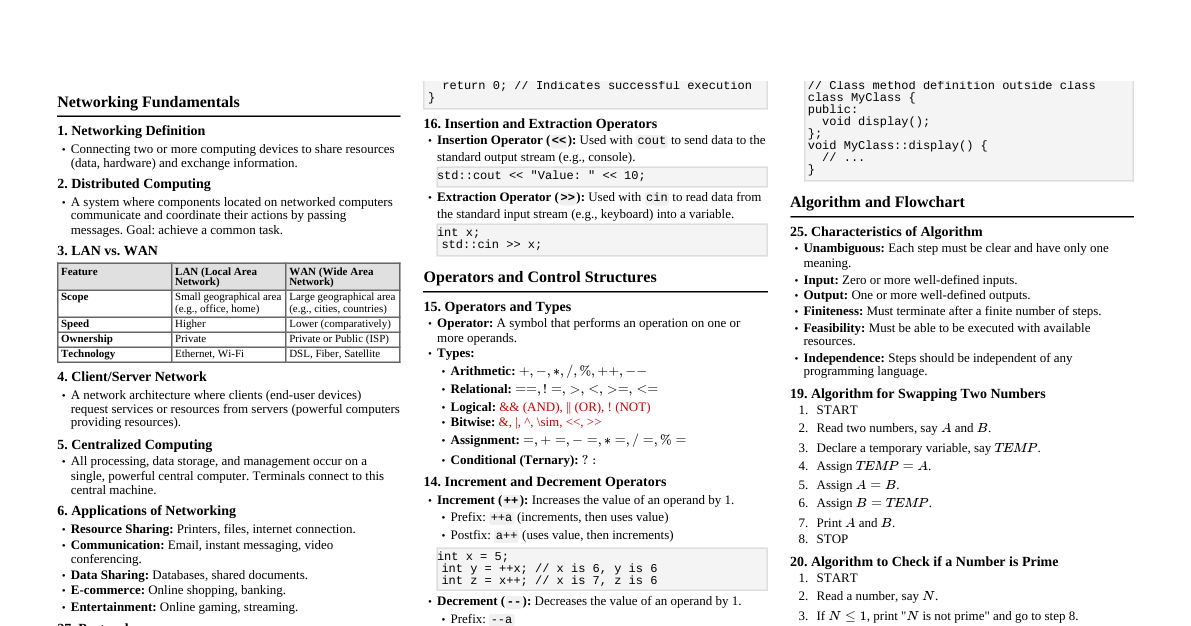
1. Networking Basics What is Networking? Networking refers to the practice of interconnecting computing devices to share data and resources. These devices are connected using communication links (wired or wireless) and follow a set of rules called protocols to exchange information. Distributed Computing A computational model where components of a software system are shared among multiple computers. These computers coordinate their activities by passing messages, appearing to the end-user as a single, coherent system. It offers scalability, reliability, and efficiency. LAN vs. WAN Feature LAN (Local Area Network) WAN (Wide Area Network) Definition Connects devices in a limited geographical area (e.g., home, office, school). Connects devices over a large geographical area (e.g., cities, countries, continents). Coverage Small area, typically within a single building or campus. Large area, often spanning multiple sites or global. Speed High data transfer rates (e.g., Ethernet, Wi-Fi). Lower data transfer rates compared to LANs, but improving. Ownership Typically owned and managed by a private organization. Often involves public telecommunication lines, managed by service providers. Examples Home Wi-Fi network, office Ethernet. The Internet, corporate networks connecting branches. Client/Server Network A distributed application architecture that partitions tasks or workloads between service providers (servers) and service requesters (clients). Clients request resources or services, and servers provide them. Client: A program or device that requests services or resources from a server. Server: A program or device that provides functionality or data to other programs or devices (clients). Centralized Computing A computing architecture where all computation, resources, and data are managed and stored in a central location, typically a powerful server or mainframe. Clients connect to this central system to perform tasks. Pros: Easier management, enhanced security, centralized backup. Cons: Single point of failure, potential bottlenecks, less flexible. Applications of Networking Resource Sharing: Sharing hardware (printers, scanners) and software (applications, databases). Communication: Email, instant messaging, video conferencing, VoIP. Data Sharing: Accessing shared files, databases, and web resources. E-commerce: Online shopping, banking, and business transactions. Entertainment: Online gaming, streaming media. Collaboration: Shared documents, project management tools. 2. C++ Programming Constructs If and If-Else Statement Conditional statements used to execute different blocks of code based on whether a condition is true or false. If Statement: if (condition) { // code to execute if condition is true } Example: int score = 85; if (score > 70) { cout << "Pass!" << endl; } If-Else Statement: if (condition) { // code to execute if condition is true } else { // code to execute if condition is false } Example: int age = 17; if (age >= 18) { cout << "Eligible to vote." << endl; } else { cout << "Not eligible to vote." << endl; } Switch Statement A multi-way branch statement that allows a variable to be tested for equality against a list of values. Each value is called a case, and the variable being switched on is checked for each case. switch (expression) { case value1: // code block 1 break; case value2: // code block 2 break; // ... more cases default: // code block if no match } Example: char grade = 'B'; switch (grade) { case 'A': cout << "Excellent!" << endl; break; case 'B': cout << "Good!" << endl; break; case 'C': cout << "Fair." << endl; break; default: cout << "Needs improvement." << endl; } Control Structures Statements that control the flow of execution in a program. They include: Sequential: Statements executed one after another. Selection (Conditional): if , if-else , switch statements. Iteration (Looping): for , while , do-while loops. Data Types in C++ Specify the type of data a variable can hold. They determine the size and memory layout of the variable, the range of values that can be stored, and the set of operations that can be applied. Type Description Size (typical) Range (typical) int Integer numbers 4 bytes $\pm 2 \times 10^9$ char Single character 1 byte $-128$ to $127$ or $0$ to $255$ float Single-precision floating-point 4 bytes $\pm 3.4 \times 10^{\pm 38}$ (7 decimal digits precision) double Double-precision floating-point 8 bytes $\pm 1.7 \times 10^{\pm 308}$ (15 decimal digits precision) bool Boolean ( true or false ) 1 byte true , false void Absence of type N/A N/A Integer and Real Constants Integer Constants: Numeric values without fractional parts. Decimal: 10 , -5 , 123 Octal (prefix 0 ): 012 (decimal 10) Hexadecimal (prefix 0x ): 0xA (decimal 10) Example: const int MAX_VALUE = 100; Real (Floating-Point) Constants: Numeric values with fractional parts. Standard form: 3.14 , -0.5 Exponential form (scientific notation): 1.2e-3 ($1.2 \times 10^{-3}$), 3.0E5 ($3.0 \times 10^5$) Example: const float PI = 3.14159f; Variables A named storage location in memory that can hold a value. Its value can change during program execution. Example: int count; (declares an integer variable named count ) Declaration of Variable The process of specifying the data type and name of a variable before it is used. This reserves memory for the variable. Syntax: dataType variableName; Example: int age; // Declares an integer variable 'age' double salary; // Declares a double-precision variable 'salary' char initial = 'J'; // Declares and initializes a character variable 'initial' Increment ( ++ ) and Decrement ( -- ) Operators Unary operators that increase or decrease the value of a variable by 1. Prefix: ++variable or --variable (increments/decrements, then uses the new value). Example: int x = 5; int y = ++x; // x becomes 6, y becomes 6 Postfix: variable++ or variable-- (uses the current value, then increments/decrements). Example: int a = 5; int b = a++; // b becomes 5, a becomes 6 Operators and Their Types Symbols that tell the compiler to perform specific mathematical or logical manipulations. Arithmetic Operators: + , - , * , / , % (modulus) Relational Operators: == , != , < , > , <= , >= Logical Operators: && (AND), || (OR), ! (NOT) Assignment Operators: = , += , -= , *= , /= , %= Bitwise Operators: & , | , ^ , ~ , << , >> Increment/Decrement Operators: ++ , -- Ternary/Conditional Operator: condition ? expr1 : expr2 Insertion ( << ) and Extraction ( >> ) Operators Used for input/output operations in C++ with streams. Insertion Operator ( << ): Used to "insert" data into an output stream (e.g., cout ). Example: cout << "Hello, World!" << endl; Extraction Operator ( >> ): Used to "extract" data from an input stream (e.g., cin ). Example: int num; cin >> num; Structure of a C++ Program A typical C++ program includes: #include <iostream> // Header for input/output operations // Global declarations (optional) int main() { // Main function: program execution begins here // Local declarations // Executable statements return 0; // Indicates successful execution } Block Diagram: Include Headers Global Declarations main() Function Local Declarations Executable Statements return 0; Keywords in C++ Reserved words that have special meaning to the compiler and cannot be used as identifiers (variable names, function names, etc.). Examples: int , float , double , char , bool , if , else , switch , case , default , for , while , do , break , continue , return , void , class , private , public , protected , this , new , delete , const , static , volatile , friend , virtual , typedef , etc. 3. Algorithms and Flowcharts Algorithm for Swapping Two Numbers Using a temporary variable: Start Declare three integer variables: a , b , temp . Read values for a and b . Store the value of a in temp : temp = a . Store the value of b in a : a = b . Store the value of temp in b : b = temp . Print the swapped values of a and b . End Without a temporary variable (using arithmetic operations): Start Declare two integer variables: a , b . Read values for a and b . Add a and b , store in a : a = a + b . Subtract b from a , store in b : b = a - b . Subtract b from a , store in a : a = a - b . Print the swapped values of a and b . End Algorithm to Check if a Number is Prime Start Declare an integer variable num and a boolean flag isPrime , initially true . Read num . If num <= 1 , set isPrime = false . Else, loop from i = 2 up to $\sqrt{\text{num}}$: If num is divisible by i (i.e., num % i == 0 ), then set isPrime = false and break the loop. If isPrime is true , print " num is a prime number". Else, print " num is not a prime number". End Program Analysis Steps The process of understanding the behavior and properties of a computer program. Key steps include: Problem Definition: Clearly understanding what the program is supposed to do. Requirement Gathering: Collecting all functional and non-functional requirements. Feasibility Study: Assessing whether the project is practical and achievable. System Design: Creating a high-level design of the system architecture. Detailed Design: Breaking down the system into smaller modules and defining their functionalities. Algorithm Development: Creating step-by-step procedures to solve the problem. Coding: Translating the design and algorithms into programming language code. Testing: Verifying that the program works as expected and meets requirements. Documentation: Creating user manuals, technical specifications, and comments within the code. Deployment & Maintenance: Releasing the program and providing ongoing support and updates. Flowchart Definition and Symbols A flowchart is a diagrammatic representation of an algorithm, workflow, or process. It uses various symbols to depict different steps and decisions. Symbol Name Description Terminal Represents the start or end of a program. Process Represents a step in the process, an action, or an operation. Input/Output Represents data being input into or output from the system. Decision Represents a point where a decision is made (e.g., Yes/No, True/False). Flow Line Indicates the direction of flow. Connector Connects parts of a flowchart on the same or different pages. Flowchart for Factorial of N Numbers START READ N FACT = 1 I = 1 I <= N ? NO YES FACT = FACT * I I = I + 1 PRINT FACT END Characteristics of an Algorithm Unambiguous: Each step must be clear and lead to only one interpretation. Input: An algorithm should have zero or more well-defined inputs. Output: An algorithm should have one or more well-defined outputs. Finiteness: An algorithm must terminate after a finite number of steps. Feasibility: The algorithm should be executable with the available resources. Independence: Steps should be independent of any programming code. 4. Advanced C++ Concepts Scope Resolution Operator ( :: ) A unary operator used to identify and differentiate between identifiers (variables, functions, classes) that have the same name but exist in different scopes. Accessing Global Variable: When a local variable has the same name as a global variable, ::variableName accesses the global one. int x = 10; // Global x int main() { int x = 20; // Local x cout << "Local x: " << x << endl; // 20 cout << "Global x: " << ::x << endl; // 10 return 0; } Accessing Class Members: Used to define a member function outside the class definition or to access static members. class MyClass { public: static int count; void func(); }; int MyClass::count = 0; // Defining static member outside class void MyClass::func() { // Defining member function outside class // ... } Accessing Namespaces: Used to access members of a specific namespace. namespace MyNamespace { int value = 100; } int main() { cout << MyNamespace::value << endl; // 100 return 0; } Protocol A set of rules that govern how devices communicate over a network. Protocols define the format, timing, sequencing, and error checking of data communication. Examples: HTTP (Hypertext Transfer Protocol): For web browsing. TCP/IP (Transmission Control Protocol/Internet Protocol): Fundamental for the Internet. FTP (File Transfer Protocol): For transferring files. SMTP (Simple Mail Transfer Protocol): For sending emails. Break and Continue Statement Statements used to alter the flow of control within loops. break Statement: Terminates the innermost loop ( for , while , do-while ) or switch statement immediately. Control passes to the statement immediately following the loop/switch. Example: for (int i = 0; i < 10; ++i) { if (i == 5) { break; // Loop terminates when i is 5 } cout << i << " "; // Prints 0 1 2 3 4 } continue Statement: Skips the rest of the current iteration of the innermost loop and proceeds to the next iteration. Example: for (int i = 0; i < 5; ++i) { if (i == 2) { continue; // Skips printing 2 } cout << i << " "; // Prints 0 1 3 4 } 5. Number Systems and Operations 1's Complement Subtraction To subtract $B$ from $A$ using 1's complement: Find the 1's complement of the subtrahend ($B$). Add the 1's complement of $B$ to $A$. If there is an end-around carry (most significant bit carry): Add the carry to the result (end-around carry). The result is positive. If there is no end-around carry: The result is negative. Find the 1's complement of the result to get the magnitude. Example: $(10110)_2 - (11101)_2$ $A = 10110_2$ $B = 11101_2$ 1's complement of $B$ ($11101_2$) is $00010_2$. Add $A$ to 1's complement of $B$: 10110 + 00010 ------- 11000 No end-around carry. So, the result is negative. 1's complement of $11000_2$ is $00111_2$. Therefore, $(10110)_2 - (11101)_2 = -(00111)_2 = -7_{10}$. Number System Conversions $(111.011)_2$ to Decimal: $$1 \cdot 2^2 + 1 \cdot 2^1 + 1 \cdot 2^0 + 0 \cdot 2^{-1} + 1 \cdot 2^{-2} + 1 \cdot 2^{-3}$$ $$= 4 + 2 + 1 + 0 + 0.25 + 0.125 = (7.375)_{10}$$ $(5971)_8$ to Binary: Convert each octal digit to its 3-bit binary equivalent: $5_8 = 101_2$ $9_8$ is not a valid octal digit. Assuming this is a typo and should be $(5771)_8$. If $(5771)_8$: $5_8 = 101_2$ $7_8 = 111_2$ $7_8 = 111_2$ $1_8 = 001_2$ So, $(5771)_8 = (101111111001)_2$ If the original number was indeed $(5971)_8$, it's an invalid octal number because it contains the digit '9'. Binary Addition $(0011010)_2 + (111001)_2$: 0011010 + 00111001 (padded to 7 bits) --------- 1010111 Step-by-step: $0+1=1$ $1+0=1$ $0+0=0$ $1+1=0$ (carry 1) $1+1+1=1$ (carry 1) $0+0+1=1$ $0+0=0$ Result: $(1010111)_2$ $(1010111)_2 + (1001111)_2$: 1010111 + 1001111 --------- 10100110 Step-by-step: $1+1=0$ (carry 1) $1+1+1=1$ (carry 1) $1+1+1=1$ (carry 1) $0+1+1=0$ (carry 1) $1+0+1=0$ (carry 1) $0+0+1=1$ $1+1=0$ (carry 1) $0+0+1=1$ Result: $(10100110)_2$