Java Programming Cheatsheet
Cheatsheet Content
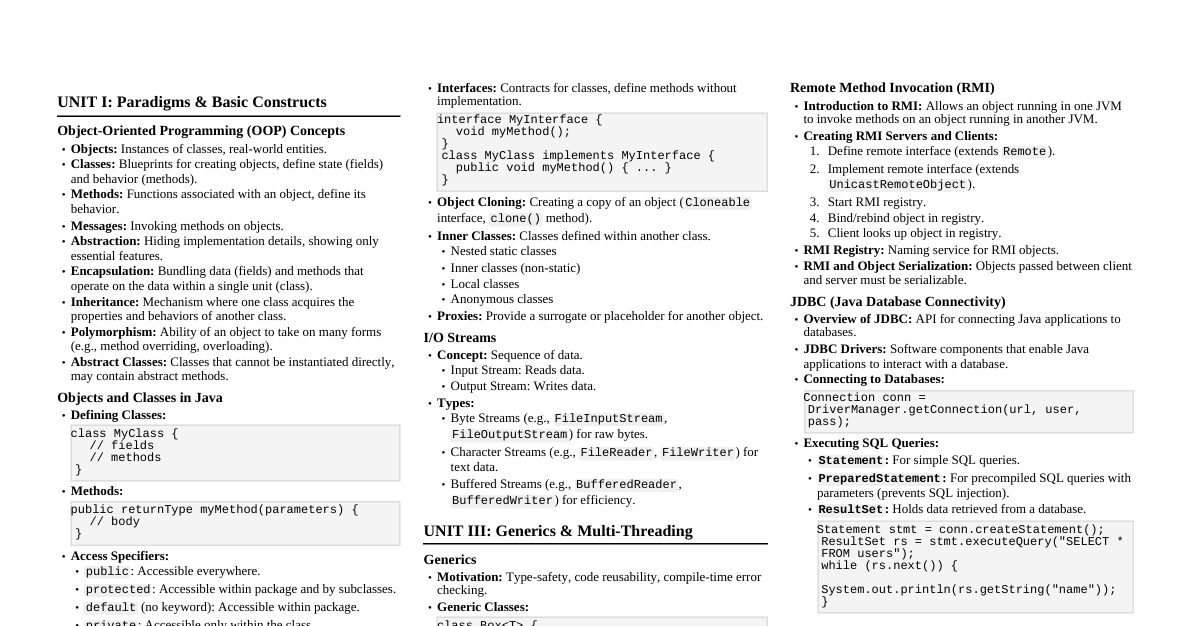
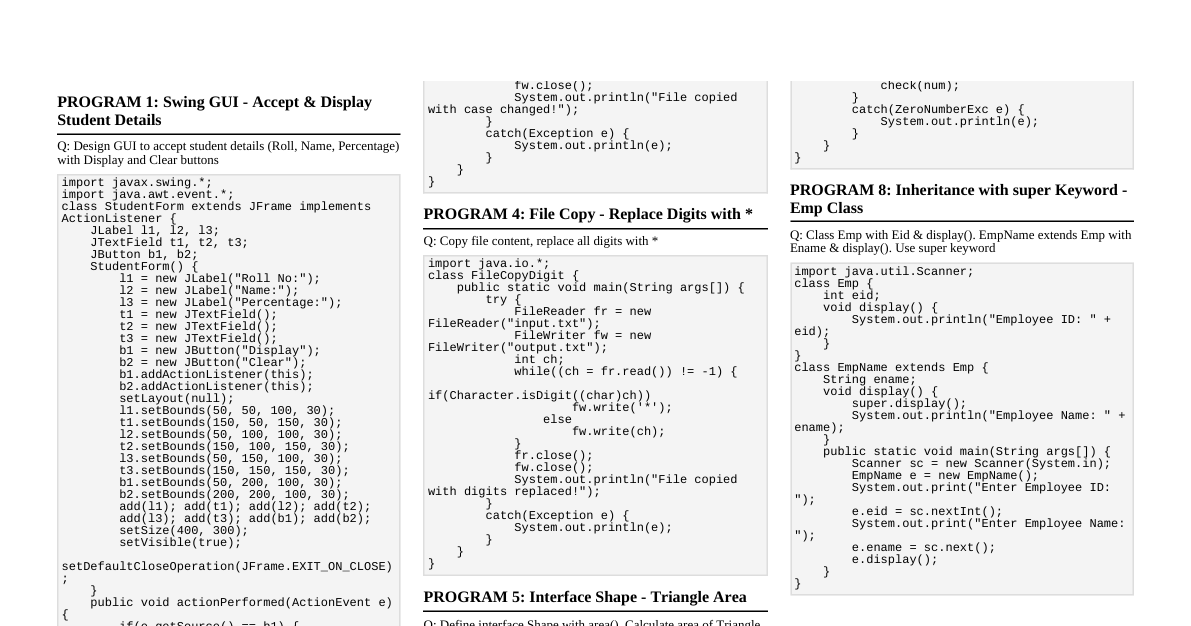
1. Basics & Fundamentals Variables & Data Types Primitive Types: byte , short , int , long , float , double , char , boolean Reference Types: Objects (e.g., String , arrays) Declaration: dataType variableName = value; Input/Output Input (Scanner): import java.util.Scanner; Scanner sc = new Scanner(System.in); int i = sc.nextInt(); String s = sc.nextLine(); sc.close(); Output (System.out): System.out.print("Hello"); System.out.println("World!"); // New line System.out.printf("Value: %d%n", 10); Operators Arithmetic: + , - , * , / , % Relational: == , != , < , > , <= , >= Logical: && (AND), || (OR), ! (NOT) Assignment: = , += , -= , etc. Increment/Decrement: ++ , -- Control Statements If-Else: if (condition) { // code } else if (otherCondition) { // code } else { // code } Switch: switch (expression) { case value1: // code break; case value2: // code break; default: // code } Loops For Loop: for (int i = 0; i Enhanced For (for-each): for (DataType item : collection) { // code } While Loop: while (condition) { // code } Do-While Loop: do { // code } while (condition); Arrays 1D Array: int[] arr = new int[5]; or int[] arr = {1, 2, 3}; 2D Array: int[][] matrix = new int[3][4]; Access: arr[index] , matrix[row][col] Length: arr.length String Basics Immutability: String objects cannot be changed after creation. Common Methods: length() , charAt() , substring() , indexOf() , equals() , equalsIgnoreCase() , trim() , toLowerCase() , toUpperCase() Concatenation: + operator or concat() method. 2. Object-Oriented Programming (OOP) Classes & Objects Class: Blueprint for creating objects. Defines state (fields) and behavior (methods). Object: Instance of a class. Declaration: class MyClass { int field; void method() {} } MyClass obj = new MyClass(); Constructors Special method to initialize objects. Same name as class, no return type. Default: Provided automatically if no other constructor is defined. Parameterized: class MyClass { int value; MyClass(int v) { this.value = v; } } this & super Keywords this : Refers to the current object. Used to distinguish instance variables from parameters, call other constructors in the same class ( this() ). super : Refers to the parent class object. Used to call parent class methods or constructors ( super() ). Inheritance A class (subclass) inherits properties and methods from another class (superclass). extends keyword: class Child extends Parent {} Types: Single, Multilevel, Hierarchical. (Java does not support multiple inheritance of classes). Polymorphism "Many forms." Objects can take on many forms. Method Overloading: Multiple methods in the same class with the same name but different parameters. (Compile-time polymorphism). Method Overriding: Subclass provides a specific implementation for a method already defined in its superclass. (Runtime polymorphism). Use @Override annotation. Encapsulation Bundling data (fields) and methods that operate on the data within a single unit (class). Achieved by making fields private and providing public getter and setter methods. Abstraction Hiding implementation details and showing only essential features. Abstract Classes: Declared with abstract keyword. Can have abstract (no body) and concrete methods. Cannot be instantiated. Subclasses must implement abstract methods. Interfaces: Blueprint of a class. Contains abstract methods (implicitly public abstract ) and constants (implicitly public static final ). From Java 8, can have default and static methods. A class implements an interface. Supports multiple inheritance of type. static vs Non- static static : Belongs to the class, not to any specific object. static fields are shared by all instances. static methods can be called directly using the class name. Non- static (Instance): Belongs to an instance of the class. Instance fields/methods require an object to be accessed. final Keyword final variable: Value cannot be changed after initialization (constant). final method: Cannot be overridden by subclasses. final class: Cannot be inherited. Packages & Access Modifiers Packages: Organize classes into namespaces. package com.example.app; Access Modifiers: public : Accessible everywhere. protected : Accessible within the package and by subclasses. Default (no keyword): Accessible only within the package. private : Accessible only within the declaring class. 3. Collections & Generics Collection Interfaces List : Ordered collection, allows duplicates. ArrayList : Resizable array, good for random access. LinkedList : Doubly linked list, good for insertions/deletions. Set : Unordered collection, no duplicates. HashSet : Uses hash table, fast operations, no order guarantee. LinkedHashSet : Hash table + linked list, maintains insertion order. TreeSet : Uses a red-black tree, sorted order. Map : Stores key-value pairs, unique keys. HashMap : Hash table, fast operations, no order guarantee. LinkedHashMap : Hash table + linked list, maintains insertion order. TreeMap : Red-black tree, sorted by key. Queue Interfaces Queue : FIFO (First-In, First-Out). PriorityQueue : Elements ordered by natural ordering or a Comparator . Deque (Double-Ended Queue): Supports element insertion/removal at both ends. ArrayDeque : Resizable array, no capacity restrictions, faster than LinkedList for implementing stacks/queues. Stack : LIFO (Last-In, First-Out). (Legacy class, Deque preferred). Iterators Iterator : Universal way to traverse collections. Methods: hasNext() , next() , remove() . ListIterator : For List implementations. Allows bidirectional traversal, modification, and adding elements. Comparable vs Comparator Comparable : Defines natural ordering for objects of a class ( compareTo() method). Comparator : Defines custom ordering for objects ( compare() method). Can have multiple comparators for one class. 4. Utility Classes & Features StringBuilder & StringBuffer Mutable sequences of characters. More efficient for string manipulation than String . StringBuilder : Not thread-safe, faster. StringBuffer : Thread-safe, slower. Wrapper Classes Provide object representations for primitive types (e.g., Integer for int , Double for double ). Useful for collections (which store objects) and methods requiring objects. Autoboxing & Unboxing Autoboxing: Automatic conversion from primitive to wrapper type (e.g., int to Integer ). Unboxing: Automatic conversion from wrapper type to primitive (e.g., Integer to int ). Enums (Enumerations) A special class that represents a group of constants. enum Day { SUNDAY, MONDAY, ... } Varargs (Variable Arguments) Allows a method to accept zero or multiple arguments of a specified type. void printNumbers(int... numbers) { ... } 5. Exception Handling try-catch-finally try : Block of code that might throw an exception. catch : Handles a specific type of exception. finally : Block that always executes, regardless of whether an exception occurred or was handled. Syntax: try { // Risky code } catch (IOException e) { // Handle IO error } catch (Exception e) { // Generic catch // Handle other errors } finally { // Cleanup code } throw vs throws throw : Used to explicitly throw an exception from a method. throw new MyException("Error!"); throws : Used in method signature to declare which exceptions a method might throw. void readFile() throws IOException {} Custom Exceptions Create your own exception by extending Exception or RuntimeException . class MyCustomException extends Exception { ... } 6. Multithreading Thread class & Runnable interface Thread class: Extend Thread and override run() method. Runnable interface: Implement Runnable , provide run() method. Then create Thread object with Runnable instance. (Preferred approach). Start a thread: threadObj.start(); (calls run() in a new thread). Thread Lifecycle New -> Runnable -> Running -> Blocked/Waiting -> Terminated Methods: start() , run() , sleep() , join() , wait() , notify() , notifyAll() . Synchronization Prevents multiple threads from accessing shared resources simultaneously. synchronized keyword: Method: public synchronized void myMethod() {} Block: synchronized(this) { // critical section } Inter-thread Communication wait() , notify() , notifyAll() methods (from Object class). Must be called within a synchronized block/method. Deadlock & Ways to Avoid Occurs when two or more threads are blocked forever, waiting for each other. Avoidance: Acquire locks in a consistent order. Avoid nested locks. Use timeouts for acquiring locks. Use java.util.concurrent utilities (e.g., ReentrantLock ). Executor Framework (Basic) Manages a pool of threads for executing tasks. ExecutorService executor = Executors.newFixedThreadPool(10); executor.submit(runnableTask); or executor.submit(callableTask); executor.shutdown(); 7. File I/O File class Represents file and directory paths. Used to get file properties, create/delete files/directories. File file = new File("path/to/file.txt"); file.exists() , file.createNewFile() , file.delete() , file.isDirectory() Byte Streams FileInputStream : Reads bytes from a file. FileOutputStream : Writes bytes to a file. Used for raw binary data (images, audio). Example: try (FileInputStream fis = new FileInputStream("in.txt"); FileOutputStream fos = new FileOutputStream("out.txt")) { int byteRead; while ((byteRead = fis.read()) != -1) { fos.write(byteRead); } } catch (IOException e) { e.printStackTrace(); } Character Streams FileReader / FileWriter : Reads/writes characters. BufferedReader / BufferedWriter : Buffers characters for efficient reading/writing, line-by-line operations. Used for text data. Example: try (BufferedReader br = new BufferedReader(new FileReader("in.txt")); BufferedWriter bw = new BufferedWriter(new FileWriter("out.txt"))) { String line; while ((line = br.readLine()) != null) { bw.write(line); bw.newLine(); } } catch (IOException e) { e.printStackTrace(); } Serialization & Deserialization Serialization: Converting an object's state into a byte stream. Deserialization: Reconstructing an object from a byte stream. Class must implement Serializable interface. Use ObjectOutputStream and ObjectInputStream . 8. Java 8+ Features Lambda Expressions Concise way to represent an anonymous function (a function without a name). (parameters) -> expression or (parameters) -> { statements; } Used with functional interfaces. Functional Interfaces An interface with exactly one abstract method. Can be annotated with @FunctionalInterface . Examples: Runnable , Callable , Consumer , Predicate , Function , Supplier . Streams API Provides a declarative way to process collections of data. Operations: Intermediate: filter() , map() , sorted() , distinct() (return a new stream). Terminal: forEach() , collect() , reduce() , count() , min() , max() (produce a result or side-effect). Example: list.stream() .filter(n -> n % 2 == 0) .map(n -> n * 2) .forEach(System.out::println); Method References Shorthand for lambda expressions that call an existing method. Types: Static method: ClassName::staticMethod Instance method of a particular object: object::instanceMethod Instance method of an arbitrary object of a particular type: ClassName::instanceMethod Constructor: ClassName::new default / static Methods in Interfaces default : Provides a default implementation for methods in interfaces, allowing new methods to be added without breaking existing implementations. static : Utility methods directly associated with the interface, not with implementing objects. Optional class Container object that may or may not contain a non-null value. Helps avoid NullPointerException . Methods: isPresent() , get() , orElse() , orElseThrow() , ifPresent() . Date & Time API ( java.time ) Modern, immutable, thread-safe date and time API. Classes: LocalDate , LocalTime , LocalDateTime , ZonedDateTime , Instant , Duration , Period . Example: LocalDate today = LocalDate.now(); LocalTime now = LocalTime.now(); LocalDateTime dt = LocalDateTime.of(today, now); 9. Advanced Java EE / Spring Concepts JDBC (Java Database Connectivity) API for connecting to and interacting with databases. Steps: Load driver -> Establish connection -> Create statement -> Execute query -> Process ResultSet -> Close resources. Connection , Statement , PreparedStatement , ResultSet . Servlets Java classes that extend the capabilities of servers (web servers). Handle HTTP requests and generate dynamic responses. doGet() , doPost() methods. JSP (JavaServer Pages) Technology for developing web pages that support dynamic content. JSP pages are translated into Servlets. Combines HTML with Java code (scriptlets, expressions, directives). MVC Architecture (Model-View-Controller) Design pattern for building user interfaces. Model: Data and business logic. View: Presentation layer (UI). Controller: Handles user input, interacts with Model and View. Cookies & Sessions Cookies: Small pieces of data sent from a website and stored on the user's web browser. Client-side storage. Sessions: Server-side mechanism to store user-specific data across multiple requests during a single visit. Filters & Listeners (Servlet API) Filters: Intercept requests and responses before/after they reach/leave the servlet. Used for logging, authentication, compression. Listeners: Respond to events (e.g., servlet context lifecycle, session lifecycle, request lifecycle). 10. Spring Framework (Core) IoC (Inversion of Control) Framework controls object creation and lifecycle, rather than the developer. Spring Container ( ApplicationContext ) manages beans. DI (Dependency Injection) Specific form of IoC where dependencies are provided to an object by an external entity (the container), rather than the object creating them itself. Types: Constructor Injection, Setter Injection, Field Injection ( @Autowired ). Beans & Bean Scopes Bean: An object instantiated, assembled, and managed by a Spring IoC container. Scopes: singleton (default): One instance per container. prototype : A new instance every time it's requested. request , session , application , websocket (web-aware scopes). 11. Spring Boot (Web) Auto-configuration Spring Boot automatically configures many aspects of your application based on classpath dependencies. Reduces boilerplate configuration. REST APIs Building web services using HTTP methods (GET, POST, PUT, DELETE) for CRUD operations. @RestController : Combines @Controller and @ResponseBody . @RequestMapping : Maps HTTP requests to handler methods. Can use @GetMapping , @PostMapping , etc. Controllers Handle incoming web requests, process input, and return a response (e.g., JSON, XML, view name). Annotated with @Controller or @RestController . Services Contain business logic. Often annotated with @Service . Act as an intermediary between controllers and repositories. Repositories Handle data access logic (CRUD operations with the database). Often extend Spring Data JPA interfaces (e.g., JpaRepository ). Annotated with @Repository . Application Properties application.properties or application.yml files for configuration. e.g., server.port=8080 , spring.datasource.url=jdbc:h2:mem:testdb Actuator Provides production-ready features like monitoring, metrics, and health checks for Spring Boot applications. Endpoints like /actuator/health , /actuator/info . Error Handling (Spring Boot) @ControllerAdvice / @RestControllerAdvice : Global exception handling. @ExceptionHandler : Defines methods to handle specific exceptions. ResponseStatusException : Programmatically throw HTTP status code exceptions. 12. Spring Data JPA / Hibernate Entities Plain Old Java Objects (POJOs) that represent tables in a relational database. Annotated with @Entity . Primary key with @Id and @GeneratedValue . Relationships Define how entities are related in the database. @OneToOne : One-to-one mapping. @OneToMany / @ManyToOne : Often used together for one-to-many. @ManyToMany : Many-to-many mapping. Specify fetching strategies ( FetchType.LAZY , FetchType.EAGER ) and cascading options. Pagination & Sorting Using Pageable interface in repository methods. Page findByName(String name, Pageable pageable); Custom Queries (JPQL / Native) JPQL (Java Persistence Query Language): Object-oriented query language for entities. Annotate repository methods with @Query . @Query("SELECT u FROM User u WHERE u.email = ?1") Can also write native SQL queries: @Query(value = "SELECT * FROM users WHERE email = ?1", nativeQuery = true)