Python Cheatsheet
Cheatsheet Content
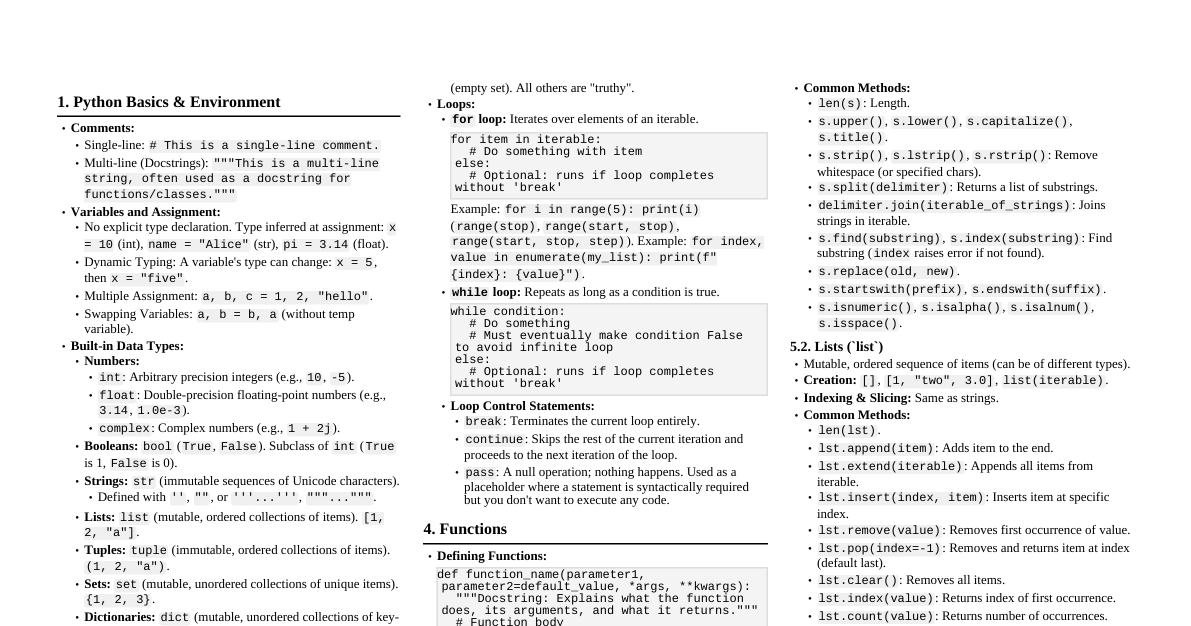
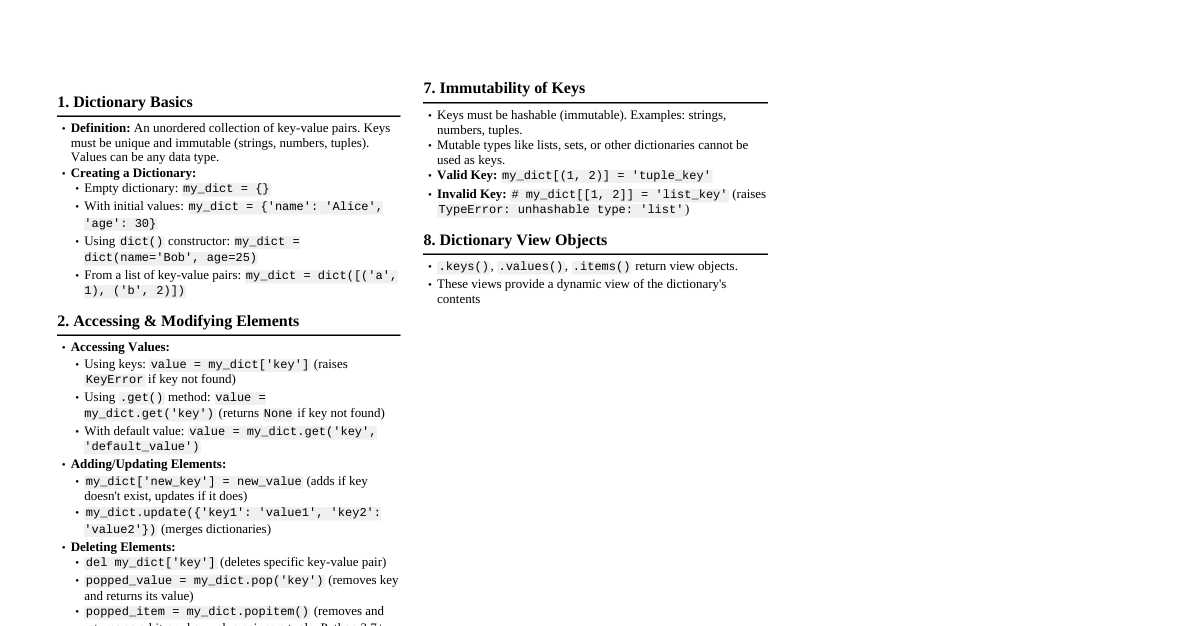
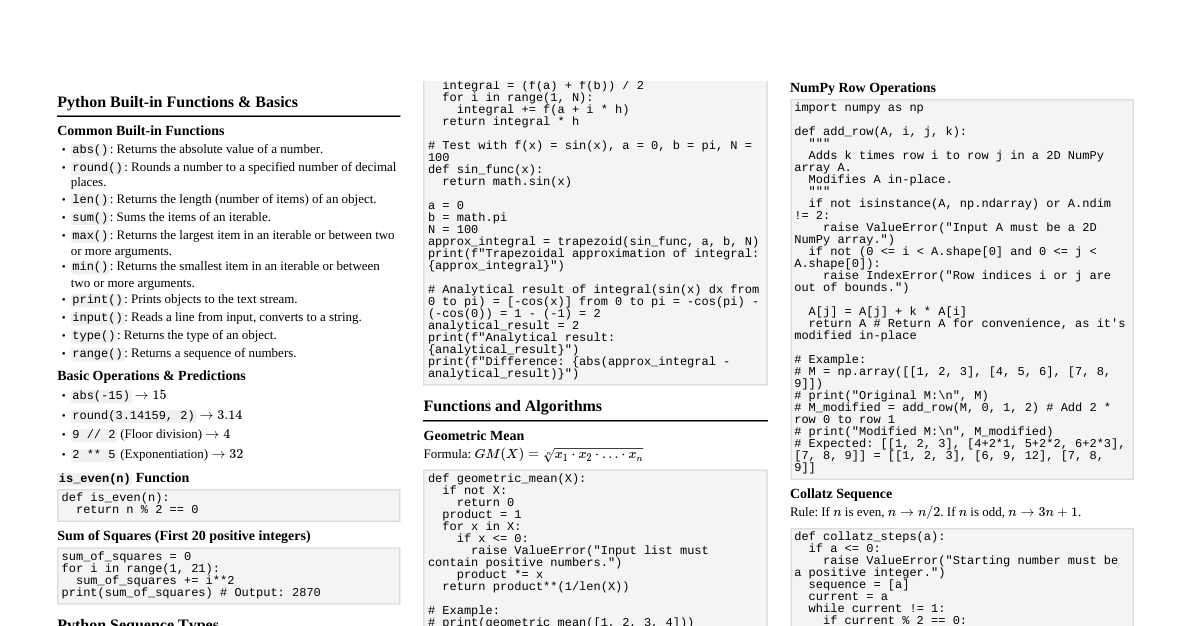
Chapter 1: The Way of the Program 1.1 The Python programming language High-level languages: Python, C++, Java. Easier to write, read, and portable. Low-level languages: Machine code, assembly language. Run directly by computer. Interpreter: Executes high-level programs line by line. Compiler: Translates source code to object code (executable) before running. Interactive Mode: Type Python programs, interpreter displays results. Prompt: >>> Script Mode: Store code in a .py file and execute it. 1.2 What is a program? A sequence of instructions for computation. Basic instructions: input, output, math, conditional execution, repetition. 1.3 What is debugging? Process of finding and removing programming errors (bugs). Syntax errors: Python cannot execute due to incorrect structure (e.g., unmatched parentheses). Runtime errors (exceptions): Errors detected while the program is running (e.g., `NameError`). Semantic errors: Program runs but does not do what was intended. Experimental debugging: Forming hypotheses, modifying code, and testing predictions. 1.4 Formal and natural languages Natural languages: Evolved naturally (e.g., English). Ambiguous, redundant, literalness with idioms. Formal languages: Designed for specific applications (e.g., programming languages). Unambiguous, concise, literal. Syntax: Rules governing structure (tokens, arrangement). Tokens: Basic elements of the language (e.g., words, numbers). Parsing: Figuring out the structure of a statement. 1.5 The first program print 'Hello, World!' (Python 2) print('Hello, World!') (Python 3) Print statement: Displays a value on the screen. 1.6 Debugging Experiment with features, make mistakes to understand error messages. Think of the computer as an employee: good at speed/precision, bad at empathy/big picture. 1.7 Glossary Problem solving: Formulating a problem, finding, and expressing its solution. High-level language: Easy for humans to read/write (e.g., Python). Low-level language: Easy for computers to execute (machine/assembly language). Portability: Program runs on different computers with few modifications. Interpret: Execute a high-level program line by line. Compile: Translate a high-level program into low-level all at once. Source code: High-level program before compiling. Object code (executable): Output of compiler. Prompt: Characters shown by interpreter when ready for input ( >>> ). Script: Program stored in a file. Interactive mode: Using interpreter by typing commands at prompt. Script mode: Using interpreter to execute statements from a file. Program: Set of instructions specifying a computation. Algorithm: General process for solving a category of problems. Bug: Error in a program. Debugging: Process of finding and removing errors. Syntax: Structure of a program. Syntax error: Error making parsing impossible. Exception: Error detected during program running. Semantics: Meaning of a program. Semantic error: Program does something other than intended. Natural language: Human language that evolved naturally. Formal language: Designed for specific purposes (e.g., programming languages). Token: Basic element of syntactic structure (like a word). Parse: Examine and analyze syntactic structure. Print statement: Instruction to display a value. Chapter 2: Variables, Expressions and Statements 2.1 Values and types Value: Basic unit of data (e.g., 1 , 'Hello' ). Types: int : Integers (e.g., 2 ). str : Strings (e.g., 'Hello, World!' ). float : Numbers with fractional parts (e.g., 3.2 ). type(value) : Returns the type of a value. 2.2 Variables Variable: A name that refers to a value. Assignment statement: Creates new variables and gives them values (e.g., message = 'Hello' ). State diagram: Graphical representation of variables and their values. 2.3 Variable names and keywords Names can contain letters and numbers, must begin with a letter. Case-sensitive ( pi is not Pi ). Keywords: Reserved words used by the interpreter; cannot be used as variable names (e.g., class , def , while ). 2.4 Operators and operands Operators: Special symbols representing computations (e.g., + , * ). Operands: Values the operator applies to. Arithmetic operators: + (addition), - (subtraction), * (multiplication), / (division), ** (exponentiation), % (modulus). Floor division (Python 2): / for integers results in integer (rounds down). Floor division (Python 3): // for integers results in integer. / always returns float. 2.5 Expressions and statements Expression: Combination of values, variables, and operators that represents a single result value (e.g., x + 17 ). Statement: Unit of code Python interpreter can execute; has no value (e.g., print , assignment). 2.6 Interactive mode and script mode Interactive mode evaluates and displays expressions immediately. Script mode evaluates expressions but doesn't display results unless explicitly told (e.g., with print ). 2.7 Order of operations (PEMDAS) P arentheses (highest precedence). E xponentiation. M ultiplication, D ivision (same precedence, left to right). A ddition, S ubtraction (same precedence, left to right). 2.8 String operations + : Concatenation (joins strings). * : Repetition (repeats string $N$ times). 2.9 Comments Notes in programs to explain code, starting with # . Ignored by interpreter. 2.10 Debugging Common syntax errors: illegal variable names (keywords) or characters. Common runtime error: "use before def" (`NameError`). Common semantic error: incorrect order of operations. 2.11 Glossary Operand: Value an operator operates on. Floor division: Divides two numbers and chops off fraction. Evaluate: Simplify an expression to a single value. Rules of precedence: Rules for evaluating expressions with multiple operators. Concatenate: Join two operands end-to-end. Comment: Program information for other programmers, ignored during execution. Chapter 3: Functions 3.1 Function calls Function: Named sequence of statements performing a computation. Function call: Executes a function by name (e.g., type('Hello') ). Argument: Value provided to a function when called. Return value: Result of a function. 3.2 Type conversion functions int(value) : Converts to integer. float(value) : Converts to floating-point. str(value) : Converts to string. 3.3 Math functions Module: File containing a collection of related functions. import math : Imports the math module. Dot notation: Access functions/variables in a module (e.g., math.log10(ratio) , math.pi ). 3.4 Composition Using an expression as part of a larger expression, or a statement as part of a larger statement. Function arguments can be any expression, including other function calls. 3.5 Adding new functions Function definition: Specifies function name and statements (e.g., def print_lyrics(): ... ). Header: First line of a function definition (ends with : ). Body: Indented statements inside a function definition. Function names follow variable naming rules; avoid keywords. Function definitions create function objects; statements inside are not executed until called. 3.6 Definitions and uses Function definitions create function objects. Statements inside a function are executed only when the function is called. 3.7 Flow of execution Order in which statements are executed. Begins at the first statement, proceeds top-to-bottom. Function call: a detour to the function body, then returns to where it left off. 3.8 Parameters and arguments Parameters: Variables inside a function assigned to arguments (e.g., bruce in def print_twice(bruce): ). Arguments are evaluated before the function is called. 3.9 Variables and parameters are local Local variable: Defined inside a function, exists only within that function. Parameters are also local. 3.10 Stack diagrams Graphical representation of function calls, their local variables, and parameters. Frame: Box representing a function call, containing local variables and parameters. Frames are arranged in a stack (caller at bottom, current function at top). __main__ : Special name for the topmost frame (program entry point). Traceback: List of functions executing when an error occurs. 3.11 Fruitful functions and void functions Fruitful functions: Return a value (e.g., math functions). Void functions: Perform an action but don't return a value (e.g., print_twice ). Their return value is None . 3.12 Why functions? Name a group of statements for readability/debugging. Reduce program size by eliminating repetitive code. Allow for easier changes (only one place to modify). Facilitate debugging by testing parts one at a time. Enable code reuse. 3.13 Importing with from import math : Imports module object; access contents with dot notation (e.g., math.pi ). from math import pi : Imports specific object; access directly (e.g., pi ). from math import * : Imports all objects; access directly. 3.14 Debugging Avoid mixing spaces and tabs for indentation. Always save your program before running. Use print 'hello' to confirm you're running the correct code. 3.15 Glossary Function object: Value created by a function definition. Local variable: Variable defined inside a function, usable only there. Return value: Result of a function. Fruitful function: Returns a value. Void function: Has no return value (returns None ). Module: File containing functions/definitions. Import statement: Reads a module file, creates module object. Module object: Provides access to values in a module. Dot notation: Syntax for calling a function in a module ( module.function ). Composition: Using an expression/statement as part of a larger one. Flow of execution: Order statements run. Stack diagram: Graphical representation of function calls, variables, values. Frame: Box in stack diagram for a function call. Traceback: List of executing functions when an exception occurs. Chapter 4: Case Study: Interface Design 4.1 TurtleWorld Drawing lines by steering turtles around the screen. from swampy.TurtleWorld import * : Imports TurtleWorld functions. world = TurtleWorld() : Creates a TurtleWorld object. bob = Turtle() : Creates a Turtle object. wait_for_user() : Pauses program until user interaction. Turtle functions: fd(turtle, distance) (forward), bk(turtle, distance) (backward), lt(turtle, angle) (left turn), rt(turtle, angle) (right turn), pu() (pen up), pd() (pen down). Instance: A member of a set (e.g., bob is an instance of Turtle ). 4.2 Simple repetition for statement: Repeats a block of code. Syntax: for item in sequence: followed by an indented body. Example: Drawing a square using a for loop. 4.3 Exercises Write a function square(t, length) to draw a square. Write a function polygon(t, n, length) to draw an $n$-sided regular polygon. Exterior angle is $360/n$ degrees. Write a function circle(t, r) that draws an approximate circle using polygon . 4.4 Encapsulation Encapsulation: Transforming a sequence of statements into a function definition. Benefits: Naming code for readability, reusability. 4.5 Generalization Generalization: Replacing something specific (e.g., a number) with something general (e.g., a variable or parameter). Makes functions more versatile. 4.6 Interface design Keyword arguments: Arguments that include the parameter name (e.g., polygon(bob, n=7, length=70) ). Interface: Summary of how to use a function (parameters, what it does, return value). A "clean" interface is "as simple as possible, but not simpler." 4.7 Refactoring Refactoring: Rearranging a program to improve function interfaces and code reuse. Example: Factoring out common code into a more general function (e.g., polyline ). 4.8 A development plan Development plan: Process for writing programs. Steps: Write small program without functions. Encapsulate into a function. Generalize with parameters. Repeat until functions work. Refactor for improvements. 4.9 docstring Docstring: String at the beginning of a function explaining its interface. Triple-quoted for multiline documentation. Important for interface design. 4.10 Debugging Interface: Like a contract between function and caller. Preconditions: Requirements that must be true before function execution. Postconditions: Conditions that must be true after function execution. Bugs in caller if preconditions are violated. 4.11 Glossary Instance: Member of a set. Loop: Part of a program that can execute repeatedly. Encapsulation: Transforming statements into a function definition. Generalization: Replacing specific with general (variable/parameter). Keyword argument: Argument including parameter name. Interface: Description of function use (arguments, return value). Refactoring: Modifying program to improve function interfaces/code quality. Development plan: Process for writing programs. Docstring: Documentation string at function start. Precondition: Requirement before function starts. Postcondition: Requirement after function ends. Chapter 5: Conditionals and Recursion 5.1 Modulus operator Modulus operator ( % ): Returns the remainder of division. Useful for checking divisibility ( x % y == 0 ) or extracting digits. 5.2 Boolean expressions Boolean expression: Evaluates to either True or False . Relational operators: == (equal to), != (not equal to), > (greater than), < (less than), >= (greater than or equal to), <= (less than or equal to). True and False are special values of type bool . 5.3 Logical operators Logical operators: and , or , not . and : True if both operands are true. or : True if at least one operand is true. not : Negates a boolean expression. Python interprets any nonzero number as "true" in a boolean context. 5.4 Conditional execution Conditional statement: Controls flow based on a condition. if statement: Executes indented block if condition is true. Condition: Boolean expression determining branch execution. Compound statement: Statement with a header and an indented body. pass statement: Does nothing; used as a placeholder. 5.5 Alternative execution if-else statement: Executes one of two branches based on a condition. Branch: Alternative sequence of statements. 5.6 Chained conditionals if-elif-else statement: Handles more than two possibilities. elif is short for "else if." Only the first true branch is executed. 5.7 Nested conditionals One conditional statement inside another. Can become difficult to read; logical operators can simplify. 5.8 Recursion Recursion: A function calling itself. countdown(n) example: Prints n , then calls countdown(n-1) until n <= 0 (base case). Base case: Conditional branch in a recursive function that does not make a recursive call. return statement: Exits function immediately. 5.9 Stack diagrams for recursive functions Each recursive call creates a new function frame on the stack. The bottom frame (base case) does not make a recursive call. 5.10 Infinite recursion Infinite recursion: Recursion that never reaches a base case, leading to a runtime error ("Maximum recursion depth exceeded"). 5.11 Keyboard input raw_input() (Python 2) / input() (Python 3): Gets string input from user. Prompt can be passed as an argument (e.g., raw_input('Prompt: ') ). \n : Newline character. Converting input to int (e.g., int(speed) ) can cause ValueError if input is not a digit string. 5.12 Debugging Tracebacks show error type and location. IndentationError : Often caused by invisible spaces/tabs. Error messages indicate where problem was discovered, not necessarily where it was caused. 5.13 Glossary Modulus operator: % , yields remainder. Boolean expression: Evaluates to True or False . Relational operator: Compares operands ( == , != , > , < , >= , <= ). Logical operator: Combines boolean expressions ( and , or , not ). Conditional statement: Controls flow based on condition. Condition: Boolean expression in conditional statement. Compound statement: Header and body. Branch: Alternative statement sequence. Chained conditional: if-elif-else . Nested conditional: Conditional inside another. Recursion: Function calling itself. Base case: Recursive function branch without recursive call. Infinite recursion: Recursion without a base case, causes runtime error. Chapter 6: Fruitful Functions 6.1 Return values Fruitful functions: Produce a result value. return expression : Exits function, uses expression as return value. Temporary variables can aid debugging. Multiple return statements are possible, but only one executes. Dead code: Code after a return statement that can never be executed. If no return statement or return without argument, function returns None . abs(x) : Built-in function for absolute value. 6.2 Incremental development Incremental development: Adding and testing small amounts of code at a time to avoid long debugging sessions. Steps: Start with a working program, make small changes. Use temporary variables to check intermediate values. Remove scaffolding or consolidate statements once working. Scaffolding: Code useful during development but not part of final product (e.g., print statements for debugging). 6.3 Composition Calling one function from within another. Can make code more concise by composing function calls (e.g., return area(distance(xc, yc, xp, yp)) ). 6.4 Boolean functions Functions that return boolean values ( True or False ). Often named as yes/no questions (e.g., is_divisible ). Can return boolean expression directly (e.g., return x % y == 0 ). 6.5 More recursion Python is a complete programming language; anything computable can be expressed. Turing Thesis: A formal language can express any computation. Recursive definition: Definition containing a reference to the thing being defined (e.g., factorial, Fibonacci). Leap of faith: Assuming a function works correctly without examining its body, especially for recursive calls. 6.6 Leap of faith Assume recursive calls work correctly, then verify the current step. 6.7 One more example (Fibonacci) fibonacci(0) = 0 fibonacci(1) = 1 fibonacci(n) = fibonacci(n-1) + fibonacci(n-2) 6.8 Checking types Input type validation for functions (e.g., factorial(1.5) leads to infinite recursion). isinstance(value, type) : Checks if value is of a specific type. Guardian: Conditional statement protecting code from values that might cause an error. 6.9 Debugging Use print statements to trace flow of execution and variable values in recursive functions. Add indentation to print statements to visualize call depth. 6.10 Glossary Temporary variable: Stores intermediate value in complex calculation. Dead code: Unreachable code (e.g., after a return ). None: Special value returned by void functions or functions without explicit return. Incremental development: Program development plan to avoid debugging by adding/testing small code. Scaffolding: Code for program development, not final version. Guardian: Conditional statement to check for/handle errors. Chapter 7: Iteration 7.1 Multiple assignment Assigning new values to variables (e.g., bruce = 5 , then bruce = 7 ). Not symmetric like mathematical equality. Use with caution as it can make code harder to read/debug. 7.2 Updating variables x = x + 1 : Updates variable based on its old value. Increment: Adding 1 to a variable. Decrement: Subtracting 1 from a variable. Variables must be initialized before updating. 7.3 The while statement Loop: Part of a program that can execute repeatedly. while statement: Repeats a block of code as long as a condition is true. Flow of execution: Evaluate condition. If false, exit loop. If true, execute body, then go to step 1. Body must change variables to eventually make condition false. 7.4 break break statement: Immediately exits the current loop. Useful when termination condition is met mid-loop. Example: User input loop terminates when 'done' is typed. 7.5 Square roots (Newton's method) Iteratively improves an approximate answer to a numerical result. Formula: $y = (x + a/x) / 2$ for $\sqrt{a}$. Stop when estimate stops changing (e.g., abs(y-x) < epsilon ). 7.6 Algorithms Algorithm: Mechanical process for solving a category of problems. Characterized by steps following rules, requiring no intelligence to carry out. Designing algorithms is a central part of programming. 7.7 Debugging Debugging by bisection: Dividing the program into halves and checking intermediate values to narrow down bug location. Useful for large programs. 7.8 Glossary Multiple assignment: More than one assignment to same variable. Update: Assignment where new value depends on old. Initialization: Assigning initial value to variable before updating. Increment: Increase variable value by one. Decrement: Decrease variable value by one. Iteration: Repeated execution of statements (loop or recursion). Infinite loop: Loop where termination condition is never satisfied. Chapter 8: Strings 8.1 A string is a sequence String: Sequence of characters. Bracket operator ( [] ): Accesses characters by index. Index: Integer indicating character position (offset from beginning, starting at 0). Negative indices count backward from the end ( [-1] is last character). Index must be an integer, otherwise TypeError . 8.2 len len(string) : Built-in function returning number of characters. IndexError : Occurs if index is out of range. 8.3 Traversal with a for loop Traversal: Processing a sequence one character/item at a time. Can use while loop with an index or for loop (e.g., for char in string: ). for loop assigns each character to the loop variable in turn. 8.4 String slices Slice: Part of a string, specified by a range of indices [n:m] . string[n:m] : Returns characters from index n up to (but not including) m . Omitting first index: starts from beginning ( [:m] ). Omitting second index: goes to end ( [n:] ). Omitting both: copies entire string ( [:] ). If n >= m : returns empty string. 8.5 Strings are immutable Immutable: Cannot change an existing string. Attempting to change a character by index results in TypeError . To modify: create a new string (e.g., concatenation with slices). Item: One of the values in a sequence. 8.6 Searching Search: Traversal pattern that stops when a target is found. find(word, letter) : Returns index of first occurrence, or -1 if not found. return statement inside loop exits immediately. 8.7 Looping and counting Counter: Variable initialized to zero and incremented to count occurrences. Example: Counting occurrences of a letter in a string. 8.8 String methods Method: Function associated with an object, called using dot notation (e.g., word.upper() ). Invocation: A statement that calls a method. string.upper() : Returns new string with uppercase letters. string.find(substring, start, end) : Finds substring, optional start/end indices. Methods return new strings, leaving original unchanged. 8.9 The in operator in operator: Boolean operator, returns True if first string is a substring of second. 8.10 String comparison Relational operators ( == , < , > , etc.) work on strings (alphabetical order). Uppercase letters come before lowercase letters. Standardize case (e.g., convert to lowercase) before comparing if case-insensitivity is desired. 8.11 Debugging When traversing sequences with indices, ensure start/end conditions are correct to avoid IndexError . Use guardian pattern to handle invalid inputs early. Draw state diagrams to visualize variable values during loop iterations. 8.12 Glossary Object: Something a variable can refer to (interchangeable with "value" for now). 8.13 Exercises Slice with step size: string[start:end:step] . [::-1] reverses a string. is_palindrome : Checks if a string reads the same forwards and backward. islower() : String method, returns True if all cased characters in the string are lowercase and there is at least one cased character, False otherwise. Chapter 9: Case Study: Word Play 9.1 Reading word lists open(filename, mode) : Opens a file and returns a file object. mode='r' : Read mode. file_object.readline() : Reads one line from file, returns as string (includes \r\n ). string.strip() : Removes leading/trailing whitespace. File objects can be used in for loops to iterate over lines. string.punctuation : String of punctuation characters. string.whitespace : String of whitespace characters. string.replace(old, new) : Replaces occurrences of old with new . string.lower() : Returns new string with lowercase letters. 9.2 Exercises (Word Play) has_no_e(word) : Returns True if word has no 'e'. avoids(word, forbidden_letters) : Returns True if word avoids any of the forbidden letters. uses_only(word, available_letters) : Returns True if word uses only available letters. uses_all(word, required_letters) : Returns True if word uses all required letters. is_abecedarian(word) : Returns True if letters are in alphabetical order. 9.3 Search All word play exercises can be solved using the search pattern (traverse sequence, return when found). 9.4 Looping with indices Sometimes indices are needed (e.g., comparing adjacent letters). is_abecedarian implementation using while loop with indices. is_palindrome implementation using two indices (one from start, one from end). 9.5 Debugging Testing programs is hard; choose test cases carefully. Special case: Atypical or non-obvious test case (e.g., empty string). Word lists (like words.txt ) can be used for testing. "Program testing can be used to show the presence of bugs, but never to show their absence!" - Edsger W. Dijkstra. 9.6 Glossary File object: Value representing an open file. Problem recognition: Solving a problem by expressing it as an instance of a previously-solved problem. Special case: Atypical test case. Chapter 10: Lists 10.1 A list is a sequence List: Sequence of values (can be any type). Elements (items): Values in a list. Created using square brackets [] (e.g., [10, 20, 30] ). Elements can be of different types. Nested list: A list within another list. Empty list: [] . Assign list values to variables. 10.2 Lists are mutable Mutable: Elements can be changed. Bracket operator [] on left side of assignment modifies element (e.g., numbers[1] = 5 ). Mapping: Relationship where each index corresponds to an element. State diagram: Shows list variables and elements. List indices work like string indices (0-based, negative indices, IndexError if out of range). in operator: Works on lists to check for element presence. 10.3 Traversing a list List traversal: Processing each element in a list. for item in list: : Reads elements. for i in range(len(list)): list[i] = ... : Writes/updates elements using indices. len(list) : Number of elements. range(start, stop) : Generates sequence of numbers. An empty list's for loop body never executes. Nested lists count as single elements for len() . 10.4 List operations + : Concatenates lists (e.g., [1,2]+[3,4] becomes [1,2,3,4] ). * : Repeats a list (e.g., [0]*4 becomes [0,0,0,0] ). 10.5 List slices Slice operator [n:m] works on lists, returning a new list. list[:] : Creates a copy of the list. Slice on left side of assignment updates multiple elements (e.g., t[1:3] = ['x','y'] ). 10.6 List methods Methods: Functions associated with list objects. list.append(element) : Adds element to end (modifies list, returns None ). list.extend(another_list) : Appends all elements from another list. list.sort() : Sorts elements in place (modifies list, returns None ). Most list methods modify the list and return None . 10.7 Map, filter and reduce Accumulator: Variable used in a loop to add up/accumulate a result. sum(list) : Built-in function to sum elements in a list (reduce operation). Reduce: Processing pattern that traverses sequence and accumulates elements into single result. Map: Processing pattern that traverses sequence and performs operation on each element (e.g., string.capitalize() ). Filter: Processing pattern that traverses list and selects elements satisfying a criterion. 10.8 Deleting elements list.pop(index) : Removes and returns element at index (modifies list). If no index, removes last. del list[index] : Deletes element at index. list.remove(value) : Removes first occurrence of value (returns None ). del list[n:m] : Deletes a slice of elements. 10.9 Lists and strings list(string) : Converts string to list of characters. string.split(delimiter) : Splits string into list of words by delimiter. delimiter.join(list_of_strings) : Joins list of strings using delimiter. 10.10 Objects and values Object: Has a type and a value. is operator: Checks if two variables refer to the exact same object (object identity). == operator: Checks if two objects have the same value (object equivalence). Two objects can be equivalent but not identical. 10.11 Aliasing Reference: Association of a variable with an object. Aliased: An object with more than one reference (more than one name). Changes to a mutable aliased object affect all references. Avoid with mutable objects. 10.12 List arguments When a list is passed to a function, the function gets a reference (alias) to the list. Modifications to the list parameter within the function are visible to the caller. Functions that modify lists (like list.append() ) return None . Slice operations (e.g., t = t[1:] ) create new lists; they don't modify the original list passed as argument. 10.13 Debugging List methods modify in place and return None (unlike string methods which return new strings). t = t.sort() is wrong as t.sort() returns None . Too many ways to do things with lists; pick an idiom and stick with it. Make copies to avoid aliasing issues with mutable objects. 10.14 Glossary List: Sequence of values. Element (item): Value in a list. Index: Integer value for element in sequence. Nested list: List within another list. List traversal: Accessing each element sequentially. Mapping: Relationship where one set's elements correspond to another. Accumulator: Variable in loop to add/accumulate result. Augmented assignment: Updates variable with operator (e.g., += ). Reduce: Processing pattern accumulating sequence elements into single result. Map: Processing pattern applying operation to each element. Filter: Processing pattern selecting elements by criterion. Object: Something a variable refers to. Equivalent: Having the same value. Identical: Being the same object. Reference: Association between variable and value. Aliasing: Two or more variables refer to same object. Delimiter: Character/string used to split another string. Chapter 11: Dictionaries 11.1 Dictionary as a set of counters Dictionary: Like a list, but indices (keys) can be almost any type. Key-value pair (item): Association of a key with a value. dict() : Creates an empty dictionary (represented by {} ). Add items: dictionary[key] = value . Access values: dictionary[key] . Order of key-value pairs is unpredictable. KeyError : Occurs if key is not in dictionary. len(dictionary) : Returns number of key-value pairs. key in dictionary : Checks if something is a key (faster than checking values). dictionary.values() : Returns a view object that displays a list of all the values in the dictionary. Hashtable: Algorithm used to implement dictionaries, offering constant search time. Histogram: Dictionary used as a set of counters (e.g., counting letter frequencies). dictionary.get(key, default_value) : Returns value for key, or default_value if key not found. 11.2 Looping and dictionaries for key in dictionary: : Traverses keys of dictionary. To print keys alphabetically: get keys, sort them, then iterate. 11.3 Reverse lookup Lookup: Finding value from key ( dictionary[key] ). Reverse lookup: Finding key(s) from value. Requires searching the dictionary. raise ValueError : Raises an exception with a message. Reverse lookup is slower than forward lookup. 11.4 Dictionaries and lists Lists can be values in a dictionary. (e.g., mapping frequencies to lists of letters). invert_dict(d) function: Creates a new dictionary where original values are keys, and original keys are lists of values. Lists cannot be keys in a dictionary. Hashable: A type that has a hash function. Immutable types (int, float, string, tuple) are hashable. Mutable types (list, dictionary) are not. Hash: A function that takes a value and returns an integer (hash value) used for storage/lookup. 11.5 Memos Memo: A computed value stored to avoid unnecessary future computations. Used to optimize recursive functions like Fibonacci by storing results in a dictionary (e.g., known = {0:0, 1:1} ). Call graph: Shows function frames and calls between them. 11.6 Global variables Global variable: Variable defined outside a function (e.g., in __main__ ), accessible from any function. Persists across function calls. Used for flags (boolean variables). To reassign a global variable inside a function, use global variable_name declaration. If global variable is mutable, parts can be modified without global declaration. 11.7 Long integers Python handles arbitrarily large integers automatically. In Python 2, large integers become long type (indicated by L suffix). In Python 3, all integers are int . 11.8 Debugging Scale down input: Reduce dataset size to simplify debugging. Check summaries and types: Print summaries (e.g., len(dict) ) or types ( type(value) ) instead of full dataset. Write self-checks: Code to automatically verify results (e.g., "sanity checks," "consistency checks"). Pretty print output: Format debugging output for readability (e.g., using pprint module). 11.9 Glossary Dictionary: Mapping from keys to values. Key-value pair (item): Key mapped to a value. Key: First part of a key-value pair in a dictionary. Value: Second part of a key-value pair in a dictionary. Implementation: Way of performing a computation. Hashtable: Algorithm for Python dictionaries. Hash function: Computes location for a key. Hashable: Type with a hash function. Lookup: Dictionary operation to find value from key. Reverse lookup: Dictionary operation to find key(s) from value. Singleton: Sequence with a single element. Call graph: Diagram showing frames created during program execution. Histogram: Set of counters. Memo: Stored computed value to avoid recomputation. Chapter 12: Tuples 12.1 Tuples are immutable Tuple: Sequence of values, indexed by integers, similar to lists but immutable. Created with comma-separated values (e.g., 'a', 'b', 'c' ) or parentheses () . Single-element tuple needs a trailing comma (e.g., 'a', ). tuple() : Creates an empty tuple. tuple(sequence) : Converts sequence to tuple. Bracket operator [] indexes elements. Cannot modify elements directly (results in TypeError ). Can replace one tuple with another (e.g., t = ('A',) + t[1:] ). 12.2 Tuple assignment Swaps values of two variables elegantly (e.g., a, b = b, a ). Left side is a tuple of variables; right side is a tuple of expressions. Right side evaluated entirely before assignments. Number of variables on left must match number of values on right. Can unpack sequences (strings, lists, tuples) (e.g., uname, domain = addr.split('@') ). 12.3 Tuples as return values Functions can return a tuple to effectively return multiple values. divmod(x, y) : Built-in function returning a tuple (quotient, remainder) . min(sequence) , max(sequence) : Built-in functions finding smallest/largest elements. 12.4 Variable-length argument tuples def function_name(*args): : Parameter name with * gathers arguments into a tuple. Gather: Operation of assembling a variable-length argument tuple. Scatter: Operation of treating a sequence as a list of arguments by using * operator (e.g., divmod(*t) ). 12.5 Lists and tuples zip(seq1, seq2, ...) : Built-in function that takes multiple sequences and "zips" them into a list of tuples. Resulting list of tuples has length of shortest sequence. Can use tuple assignment in a for loop to traverse list of tuples. enumerate(sequence) : Returns pairs of (index, element) . 12.6 Dictionaries and tuples dictionary.items() : Returns a view object that displays a list of (key, value) tuples. Can initialize a new dictionary from a list of (key, value) tuples: dict(list_of_tuples) . Combining dict() with zip() creates dictionaries concisely. dictionary.update(list_of_tuples) : Adds/updates items from list of tuples. Traversing a dictionary: for key, val in d.items(): Tuples can be dictionary keys because they are immutable. 12.7 Comparing tuples Relational operators ( < , > , == , etc.) work on tuples. Compares elements from left to right, stopping at the first differing element. sort() function works similarly. DSU (Decorate-Sort-Undecorate) pattern: Decorate: Build list of tuples (sort_key, element) . Sort: Sort the list of tuples. Undecorate: Extract sorted elements. 12.8 Sequences of sequences Different sequence types (strings, lists, tuples) can be used interchangeably in many contexts. Choose strings for characters, lists for mutable sequences, tuples for immutable sequences or dictionary keys. Tuples are simpler for return statements. 12.9 Debugging Data structures: Collection of related values (lists, dictionaries, tuples). Shape errors: Errors caused by wrong type, size, or composition of data structure. structshape module: Provides structshape(data_structure) to summarize its shape. 12.10 Glossary Tuple: Immutable sequence of elements. Tuple assignment: Assignment with a sequence on right, tuple of variables on left. Gather: Assembling variable-length argument tuple. Scatter: Treating sequence as list of arguments. DSU: Decorate-Sort-Undecorate pattern. Data structure: Collection of related values. Shape (of a data structure): Summary of type, size, composition. Chapter 13: Case Study: Data Structure Selection 13.1 Word frequency analysis string.punctuation : String of punctuation characters. string.whitespace : String of whitespace characters. string.replace('old', 'new') : Replaces occurrences. string.strip(chars) : Removes leading/trailing whitespace. string.lower() : Converts to lowercase. Count total words, different words, and word frequencies using dictionaries. 13.2 Random numbers Deterministic: Program does same thing each time with same inputs. Pseudorandom numbers: Appear random but generated deterministically. random module: Provides functions for pseudorandom numbers. random.random() : Returns a random float $0.0 \le x < 1.0$. random.randint(low, high) : Returns random integer $low \le x \le high$. random.choice(sequence) : Returns a random element from sequence. 13.3 Word histogram Reading a file and building a histogram of word frequencies. process_file(filename) : Loops through lines, passes to process_line . process_line(line, hist) : Processes line, updates histogram. hist.get(word, 0) + 1 : Increments word count or initializes to 1. sum(hist.values()) : Total number of words. len(hist) : Number of different words. 13.4 Most common words Applying DSU pattern to find most common words. most_common(hist) : Returns list of (frequency, word) tuples, sorted in reverse by frequency. t.sort(reverse=True) : Sorts in descending order. 13.5 Optional parameters User-defined functions can have optional parameters with default values (e.g., def print_most_common(hist, num=10): ). Required parameters must come before optional ones. 13.6 Dictionary subtraction Finding words in one set but not another (set subtraction). subtract(d1, d2) : Returns new dictionary with keys from d1 not in d2 . set : Python data structure for common set operations. 13.7 Random words Choosing a random word from a histogram with probability proportional to frequency. Building a list with multiple copies of each word ( [word] * freq ), then random.choice() . More efficient method: cumulative sum of frequencies, random number, bisection search. 13.8 Markov analysis Characterizes relationships between successive words (mapping prefixes to suffixes). Order: Length of prefix. Generating random text based on Markov analysis. Mash-up: Analyzing text from multiple sources. 13.9 Data structures Data structure selection: Choosing appropriate data structures for problem (e.g., string, list, tuple for prefixes, list or histogram for suffixes). Consider operations needed (add, remove, search). Benchmarking: Implementing alternatives and testing performance. Consider run time and storage space. Can use different structures for analysis and generation. 13.10 Debugging Reading: Examine code closely. Running: Experiment with changes, build scaffolding. Ruminating: Think about error type (syntax, runtime, semantic), clues from messages, recent changes. Retreating: Undo changes to return to working program, then rebuild. Avoid "random walk programming." 13.11 Glossary Deterministic: Program does same thing with same inputs. Pseudorandom: Numbers appearing random but generated deterministically. Default value: Value for an optional parameter. Override: Replace a default value. Benchmarking: Comparing data structures by testing. Chapter 14: Files 14.1 Persistence Transient programs: Run, produce output, then data disappears. Persistent programs: Run long-term, keep data in permanent storage (e.g., hard drive). Text files: Simplest way to maintain data. pickle module: Stores Python objects. 14.2 Reading and writing open(filename, mode) : Opens file. mode='w' : Write mode (clears existing data, creates new file if none). file_object.write(string) : Writes data to file. file_object.close() : Closes file. 14.3 Format operator % : Format operator (when first operand is a string). Format string: Contains format sequences. Format sequence (e.g., %d , %g , %s ): Specifies how second operand is formatted. If multiple format sequences, second operand must be a tuple. 14.4 Filenames and paths Directories (folders): Organize files. Current directory: Default directory for operations. os module: Functions for working with files/directories. os.getcwd() : Returns current working directory. Path: String identifying a file. Relative path: Starts from current directory. Absolute path: Starts from topmost directory. os.path.abspath(path) : Returns absolute path. os.path.exists(path) : Checks if file/directory exists. os.path.isdir(path) : Checks if it's a directory. os.path.isfile(path) : Checks if it's a file. os.listdir(directory) : Returns list of files/directories. os.path.join(path1, path2) : Joins paths. 14.5 Catching exceptions File operations can raise exceptions (e.g., IOError if file not found, permission denied, or is a directory). try-except statement: Handles exceptions. Catching an exception: Using try-except to prevent program termination. 14.6 Databases Database: File organized for storing data (like a dictionary). anydbm module: Interface for creating/updating database files. anydbm.open(filename, mode) . mode='c' creates if doesn't exist. Database objects act like dictionaries. Keys and values must be strings. 14.7 Pickling pickle module: Translates objects to strings (pickling) and back (unpickling). pickle.dumps(object) : Returns string representation of object. pickle.loads(string) : Reconstitutes object from string. Pickling/unpickling is like copying an object. shelve module: Combines anydbm and pickle to store non-strings in a database. 14.8 Pipes Pipe: Object representing a running program (command-line process). os.popen(command) : Runs shell command, returns file-like object. file_object.read() : Reads all output. file_object.close() : Returns final status of process ( None for no errors). 14.9 Writing modules Any .py file can be imported as a module. Idiom for test code in modules: if __name__ == '__main__': block executes only when script is run directly. __name__ : Built-in variable, '__main__' when run as script, module name when imported. Reloading modules: Python doesn't re-read imported files. Use reload(module) (Python 2) or restart interpreter. 14.10 Debugging Whitespace issues (spaces, tabs, newlines) can be tricky. repr(object) : Returns string representation of object, showing whitespace characters (e.g., \t , \n ). Different systems use different line endings ( \n , \r , \r\n ). 14.11 Glossary Persistent: Program runs indefinitely, keeps data. Format operator: % , formats string with tuple elements. Format string: Contains format sequences for % operator. Format sequence: Specifies how value is formatted. Text file: Sequence of characters in permanent storage. Directory: Named collection of files. Path: String identifying a file. Relative path: Starts from current directory. Absolute path: Starts from topmost directory. Catch: Prevent exception from terminating program. Database: File for storing data, organized like dictionary. Chapter 15: Classes and Objects 15.1 User-defined types Class: User-defined type (e.g., Point ). class ClassName(object): : Class definition. Class object: Value created by class definition, contains type information. Instantiation: Creating a new object from a class (e.g., blank = Point() ). Instance: An object that belongs to a class. 15.2 Attributes Attribute: Named value associated with an object. Assign values using dot notation (e.g., blank.x = 3.0 ). Read values using dot notation (e.g., print blank.y ). Object diagram: Shows an object and its attributes. 15.3 Rectangles (Example) Designing a class: Decide what attributes it needs. Example Rectangle class with width , height , and a Point object for corner . Embedded object: An object stored as an attribute of another object. 15.4 Instances as return values Functions can return instances of objects. Example: find_center(rect) returns a Point object. 15.5 Objects are mutable Can change object state by assigning to attributes (e.g., box.width = 150.0 ). Functions can modify objects passed as arguments. 15.6 Copying Aliasing: Multiple variables refer to the same object. copy module: Provides functions to duplicate objects. copy.copy(object) : Performs a shallow copy (copies object and references, not embedded objects). copy.deepcopy(object) : Performs a deep copy (copies object and all embedded objects recursively). is operator checks object identity; == checks object equivalence (default for instances unless overloaded). 15.7 Debugging AttributeError : Occurs if you try to access a non-existent attribute. type(object) : Returns the type of an object. hasattr(object, 'attribute_name') : Checks if object has an attribute. 15.8 Glossary Class: User-defined type. Class object: Object containing type information, used to create instances. Instance: Object belonging to a class. Attribute: Named value associated with an object. Embedded (object): Object stored as an attribute of another object. Shallow copy: Copies object and its references, not embedded objects. Deep copy: Copies object and all embedded objects recursively. Object diagram: Diagram showing objects, attributes, values. Chapter 16: Classes and Functions 16.1 Time (Example) class Time(object): : Defines a Time class with hour , minute , second attributes. State diagram for Time: Shows attributes and their values. Exercise: print_time(time_object) function, is_after(t1, t2) boolean function. Format sequence %.2d prints integer with leading zero (e.g., 09 ). 16.2 Pure functions Pure function: Does not modify any arguments, has no side effects (e.g., printing or user input), only returns a value. Prototype and patch: Development plan starting with a simple prototype and fixing errors incrementally. Example: add_time(t1, t2) creates a new Time object. 16.3 Modifiers Modifier: Function that changes one or more of its arguments. Example: increment(time, seconds) modifies time object. Can be less efficient but convenient. Functional programming style: Prefer pure functions, use modifiers only when necessary. 16.4 Prototyping versus planning Prototype and patch: Effective when problem is not fully understood. Planned development: High-level insight and planning make programming easier. Insight: Time objects can be treated as base 60 numbers. time_to_int(time) : Converts Time object to total seconds. int_to_time(seconds) : Converts total seconds to Time object using divmod . Rewriting add_time using conversion functions makes it shorter and more verifiable. 16.5 Debugging Invariant: Condition that should always be true. valid_time(time) : Checks if Time object attributes are valid. raise ValueError('message') : Raises an exception. assert condition, 'message' : Checks condition, raises AssertionError if false. assert statements distinguish normal code from error checking. 16.6 Glossary Pure function: Does not modify arguments, no side effects, returns value. Modifier: Changes one or more arguments. Functional programming style: Design prioritizing pure functions. Invariant: Condition that is always true. Prototype and patch: Development plan with incremental fixing. Planned development: Development plan with high-level insight and planning. Chapter 17: Classes and Methods 17.1 Object-oriented features Object-oriented programming (OOP): Programming style with object definitions and function definitions (methods). Objects represent real-world concepts; methods represent interactions. Method: Function defined inside a class, invoked on instances. Two syntactic differences from functions: defined inside class, different invocation syntax. 17.2 Printing objects Move print_time function inside Time class. First parameter of a method is conventionally named self (refers to the instance). Function syntax: Time.print_time(start) . Method syntax: start.print_time() . Subject: The object a method is invoked on. 17.3 Another example Rewrite increment as a method, assuming time_to_int is also a method. Method invocation: subject.method(arguments) . self is implicitly passed as the first argument. 17.4 A more complicated example Rewrite is_after as a method. Conventional parameters: self (first object), other (second object). 17.5 The __init__ method __init__ : Special method for initialization, invoked when object is instantiated. Parameters often have same names as attributes (e.g., self.hour = hour ). Parameters can be optional with default values. 17.6 The __str__ method __str__ : Special method, returns string representation of object. Invoked by print object . Useful for debugging. 17.7 Operator overloading Operator overloading: Changing operator behavior for user-defined types. Define special methods (e.g., __add__ for + ) to customize. Example: __add__(self, other) for Time objects to add times. 17.8 Type-based dispatch Type-based dispatch: Programming pattern checking operand type and invoking different methods. isinstance(object, classinfo) : Checks if an object is an instance of a class or a subclass. __radd__(self, other) : Special method for "right-side add" (when user-defined object is on right of + ). 17.9 Polymorphism Polymorphic: Function that can work with more than one type. Facilitates code reuse (e.g., histogram works for strings, lists, tuples if elements are hashable). Unintentional polymorphism: Function works with types you never planned for. 17.10 Debugging Attributes can be added at any point, but good practice is to initialize all in __init__ . object.__dict__ : Dictionary mapping attribute names (strings) to values. getattr(object, 'attribute_name') : Returns attribute value. print_attributes(obj) : Helper function to print object attributes. 17.11 Interface and implementation Information hiding: Principle that interface should not depend on implementation details (hide attributes). Methods should be used to read/modify object state, not direct attribute access. Refactoring implementation without changing interface keeps other parts of program working. 17.12 Glossary Object-oriented language: Provides features for OOP. Object-oriented programming (OOP): Data and operations organized into classes/methods. Method: Function defined inside a class, invoked on instances. Subject: Object a method is invoked on. Operator overloading: Changing operator behavior for user-defined types. Type-based dispatch: Dispatches computation based on argument type. Polymorphic: Function working with multiple types. Information hiding: Interface independent of implementation. Chapter 18: Inheritance 18.1 Card objects (Example) Card attributes: rank and suit . Encoding: Mapping values to integers (e.g., suits to 0-3, ranks to 1-13). class Card(object): : Card class definition. __init__(self, suit=0, rank=2) : Initializes Card attributes, default to 2 of Clubs. 18.2 Class attributes Class attributes: Variables defined inside a class but outside any method (e.g., suit_names , rank_names ). Associated with the class object. Instance attributes: Variables like suit and rank , associated with a particular instance. Access using dot notation (e.g., Card.rank_names ). __str__(self) : Method to return string representation of Card. 18.3 Comparing cards __cmp__(self, other) (Python 2): Special method for relational operators. Returns positive if self > other , negative if self < other , 0 if equal. In Python 3, __lt__ , __le__ , __gt__ , __ge__ , __eq__ , __ne__ are used. Can use tuple comparison for concise comparison logic. 18.4 Decks class Deck(object): : Deck class. __init__(self) : Initializes cards attribute as a list and populates it with 52 cards using nested loops. 18.5 Printing the deck __str__(self) for Deck : Uses list comprehension and '\n'.join(list) to concatenate card strings. 18.6 Add, remove, shuffle and sort list.pop() : Removes and returns last item (used for dealing cards). list.append(element) : Adds element to end. Veneer: Method that provides a different interface to another function without much computation. random.shuffle(list) : Shuffles list in place. 18.7 Inheritance Inheritance: Ability to define new class as modified version of existing class. Parent class (superclass): Existing class. Child class (subclass): New class inheriting from parent. class Hand(Deck): : Hand inherits from Deck . Child class inherits methods from parent. Overriding methods: Child class defines method with same name as parent, uses its own version. 18.8 Class diagrams Class diagram: Abstract representation of program structure, showing classes and relationships. HAS-A relationship: Objects of one class contain references to objects of another class (e.g., Rectangle has a Point ). IS-A relationship: One class inherits from another (e.g., Hand is a Deck ). Graphical notation: Hollow triangle for IS-A, standard arrow for HAS-A. Multiplicity: Indicates how many references (e.g., * for any number). 18.9 Debugging Inheritance can make debugging difficult due to method invocation uncertainty. Use print statements to trace execution flow. find_defining_class(obj, 'method_name') : Returns the class that defines a given method for an object. type(obj).mro() : Returns Method Resolution Order (list of classes searched for methods). When overriding, maintain same interface (parameters, return type, preconditions, postconditions). 18.10 Data encapsulation Object-oriented design: Development plan focused on objects and methods. Encapsulate global variables as attributes of an object. Transform associated functions into methods. Example: Encapsulating Markov analysis state into a Markov class. 18.11 Glossary Encode: Represent one set of values using another. Class attribute: Attribute associated with class object, defined outside methods. Instance attribute: Attribute associated with instance of a class. Veneer: Method providing different interface without much computation. Inheritance: Defining new class as modified version of existing. 18.12 Exercises Parent class: Class from which child inherits. Child class (subclass): New class inheriting from existing. IS-A relationship: Child class to parent class relationship. HAS-A relationship: Instances of one class contain references to instances of another. Class diagram: Shows classes and relationships. Multiplicity: Notation in class diagram showing number of references. Chapter 19: Case Study: Tkinter 19.1 GUI Graphical User Interface (GUI): Programs with graphical elements. Tkinter: Python module for creating GUIs. from swampy.Gui import * : Imports Gui module. g = Gui() : Creates a Gui object. g.title('Title') : Sets window title. g.mainloop() : Runs event loop, waits for user actions. Widgets: Elements making up a GUI (buttons, canvases, entries, scrollbars, frames). Frame: Container widget, often invisible, holds other widgets. 19.2 Buttons and callbacks button = g.bu(text='Press me.', command=function) : Creates a Button widget. Options: Parameters controlling widget appearance and function. Keyword arguments: Specify options (e.g., text='...' ). Callback: Function executed when a widget is activated (e.g., button pressed). label = g.la(text='Text') : Creates a Label widget. Tkinter stacks widgets top-to-bottom and centers them by default. Event-driven programming: Flow of execution determined by user actions (events). 19.3 Canvas widgets Canvas: Widget for drawing lines, circles, shapes. canvas = g.ca(width=W, height=H) : Creates a Canvas. canvas.config(bg='color') : Changes configuration (e.g., background color). Items: Graphical elements on a Canvas. item = canvas.circle([x,y], radius, fill='color') : Draws a circle. Cartesian coordinate system: Origin at center, positive y-axis up. item.config(option=value) : Changes item configuration. 19.4 Coordinate sequences canvas.rectangle([[x1,y1], [x2,y2]], ...) : Draws rectangle using bounding box (opposite corners). canvas.oval([[x1,y1], [x2,y2]], ...) : Draws oval within bounding box. canvas.line([[x1,y1], [x2,y2], ...], ...) : Draws lines connecting points. canvas.polygon([[x1,y1], [x2,y2], ...], ...) : Draws and fills polygon. 19.5 More widgets Entry: Single-line text input widget. Text: Multi-line text input widget. entry = g.en(text='Default text.') : Creates an Entry. entry.get() : Returns contents of Entry. text = g.te(width=W, height=H) : Creates a Text widget. text.insert(END, 'text') : Inserts text into Text widget. END is a special index. Dotted index line.column specifies character position in Text widget. text.get(start, end) : Gets text from Text widget. text.delete(start, end) : Deletes text from Text widget. 19.6 Packing widgets Packing: Arranging and displaying widgets. self.row() , self.col() , self.gr(cols=N) : Create frames for arranging widgets. self.endrow() , self.endcol() , self.endgr() : Close frames. Bound methods: Methods associated with a particular instance (e.g., self.canvas.dump ). Weights: Determine how extra space is allocated between widgets. pady : Adds padding in y-direction. Geometry managers: Systems for arranging widgets (pack, grid, place). 19.7 Menus and Callables Menubutton: Widget that pops up a menu when pressed. mb = g.mb(text='Text') : Creates a Menubutton. g.mi(menubutton, text='Text', command=Callable(function, args)) : Creates a menu item. Callable object: Stores a function and its arguments for later invocation. 19.8 Binding Binding: Association between a widget, an event, and a callback (event handler). widget.bind(event_string, event_handler) . Event string: Specifies event (e.g., '<ButtonPress-1>' for left mouse click). Event handler: Function (or bound method) that takes an Event object as parameter. Event object: Contains event details (e.g., mouse coordinates event.x , event.y ). canvas.canvas_coords([x,y]) : Translates pixel coordinates to Canvas coordinates. widget.cget('option') : Gets current value of an option. Draggable class: Child class of Item that adds drag-and-drop capability. 19.9 Debugging Common error: Calling function instead of passing reference for callback. GUI programming challenge: Flow of execution determined by user actions. Design programs to work correctly for any sequence of events. Manage complexity by encapsulating state in objects and defining invariants. 19.10 Glossary GUI: Graphical user interface. Widget: Element of a GUI. Option: Controls widget appearance/function. Keyword argument: Argument specifying parameter name. Callback: Function called when user performs action on widget. Bound method: Method associated with instance. Event-driven programming: Flow of execution determined by user actions. Event: User action (mouse click, key press) causing GUI response. Event loop: Infinite loop waiting for user actions. Item: Graphical element on a Canvas. Bounding box: Rectangle enclosing items, specified by two opposite corners. Pack: Arrange/display GUI elements. Geometry manager: System for packing widgets. Binding: Association between widget, event, and event handler. Chapter 20: The Goodies 20.1 Conditional expressions Conditional expression: Shorthand for if-else statement. Syntax: expression_true if condition else expression_false . Returns one of two values based on a condition. 20.2 List comprehensions List comprehension: Concise way to create new lists from existing sequences. Syntax: [expression for item in sequence if condition] . Can be used for mapping and filtering. More readable and often faster than explicit loops for simple transformations. 20.3 Generator expressions Generator expression: Similar to list comprehension but creates a generator object. Syntax: (expression for item in sequence if condition) (uses parentheses). Generators produce values on demand (lazy evaluation), saving memory for large sequences. Can only be iterated over once. 20.4 Any and All any(iterable) : Returns True if any element of the iterable is true. all(iterable) : Returns True if all elements of the iterable are true. Empty iterable returns False for any() and True for all() . 20.5 Sets Set: Unordered collection of unique elements. Created using curly braces {} or set() . set(iterable) : Converts iterable to a set. Set operations: | (union), & (intersection), - (difference), ^ (symmetric difference). Useful for membership testing ( element in my_set ) and removing duplicates. 20.6 Counters collections.Counter : Subclass of dictionary for counting hashable objects. Counter(iterable) : Creates a counter from an iterable. most_common(n) : Returns a list of the $n$ most common elements and their counts. Can be used for word frequency analysis. 20.7 defaultdict collections.defaultdict : Subclass of dictionary that calls a factory function (e.g., int , list , set ) to supply missing values. Avoids KeyError when accessing non-existent keys. Example: dd = defaultdict(list) creates lists for new keys automatically. 20.8 Command-line arguments sys.argv : List of command-line arguments. sys.argv[0] is the script name. sys.argv[1:] are the arguments passed by the user. Useful for making scripts configurable without modifying code. 20.9 datetime module Provides classes for manipulating dates and times. datetime.date : Date object (year, month, day). datetime.time : Time object (hour, minute, second, microsecond). datetime.datetime : Date and time object. datetime.timedelta : Duration object. Example: Calculating age, time differences. 20.10 Debugging with pdb Python Debugger ( pdb ): Interactive debugger. import pdb; pdb.set_trace() : Sets a breakpoint. Common pdb commands: n (next): Execute current line, move to next. s (step): Step into function call. c (continue): Continue execution until next breakpoint or end. q (quit): Quit debugger. p expression (print): Evaluate and print expression. l (list): List source code around current line. w (where): Print stack trace. 20.11 Profiling Profiling: Measuring program performance (execution time, memory use). cProfile module: Standard library profiler. python -m cProfile your_script.py : Runs script with profiler. Output shows function calls, total time, cumulative time. Helps identify bottlenecks (parts of code that take most time). 20.12 More about debugging Rubber duck debugging: Explaining problem to inanimate object to clarify thoughts. When stuck, take a break. Work backward from symptoms, or forward from causes. Divide and conquer. Simplify the problem. 20.13 Glossary Conditional expression: Expression that evaluates to one of two values depending on a condition. List comprehension: Concise syntax for creating a new list by transforming or filtering elements of another sequence. Generator expression: Similar to list comprehension but creates a generator object that yields elements on demand. Set: Unordered collection of unique, hashable elements. Factory function: A function used by defaultdict to create default values for missing keys. Command-line argument: Data passed to a program when it is executed from the command line. Profiler: A tool that measures the performance of a program, such as execution time or memory usage. Bottleneck: A part of a program that consumes a disproportionately large amount of resources (e.g., time or memory).